When spreadsheets become overwhelming and your data analysis needs exceed your current Excel knowledge, professional support can make all the difference. The analytics doctor excel services provide comprehensive solutions for individuals and organizations struggling with spreadsheet challenges, from basic formula troubleshooting to complex automation projects. Whether you're managing financial reports, tracking project timelines, or analyzing customer data, having access to expert Excel guidance ensures your spreadsheets work efficiently and accurately.
Understanding Professional Excel Support Services
The analytics doctor excel services encompass a broad spectrum of spreadsheet solutions designed to address the most common and complex challenges users face. These services go beyond simple troubleshooting to include comprehensive training, custom automation, data visualization, and ongoing support that adapts to your specific business needs.
Diagnostic Services for Spreadsheet Problems
Every spreadsheet problem starts with accurate diagnosis. Professional Excel services begin by identifying the root cause of issues rather than applying temporary fixes. This diagnostic approach saves time and prevents recurring problems.
Common spreadsheet issues requiring expert diagnosis:
- Formulas producing incorrect results or error messages
- Files running slowly or crashing frequently
- Data integrity problems and inconsistencies
- Circular reference errors disrupting calculations
- Broken links to external data sources
- Corrupted workbooks that won't open properly
When you encounter these challenges, the analytics doctor excel services provide systematic troubleshooting that examines formula logic, data structure, file size optimization, and compatibility issues. This thorough approach ensures problems are resolved permanently rather than patched temporarily.

Personalized Training Programs
One-size-fits-all Excel training rarely addresses the specific challenges your organization faces. Customized training programs focus on the features and techniques you actually need for your daily work. The analytics doctor excel services include personalized instruction that adapts to your current skill level and learning pace.
Training sessions cover everything from fundamental spreadsheet skills to advanced analytics techniques. Beginners learn proper data entry, basic formulas, and formatting best practices. Intermediate users master VLOOKUP, conditional formatting, and PivotTable creation. Advanced participants explore complex array formulas, Power Query, and VBA automation.
| Skill Level | Core Topics | Session Duration | Typical Outcomes |
|---|---|---|---|
| Beginner | Data entry, basic formulas, formatting | 2-4 hours | Confident spreadsheet navigation, error-free data input |
| Intermediate | VLOOKUP, conditional formatting, charts | 4-6 hours | Independent report creation, visual data analysis |
| Advanced | Array formulas, Power Query, macros | 6-10 hours | Automated workflows, complex data transformations |
Building Smarter Spreadsheets Through Expert Design
The analytics doctor excel services emphasize creating spreadsheets that are not only functional but maintainable and scalable. Poor spreadsheet design leads to errors, inefficiency, and frustration. Expert design principles transform chaotic workbooks into organized, professional tools.
Data Structure and Organization
Proper data structure forms the foundation of effective spreadsheets. Well-organized data enables accurate analysis, easier maintenance, and better collaboration. Professional Excel services teach and implement best practices for data layout that prevent common pitfalls.
Key principles for optimal data organization:
- Use structured tables with clear headers in the first row
- Keep each data element in a single column (no merged cells)
- Avoid blank rows or columns within data ranges
- Separate input data, calculations, and output reports into distinct areas
- Implement consistent naming conventions for worksheets and ranges
- Document assumptions and formulas for future reference
These structural improvements make your spreadsheets more reliable and easier to update. When data is properly organized, creating dashboards becomes straightforward, and analyzing trends requires minimal effort.
Formula Optimization and Error Prevention
Complex formulas often become the source of spreadsheet errors and performance problems. The analytics doctor excel services include formula auditing and optimization that improves both accuracy and speed. Expert formula design uses the most efficient functions while maintaining readability.
Excel offers numerous ways to accomplish the same calculation, but not all approaches are equal. For instance, INDEX-MATCH combinations often outperform VLOOKUP for large datasets. Excel’s data analysis features include powerful functions that simplify complex calculations when used correctly.
Automation Solutions That Save Time
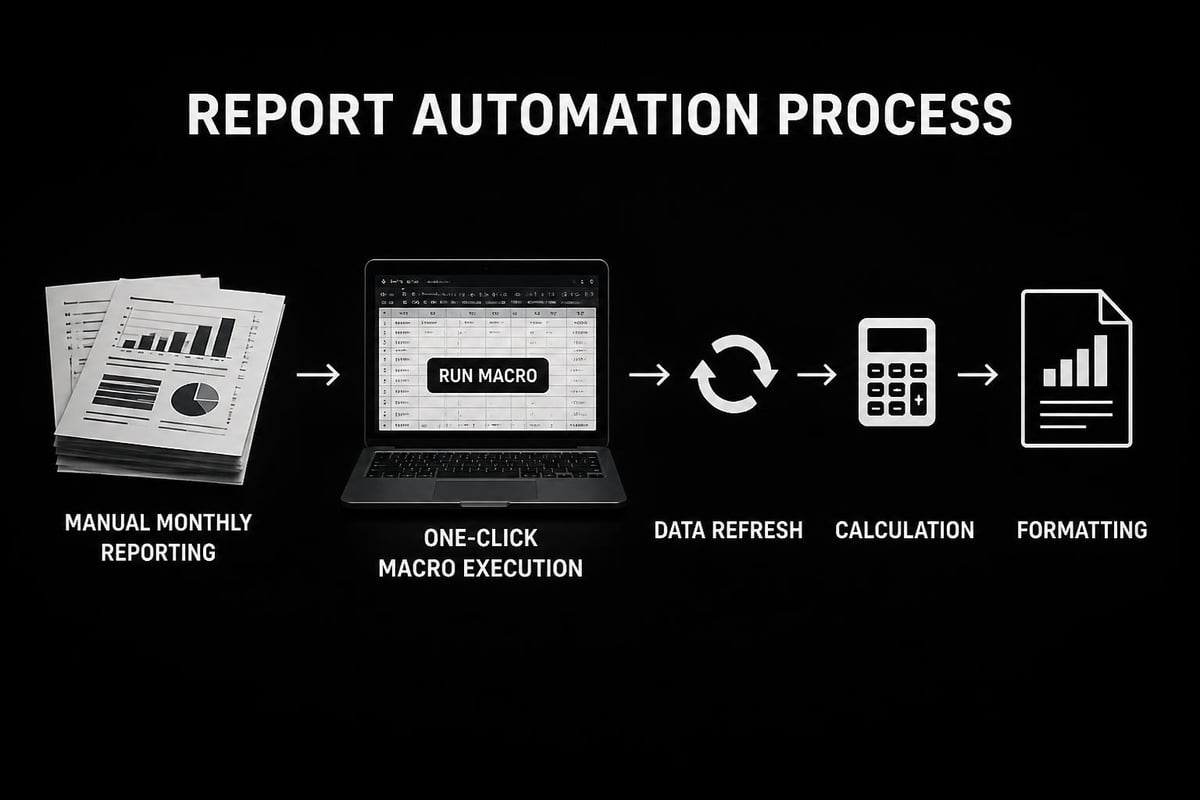
Repetitive Excel tasks consume valuable hours that could be spent on higher-value work. The analytics doctor excel services create automation solutions that eliminate manual processes and reduce human error. From simple macro recordings to sophisticated VBA applications, automation transforms how you work with data.
Macro Development for Routine Tasks
Macros automate repetitive actions by recording or programming sequences of commands. Professional macro development ensures your automation is reliable, maintainable, and user-friendly. Rather than struggling with recorded macros that break easily, expert-built solutions handle variations in data and include error handling.
- Identify repetitive tasks that follow consistent patterns
- Define the automation scope and expected inputs/outputs
- Develop and test macros with sample data scenarios
- Document the automation with clear instructions
- Train users on proper macro execution
- Maintain and update as business needs evolve
Understanding data analysis in Excel helps identify which processes benefit most from automation. Tasks performed daily or weekly with consistent steps offer the best automation opportunities.
Custom VBA Applications
Visual Basic for Applications (VBA) enables building sophisticated solutions within Excel. The analytics doctor excel services develop custom applications that extend Excel's capabilities far beyond standard features. These applications include custom user interfaces, advanced data processing, and integration with external systems.
Common VBA application types:
- Automated report generation systems
- Data validation and quality checking tools
- Custom calculation engines for specialized formulas
- Interactive dashboards with dynamic filtering
- Batch processing utilities for multiple files
- Integration modules connecting Excel to databases
Advanced Excel projects often require VBA programming to achieve the desired functionality. Professional development ensures these applications are robust, documented, and maintainable over time.
Data Visualization and Reporting Excellence
Transforming raw data into meaningful insights requires effective visualization. The analytics doctor excel services help create compelling charts, dashboards, and reports that communicate information clearly. Poor visualization obscures important patterns, while expert design reveals actionable insights.
Dashboard Design Principles
Effective dashboards present key metrics at a glance without overwhelming viewers. Professional dashboard design balances comprehensive information with visual simplicity. Each element serves a specific purpose, and layout guides the viewer's attention to the most important data points.
| Dashboard Element | Purpose | Best Practices |
|---|---|---|
| Key Performance Indicators | Show critical metrics at a glance | Use large, clear numbers with trend indicators |
| Trend Charts | Reveal patterns over time | Choose appropriate chart types, avoid clutter |
| Comparison Charts | Highlight differences between categories | Use consistent colors, clear labels |
| Filters and Slicers | Enable interactive exploration | Group logically, limit to essential options |
Professional visualization follows established design principles that improve comprehension and decision-making. Color choices, chart types, and layout all contribute to how effectively your dashboard communicates insights.
Chart Selection and Customization
Choosing the right chart type for your data makes the difference between clarity and confusion. The analytics doctor excel services include guidance on selecting and customizing charts that accurately represent your information. Each chart type has specific strengths and appropriate use cases.
Line charts excel at showing trends over time. Bar charts compare values across categories. Scatter plots reveal correlations between variables. Pie charts show proportions of a whole, though often bar charts communicate the same information more effectively. Understanding these distinctions ensures your visualizations enhance rather than obscure your message.
Troubleshooting Complex Spreadsheet Issues
Even well-designed spreadsheets encounter problems. The analytics doctor excel services provide expert troubleshooting for issues that stump typical users. From file corruption to mysterious calculation errors, professional diagnosis resolves problems efficiently.
Performance Optimization
Large spreadsheets often suffer from poor performance, taking minutes to recalculate or freezing during operations. Multiple factors contribute to slow performance, and systematic optimization addresses each component. File size, formula complexity, volatile functions, and formatting all impact calculation speed.
Performance improvement techniques:
- Replace volatile functions (INDIRECT, OFFSET) with stable alternatives
- Convert formulas to values where calculations aren't needed
- Limit conditional formatting to necessary ranges
- Remove unused styles and defined names
- Split large workbooks into connected smaller files
- Use manual calculation mode for complex models
Recent research on Excel as an integrated development environment highlights both its analytical power and potential performance challenges. Professional optimization balances functionality with speed.

File Recovery and Protection
Data loss represents one of the most serious spreadsheet problems. The analytics doctor excel services include strategies for recovering corrupted files and preventing future data loss. When files won't open or data disappears, specialized recovery techniques often salvage critical information.
Protection features safeguard sensitive data and prevent unauthorized changes. Password protection, worksheet locking, and cell-level restrictions control who can modify specific spreadsheet elements. However, forgotten passwords create access problems. Professional services can help with password-protected Excel files while respecting legitimate security needs.
Collaborative Spreadsheet Management
Modern work requires collaboration, and Excel offers numerous features supporting teamwork. The analytics doctor excel services optimize spreadsheets for multi-user environments, ensuring data integrity while enabling efficient collaboration. Proper setup prevents conflicts and maintains version control.
Sharing and Version Control
Multiple people editing the same spreadsheet creates challenges without proper management. Shared workbooks, OneDrive integration, and SharePoint collaboration each offer different capabilities and limitations. Professional guidance helps select the right approach for your team's needs.
Understanding how to share editable Excel files properly prevents common collaboration problems. Version tracking, change history, and conflict resolution become critical as team size increases. The analytics doctor excel services implement systems that maintain data quality across multiple contributors.
Data Validation and Quality Control
When multiple users input data, maintaining quality requires built-in validation rules. The analytics doctor excel services create validation systems that prevent errors at the point of entry. Drop-down lists, input restrictions, and conditional warnings guide users toward correct data entry.
Effective validation strategies include:
- Drop-down lists limiting choices to valid options
- Data type restrictions ensuring proper formats
- Range limits preventing impossible values
- Dependency rules checking related field consistency
- Custom error messages providing clear guidance
- Audit trails tracking data changes and sources
These controls transform spreadsheets from error-prone documents into reliable data collection tools. Quality improves automatically when the system prevents mistakes rather than requiring detection and correction afterward.
Integration and Data Connection Solutions
Spreadsheets rarely exist in isolation. The analytics doctor excel services connect Excel to external data sources, databases, and web services. These integrations eliminate manual data transfer and ensure reports always reflect current information.
Power Query for Data Transformation
Power Query revolutionizes how Excel handles external data. This powerful tool imports data from diverse sources and applies complex transformations through an intuitive interface. The analytics doctor excel services leverage Power Query to create automated data pipelines that refresh with a single click.
Power Query eliminates the tedious manual processes of cleaning and reshaping data. It handles tasks like removing duplicates, splitting columns, pivoting data, and merging multiple sources. Once configured, these transformations repeat automatically whenever data refreshes.
Database Connectivity
Connecting Excel directly to databases ensures reports always reflect current operational data. SQL queries pull precisely the information needed, and scheduled refreshes keep reports up-to-date. Professional database integration balances data access with performance and security considerations.
The analytics doctor excel services design database connections that optimize query performance while respecting system resources. Parameterized queries, incremental loading, and appropriate indexing ensure efficient data retrieval. Tutorials on Excel’s data analysis capabilities demonstrate the foundation these advanced techniques build upon.
Continuous Support and Skill Development
Spreadsheet needs evolve as businesses grow and change. The analytics doctor excel services provide ongoing support that adapts to new challenges and opportunities. Rather than one-time fixes, continuous engagement ensures long-term spreadsheet success.
Subscription Support Models
Regular access to Excel expertise prevents small problems from becoming major crises. Support subscriptions include scheduled check-ins, priority troubleshooting, and proactive optimization. This approach catches issues early and keeps skills current as Excel introduces new features.
| Support Tier | Monthly Hours | Response Time | Best For |
|---|---|---|---|
| Basic | 2-4 hours | 48 hours | Occasional questions, minor troubleshooting |
| Professional | 8-12 hours | 24 hours | Regular optimization, moderate development |
| Enterprise | 20+ hours | 4 hours | Complex systems, mission-critical applications |
Educational approaches continue advancing, with research exploring teaching data analytics with large language models showing promising results for enhanced learning engagement. Professional support incorporates the latest pedagogical techniques.
Keeping Current with Excel Updates
Microsoft regularly adds features and changes functionality. Staying current with these updates ensures you leverage the latest capabilities. The analytics doctor excel services include guidance on new features worth adopting and changes requiring adjustment to existing spreadsheets.
Recent developments like dynamic arrays, XLOOKUP, and enhanced Power Query capabilities significantly improve what's possible in Excel. Professional guidance helps determine which new features benefit your specific use cases and how to implement them effectively.
Industry-Specific Applications
Different industries have unique spreadsheet requirements. The analytics doctor excel services understand sector-specific needs and apply appropriate solutions. Financial modeling requires different expertise than inventory management or scientific data analysis.
Financial Analysis and Modeling
Financial spreadsheets demand absolute accuracy and robust design. Complex calculations, scenario analysis, and sensitivity testing require advanced formula techniques and careful model structure. Professional financial modeling follows established best practices that ensure transparency and reliability.
Automated frameworks for generating Excel tutorials demonstrate emerging approaches to teaching complex Excel applications. However, nuanced financial modeling still benefits from personalized expert guidance tailored to specific business contexts.
Project Management and Tracking
Excel serves as a powerful project management tool when properly configured. Gantt charts, resource allocation, budget tracking, and status reporting all function effectively within spreadsheets. The analytics doctor excel services create project management systems that integrate seamlessly with existing workflows.
Comprehensive training resources, including a 7-hour Excel data analysis tutorial, provide foundation knowledge that professional services build upon for specialized project tracking solutions.
Mastering Excel requires both foundational knowledge and expert guidance tailored to your specific challenges. Whether you're struggling with broken formulas, seeking automation solutions, or building complex analytical models, professional support accelerates your progress and ensures reliable results. The Analytics Doctor specializes in diagnosing spreadsheet problems and delivering practical solutions through personalized training, custom automation, and ongoing support that transforms how you work with data.