Business intelligence consulting services excel at transforming raw spreadsheet data into strategic insights that drive decision-making across organizations. As companies accumulate vast amounts of data in Excel workbooks, the challenge shifts from data collection to meaningful analysis and visualization. Professional BI consultants bridge this gap by diagnosing data problems, implementing automated reporting systems, and creating analytical frameworks that turn scattered spreadsheets into cohesive intelligence platforms. Whether you're struggling with broken formulas, disconnected data sources, or inefficient manual processes, understanding how BI consulting works with Excel can revolutionize your approach to data management.
Understanding Business Intelligence Consulting for Excel Users
Business intelligence consulting extends far beyond simple spreadsheet maintenance. These specialized services focus on extracting maximum value from your existing data infrastructure while preparing organizations for scalable growth.
What BI Consultants Do With Excel Data
Professional BI consultants assess your current Excel-based workflows and identify opportunities for improvement. They examine how data flows through your organization, where bottlenecks occur, and which processes consume excessive time. This diagnostic approach mirrors medical treatment-identifying symptoms, diagnosing root causes, and prescribing targeted solutions.
Core activities include:
- Auditing existing spreadsheet systems for errors and inefficiencies
- Mapping data relationships across multiple workbooks
- Designing automated data collection and processing workflows
- Creating standardized templates and reporting frameworks
- Training teams on advanced Excel techniques and best practices
Many organizations reach a critical point where their spreadsheet solutions no longer scale effectively. Knowledge Excel offers Excel consulting services that address these challenges through structured analytical models and dashboard development.

The Excel Advantage in BI Consulting
Excel remains the most accessible and widely-used data analysis tool in business environments. Unlike enterprise BI platforms requiring significant investment and training, Excel offers immediate familiarity combined with powerful analytical capabilities when properly configured.
Business intelligence consulting services excel by leveraging this universal platform while introducing professional-grade techniques:
| Excel Feature | Basic Use | BI Consulting Enhancement |
|---|---|---|
| Formulas | Simple calculations | Complex nested logic with error handling |
| Pivot Tables | Basic summaries | Dynamic reporting with automated refresh |
| Charts | Static visuals | Interactive dashboards with slicers |
| Data validation | Input restrictions | Comprehensive data quality frameworks |
| VBA macros | Recorded actions | Custom automation solutions |
The flexibility of Excel allows consultants to build solutions tailored precisely to your business processes without forcing organizational change around rigid software requirements.
Identifying When You Need BI Consulting Services
Recognizing the right time to engage professional help prevents small inefficiencies from becoming major operational obstacles.
Warning Signs Your Spreadsheets Need Expert Attention
Several indicators suggest your Excel-based systems would benefit from business intelligence consulting services excel expertise. Manual data entry consuming hours each week represents lost productivity that automation could eliminate. When team members spend more time formatting reports than analyzing results, the balance has shifted from insight generation to administrative burden.
Critical warning signs:
- Multiple versions of the "same" spreadsheet creating conflicting reports
- Formulas breaking whenever new data is added
- Inability to trace how numbers were calculated
- Reports taking days to compile instead of minutes
- Key decisions delayed waiting for data analysis
Error rates provide another important metric. If your team regularly discovers calculation mistakes or data inconsistencies after decisions have been made, the risk exposure may outweigh the cost of professional intervention. Advanced Excel projects often require specialized knowledge to implement correctly from the start.
Growth-Driven BI Needs
Business expansion frequently outpaces spreadsheet capabilities. A workbook managing 50 customers may function perfectly but collapse under the weight of 500. Similarly, processes designed for monthly reporting often fail when stakeholders demand weekly or daily updates.
Consultant intervention becomes valuable when your Excel systems no longer support business velocity. Transition points include expanding into new markets, increasing transaction volumes, adding reporting complexity, or integrating data from multiple sources. DMC’s business intelligence approach emphasizes defining clear goals before designing data strategies.
Core Services Provided by BI Excel Consultants
Professional consulting encompasses a spectrum of services addressing different organizational needs and maturity levels.
Data Architecture and Modeling
Effective business intelligence consulting services excel at structuring data for optimal analysis. Consultants redesign spreadsheet layouts to eliminate redundancy, establish consistent naming conventions, and create relationships between related data sets. This foundation work prevents future problems while making current analysis more reliable.
Data modeling transforms flat spreadsheets into dimensional structures supporting complex questions. Instead of storing all information in one massive table, consultants create linked tables for entities like customers, products, transactions, and dates. This relational approach mirrors database design principles while remaining accessible through Excel's familiar interface.
Data architecture improvements:
- Normalized table structures reducing data duplication
- Established primary and foreign key relationships
- Standardized data types and formatting rules
- Clear documentation of data sources and definitions
- Version control systems for tracking changes
Dashboard and Reporting Development
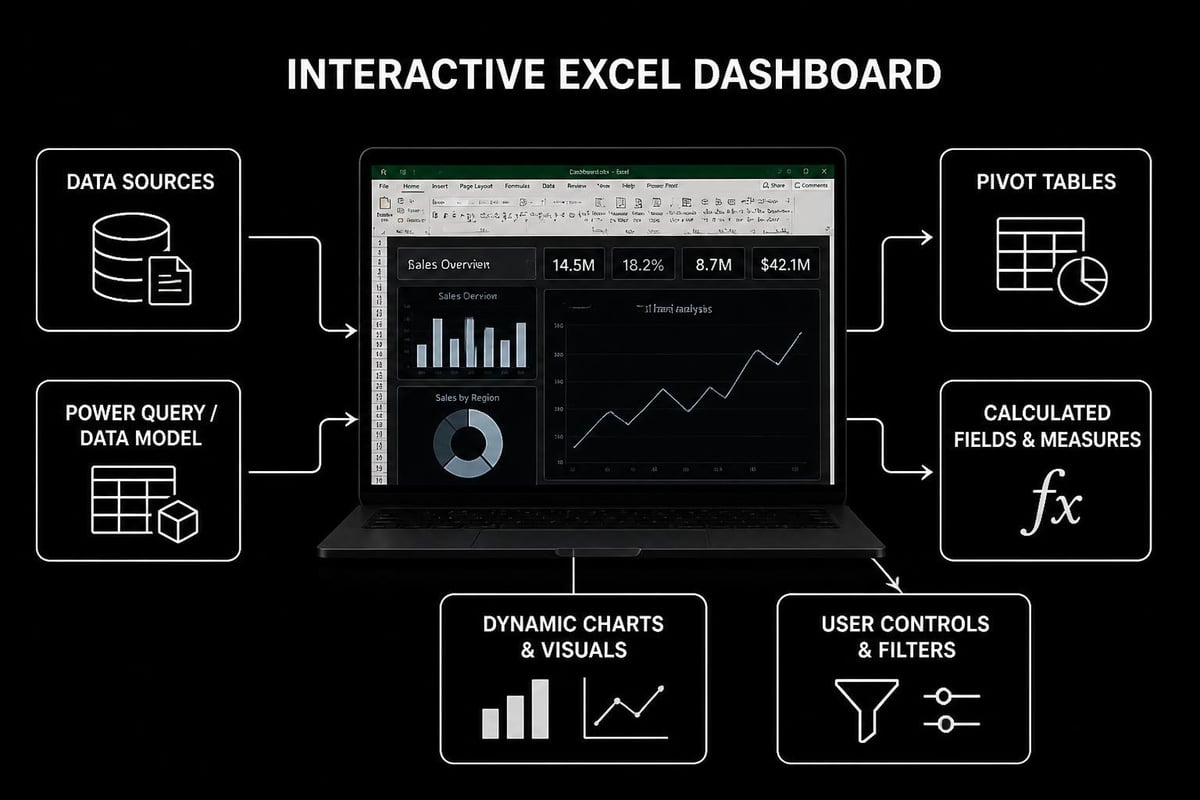
Business intelligence consulting services excel particularly shine in visualization and reporting. Professional consultants transform static spreadsheets into interactive dashboards that update automatically as new data arrives. These solutions combine pivot tables, charts, conditional formatting, and slicers into cohesive reporting interfaces.
Effective dashboards answer specific business questions at a glance. Rather than presenting every available metric, consultants work with stakeholders to identify key performance indicators and design displays highlighting actionable insights. Color coding, trend indicators, and variance analysis help users quickly identify areas requiring attention.
Brewster Consulting’s dashboard development services demonstrate how custom reporting transforms raw data into strategic insights. The goal extends beyond attractive visuals to creating tools that genuinely influence decision-making processes.
Process Automation and Optimization
Manual repetitive tasks represent prime opportunities for consultant-driven improvement. Business intelligence consulting services excel by identifying processes suitable for automation and implementing solutions that save hundreds of hours annually.
Common automation targets include data import from external sources, report generation and distribution, data validation and cleaning, calculation updates across linked workbooks, and file management tasks. Consultants leverage Excel's built-in features like Power Query for data transformation and VBA for custom automation when standard features prove insufficient.
The optimization process begins with documenting current workflows step-by-step. Consultants then redesign these processes, eliminating unnecessary steps, parallelizing sequential tasks where possible, and automating manual actions. Implementing VBA solutions requires expertise to ensure reliability and maintainability.
Transition Strategies From Excel to Advanced BI Tools
Many organizations eventually outgrow even optimized Excel solutions, requiring migration to dedicated business intelligence platforms.
When Excel Reaches Its Limits
Despite its versatility, Excel has technical constraints that eventually necessitate alternative solutions. File size limitations, concurrent user restrictions, calculation performance bottlenecks, and security limitations represent hard boundaries that no amount of optimization can completely eliminate.
Business intelligence consulting services excel at recognizing these transition points and planning appropriate migrations. Rather than abruptly abandoning familiar tools, experienced consultants create phased transition plans preserving institutional knowledge while introducing more capable platforms.
| Limitation | Excel Threshold | BI Platform Advantage |
|---|---|---|
| Data volume | ~1 million rows | Billions of rows |
| Concurrent users | Limited sharing | Unlimited simultaneous access |
| Refresh speed | Minutes to hours | Seconds to minutes |
| Data sources | Manual integration | Automated connections |
| Mobile access | Limited functionality | Full-featured apps |
Power BI as the Natural Next Step
Microsoft Power BI represents the most logical evolution for Excel-heavy organizations. The platform shares a familiar Microsoft interface while offering enterprise-grade capabilities. Importantly, Power BI directly imports Excel data models, allowing organizations to leverage existing work rather than starting from scratch.
Consultants specializing in both Excel and Power BI can design hybrid solutions where Excel remains the data preparation tool while Power BI handles visualization and distribution. This approach preserves team familiarity with Excel while unlocking advanced sharing and collaboration features. ExcelFort’s Power BI services illustrate how these platforms complement each other.
Witanalytica’s business intelligence services span multiple BI platforms including Power BI, Tableau, and Looker, providing flexibility in choosing the right tool for specific organizational needs.
Selecting the Right BI Consulting Partner
Choosing an appropriate consultant significantly impacts project success and return on investment.
Evaluating Consultant Expertise
Business intelligence consulting services excel when consultants combine technical proficiency with industry understanding. Evaluate candidates based on demonstrated Excel expertise including advanced formulas, Power Query, pivot tables, and VBA development. Ask for specific examples of similar projects they've completed, focusing on measurable outcomes rather than general capabilities.
Essential qualifications include:
- Certification in relevant Microsoft technologies
- Portfolio of successful Excel BI implementations
- Industry-specific experience matching your sector
- Strong communication skills for training and documentation
- References from comparable organizations
The best consultants diagnose problems rather than immediately prescribing solutions. Initial discovery should involve asking questions about your business processes, pain points, and strategic objectives. Consultants who lead with predetermined solutions may miss opportunities for tailored approaches addressing your specific needs.
Understanding Service Models and Pricing
Consulting engagement structures vary significantly across providers. Project-based pricing offers predictability for defined scope work like building specific dashboards or automating particular reports. Hourly consulting provides flexibility for ongoing support and troubleshooting needs. Retainer arrangements suit organizations requiring regular access to consultant expertise.
Valiotti Data’s business intelligence consulting approach emphasizes comprehensive assessment before proposing solutions, ensuring recommendations align with business goals and technical requirements.
Clarify what deliverables you'll receive beyond the implemented solution. Quality consultants provide documentation explaining how systems work, training materials for end users, and knowledge transfer ensuring your team can maintain solutions independently. Ongoing support options should address post-implementation questions and future enhancements.
Implementation Best Practices for BI Excel Projects
Successful consulting engagements follow structured approaches maximizing value while minimizing disruption.
Phased Rollout Strategies
Business intelligence consulting services excel through incremental implementation rather than wholesale system replacement. Start with high-impact, low-complexity projects demonstrating quick wins and building organizational confidence. A well-designed monthly sales dashboard delivering immediate value generates enthusiasm for more ambitious initiatives.
Recommended implementation phases:
- Phase 1: Diagnostic assessment and priority identification (1-2 weeks)
- Phase 2: Quick wins addressing urgent pain points (2-4 weeks)
- Phase 3: Core system redesign and automation (1-3 months)
- Phase 4: Advanced analytics and integration (ongoing)
Each phase should conclude with stakeholder review and adjustment before proceeding. This iterative approach allows course correction based on actual usage patterns rather than theoretical requirements.
Change Management and Adoption
Technical excellence means little if users continue working around new systems rather than with them. Successful consultants invest in change management, helping teams understand not just how new tools work but why they improve upon previous methods.
Training should be role-specific and hands-on. Finance teams need different dashboard skills than operations managers. Practice exercises using real company data prove more effective than generic examples. Sharing editable Excel files properly ensures collaborative work doesn't create version control nightmares.
Creating internal champions who master new systems and assist colleagues accelerates adoption. These power users bridge the gap between consultants and end users, providing ongoing support after formal consulting engagements conclude.

Measuring ROI From BI Consulting Services
Quantifying consulting value justifies investment and guides future decisions about expanding or modifying implemented solutions.
Tangible Metrics and Time Savings
Business intelligence consulting services excel when they deliver measurable improvements in operational efficiency. Track time required for routine reporting tasks before and after implementation. A process consuming 8 hours weekly that drops to 30 minutes represents 390 hours saved annually-substantial value even before considering improved accuracy and timeliness.
Error reduction provides another concrete metric. Calculate the cost of data errors including time spent identifying and correcting mistakes, delayed decisions, and direct financial impacts from incorrect information. Comparing error rates before and after consulting intervention demonstrates quality improvements.
Key performance indicators:
- Hours saved on recurring reporting tasks
- Reduction in data errors and corrections
- Decision-making speed improvements
- User satisfaction scores
- System utilization rates
Strategic Value and Competitive Advantage
Beyond efficiency gains, effective business intelligence creates strategic advantages difficult to quantify but critically important. Access to real-time insights enables faster response to market changes, better resource allocation, and more confident decision-making.
Organizations with mature BI capabilities identify trends and opportunities competitors miss. They optimize pricing strategies based on comprehensive profitability analysis, allocate marketing budgets to highest-return channels, and anticipate operational bottlenecks before they impact customers. These capabilities compound over time, creating sustainable competitive differentiation.
Advanced Techniques in Excel-Based BI
Sophisticated consulting leverages lesser-known Excel capabilities that dramatically expand analytical possibilities.
Power Query for Data Transformation
Power Query transforms Excel into a professional ETL (Extract, Transform, Load) tool capable of handling complex data preparation workflows. This built-in feature connects to databases, web services, text files, and other Excel workbooks, automatically refreshing data on schedule.
Consultants use Power Query to merge data from disparate sources, clean and standardize inconsistent formats, remove duplicates and filter irrelevant records, and create calculated columns and custom transformations. Unlike manual data preparation, Power Query remembers every transformation step, enabling reliable automation of previously tedious processes.
The M language underlying Power Query allows advanced users to write custom transformation logic beyond the graphical interface capabilities. Business intelligence consulting services excel by combining point-and-click simplicity for common tasks with code-based flexibility for unique requirements.
Advanced Formula Techniques
Modern Excel offers formula capabilities rivaling dedicated analytics software when properly applied. Dynamic arrays introduced in recent versions fundamentally change how formulas work, enabling single formulas to generate entire tables of results.
Functions like XLOOKUP, FILTER, SORT, and UNIQUE replace complex multi-step processes with elegant single-formula solutions. Consultants combine these functions with traditional tools like pivot tables and VLOOKUP alternatives to create responsive analytical models.
| Traditional Approach | Modern Formula Technique | Benefit |
|---|---|---|
| Multiple helper columns | Dynamic array spilling | Cleaner workbooks |
| Manual filtering and copying | FILTER function | Automatic updates |
| Nested IF statements | IFS or SWITCH functions | Improved readability |
| Complex VLOOKUP formulas | XLOOKUP | Error-resistant lookups |
Error handling separates professional implementations from amateur efforts. Consultants wrap formulas in IFERROR, IFNA, or custom error-checking logic preventing cascading failures when data changes unexpectedly.
Security and Governance in BI Excel Systems
Professional consulting addresses data security and governance requirements often overlooked in homegrown spreadsheet solutions.
Protecting Sensitive Information
Business intelligence consulting services excel at implementing appropriate security measures balancing data protection with usability. Workbook protection prevents accidental modification of formulas and structure while allowing data entry in designated areas. Password protection adds authentication requirements for accessing sensitive financial or personnel information.
More sophisticated security involves separating data storage from presentation layers. Consultants create systems where sensitive source data resides in protected workbooks or databases while user-facing dashboards display only aggregated or filtered information appropriate for each role.
Version Control and Audit Trails
Tracking who changed what data and when becomes critical in regulated industries and high-stakes decision environments. Excel lacks built-in version control, but consultants implement workarounds including automated backup systems, change logging through VBA, and integration with file sharing platforms offering revision history.
Documentation standards ensure continuity when staff transitions occur. Professional implementations include README worksheets explaining workbook purposes, data dictionaries defining all fields and calculations, and formula documentation through cell comments and separate reference materials.
Industry-Specific BI Applications
Different sectors face unique analytical challenges where business intelligence consulting services excel through specialized expertise.
Financial Services and Accounting
Financial institutions require precise, auditable reporting meeting regulatory standards while supporting strategic planning. Consultants build systems tracking profitability by customer, product, and channel, automating regulatory report generation, analyzing credit risk and portfolio performance, and creating budgeting and forecasting models.
Construction estimating spreadsheets demonstrate industry-specific applications where generic BI tools require customization to address unique workflows and calculation requirements.
Healthcare and Life Sciences
Healthcare organizations manage complex data including patient outcomes, operational efficiency, financial performance, and regulatory compliance. BI consultants create dashboards monitoring key clinical metrics, analyzing resource utilization and staffing patterns, tracking quality indicators and patient satisfaction, and supporting value-based care initiatives.
Retail and E-commerce
Retail businesses demand rapid analysis of sales patterns, inventory levels, and customer behavior. Consulting projects focus on sales performance across products, stores, and time periods, inventory optimization reducing carrying costs, customer segmentation and lifetime value analysis, and marketing campaign effectiveness measurement.
Future-Proofing Your Excel BI Investment
Strategic planning ensures today's solutions remain valuable as business needs evolve and technology advances.
Building Scalable Architectures
Business intelligence consulting services excel when they design systems accommodating growth without complete redesign. Scalable architectures use modular components easily expanded or replaced, standardized data structures facilitating integration, and automated processes reducing manual intervention requirements.
Consultants anticipate future needs during initial design, building flexibility into data models and reporting frameworks. Extra capacity in database connections, placeholder fields for anticipated data elements, and extensible calculation engines prevent premature obsolescence.
Continuous Improvement Frameworks
BI systems require ongoing refinement as business questions evolve and new data sources become available. Establish regular review cycles assessing dashboard relevance, identifying new reporting needs, evaluating emerging technology opportunities, and gathering user feedback for enhancements.
Creating internal capabilities reduces long-term dependence on external consultants while maintaining access to specialized expertise when needed. Training programs developing advanced Excel skills among staff enable routine modifications and troubleshooting without consultant intervention.
Business intelligence consulting services excel by transforming everyday spreadsheets into strategic assets that drive informed decision-making and competitive advantage. The combination of diagnostic expertise, technical proficiency, and business acumen creates solutions uniquely tailored to organizational needs while maintaining the accessibility Excel users expect. Whether you're struggling with broken formulas, inefficient processes, or simply want to extract more value from your data, professional guidance accelerates progress and prevents costly mistakes. The Analytics Doctor specializes in diagnosing spreadsheet problems and delivering clear, practical solutions that make your data work harder for your business.