Contractors and construction professionals face mounting pressure to deliver accurate project estimates quickly while maintaining competitive pricing. A well-designed construction estimating spreadsheet serves as the foundation for profitable projects, transforming raw material costs, labor hours, and overhead calculations into reliable bid proposals. Yet many construction professionals struggle with spreadsheet errors, inconsistent formulas, and templates that don't scale with project complexity. Understanding how to build and maintain a robust estimating system can mean the difference between winning profitable contracts and losing money on accepted bids.
Essential Components of Construction Estimating Spreadsheets
Every effective construction estimating spreadsheet requires specific structural elements that work together to produce accurate totals. At the core, you need clearly defined sections for direct costs, indirect costs, and markup calculations that feed into your final proposal numbers.
Material Cost Tracking
Material costs typically represent the largest portion of construction estimates, making accurate tracking essential for profitability. Your spreadsheet should include:
- Item descriptions with sufficient detail to avoid confusion during procurement
- Unit measurements (square feet, linear feet, cubic yards, pieces)
- Quantity calculations that reference project specifications
- Unit costs with date stamps to track price fluctuations
- Vendor information for quick reordering and price verification
- Waste factors appropriate to each material type
The free construction estimating template provides a solid starting point for organizing these material categories. However, customization remains crucial because every construction business handles materials differently based on their specialty, supplier relationships, and regional pricing variations.

Labor Cost Calculations
Labor estimation requires more than simple hourly rates multiplied by projected hours. Successful contractors account for productivity variations, crew composition, and project-specific conditions that affect actual labor costs.
| Labor Factor | Calculation Method | Common Issues |
|---|---|---|
| Base hourly rate | Trade-specific wage + burden | Forgetting to include benefits, taxes, insurance |
| Productivity rate | Units completed per hour | Using generic rates instead of crew-specific data |
| Crew composition | Mix of journeyman/apprentice | Improper ratios affecting efficiency |
| Overtime premium | Time-and-a-half or double-time | Not accounting for compressed schedules |
| Travel time | Portal-to-portal or per diem | Underestimating remote project costs |
Many contractors benefit from exploring advanced Excel projects to create more sophisticated labor tracking systems. These advanced techniques enable dynamic crew calculations that automatically adjust based on project duration and workforce availability.
Building Formulas for Accurate Estimates
The power of a construction estimating spreadsheet lies in its formulas-when built correctly. Poor formula structure leads to calculation errors that can cost thousands of dollars in lost profit or unbiddable proposals.
Absolute vs Relative References
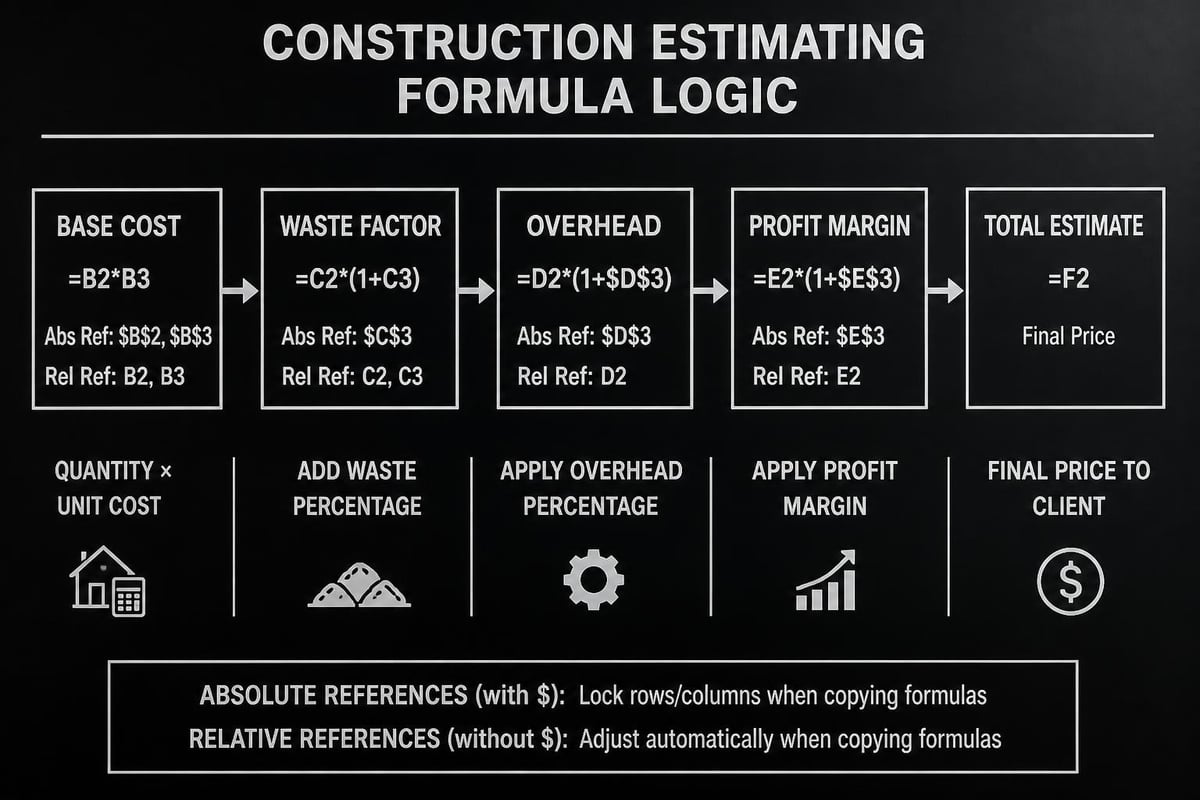
Understanding cell reference types prevents one of the most common spreadsheet errors in construction estimating. When you copy a formula containing relative references (like B2), Excel automatically adjusts the reference based on where you paste it. Absolute references (like $B$2) remain locked to specific cells regardless of where you copy the formula.
Best practice for construction estimating: Use absolute references for markup percentages, overhead rates, and tax percentages that apply across multiple line items. Use relative references for quantities and measurements that change for each row. The guidance on construction estimating in Excel emphasizes this distinction as fundamental to maintaining accuracy.
Nested Calculations for Complex Pricing
Real-world construction projects require layered calculations that build upon each other. A typical pricing formula might look like this:
- Base material cost = Quantity × Unit Price
- Material with waste = Base material cost × (1 + Waste Factor)
- Material with delivery = Material with waste + Delivery Charge
- Subtotal with labor = Material with delivery + Labor Cost
- Subtotal with overhead = Subtotal with labor × (1 + Overhead Rate)
- Final line item = Subtotal with overhead × (1 + Profit Margin)
Rather than creating a single complex formula, break these calculations into separate columns. This approach makes troubleshooting easier and allows you to verify each step independently. When formulas span multiple cells, errors become immediately visible rather than hidden within parentheses.
Data Validation for Input Control
Construction estimating spreadsheets fail most often due to input errors-incorrect units, transposed numbers, or missing decimal points. Data validation rules prevent these mistakes before they corrupt your estimates.
Set dropdown lists for:
- Material categories (concrete, lumber, electrical, plumbing)
- Unit measurements (SF, LF, CY, EA)
- Labor trades (carpenter, electrician, plumber, laborer)
- Overhead categories (general conditions, insurance, permits)
The best practices for spreadsheet estimates recommend creating a separate reference sheet with all valid input options, then linking your validation rules to those ranges. This centralized approach makes updating options significantly easier as your business evolves.
Template Selection and Customization
Pre-built templates accelerate the estimating process, but selecting the right foundation matters enormously. Generic templates often miss industry-specific requirements or include unnecessary complexity that slows down your workflow.
Evaluating Pre-Built Templates
When reviewing available construction estimating templates, assess these critical factors:
- Cost breakdown structure matching your typical project types
- Formula transparency allowing you to verify calculations
- Flexibility for adding custom line items without breaking formulas
- Professional appearance suitable for client-facing proposals
- File size and speed especially important for large commercial projects
The contractor estimate template offers robust line-item tracking with built-in calculations, making it particularly suitable for residential contractors who bid on similar projects repeatedly. Commercial contractors might require more extensive templates like those available through construction estimating template collections that include specialized sheets for concrete, electrical, and HVAC work.
Adapting Templates to Your Business
No template perfectly matches your specific business processes out of the box. Effective customization involves strategic modifications that enhance usability without compromising formula integrity:
Add your company branding in headers and footers, including logo, contact information, and license numbers. This professional presentation distinguishes your estimates from competitors using generic templates.
Customize cost categories to reflect how you actually track expenses. If you separate rough carpentry from finish carpentry, split those categories. If you bundle certain materials with labor, create combined line items that match your accounting system.
Incorporate historical data from completed projects. Replace generic productivity rates with actual numbers from your crews. Update material costs based on your supplier pricing. This historical foundation dramatically improves estimate accuracy for similar future projects.
Professional training resources like those offered by My Training Network can help your estimating team master these customization techniques while maintaining spreadsheet integrity throughout the modification process.
Advanced Features for Professional Estimates
Beyond basic cost tracking, sophisticated construction estimating spreadsheets incorporate features that streamline the bidding process and improve decision-making.
Automated Proposal Generation
Link your estimating spreadsheet to a formatted proposal template that automatically populates with your calculations. This connection eliminates manual transcription errors and saves significant time when preparing client-facing documents.
The construction estimate and proposal template demonstrates this integration, where estimate details flow seamlessly into professional proposals ready for client review. For contractors creating multiple estimates weekly, this automation represents hours of saved administrative work.
Scenario Comparison Tools
Winning bids often requires presenting options at different price points. Build comparison sections that show:
| Scenario | Materials | Labor | Overhead | Profit | Total |
|---|---|---|---|---|---|
| Economy | $45,000 | $32,000 | $11,550 | $8,855 | $97,405 |
| Standard | $52,000 | $35,000 | $13,050 | $10,005 | $110,055 |
| Premium | $61,000 | $38,000 | $14,850 | $11,385 | $125,235 |
These scenario models help clients understand value differences while giving you flexibility to match various budget constraints. The calculations remain linked to your main estimate, so changes in material costs or labor rates automatically update all scenarios.
Visual Dashboards for Quick Analysis
Transform raw estimate data into visual insights using charts and conditional formatting. Creating Excel dashboards helps you quickly identify cost distribution, compare estimates across projects, and spot pricing trends.
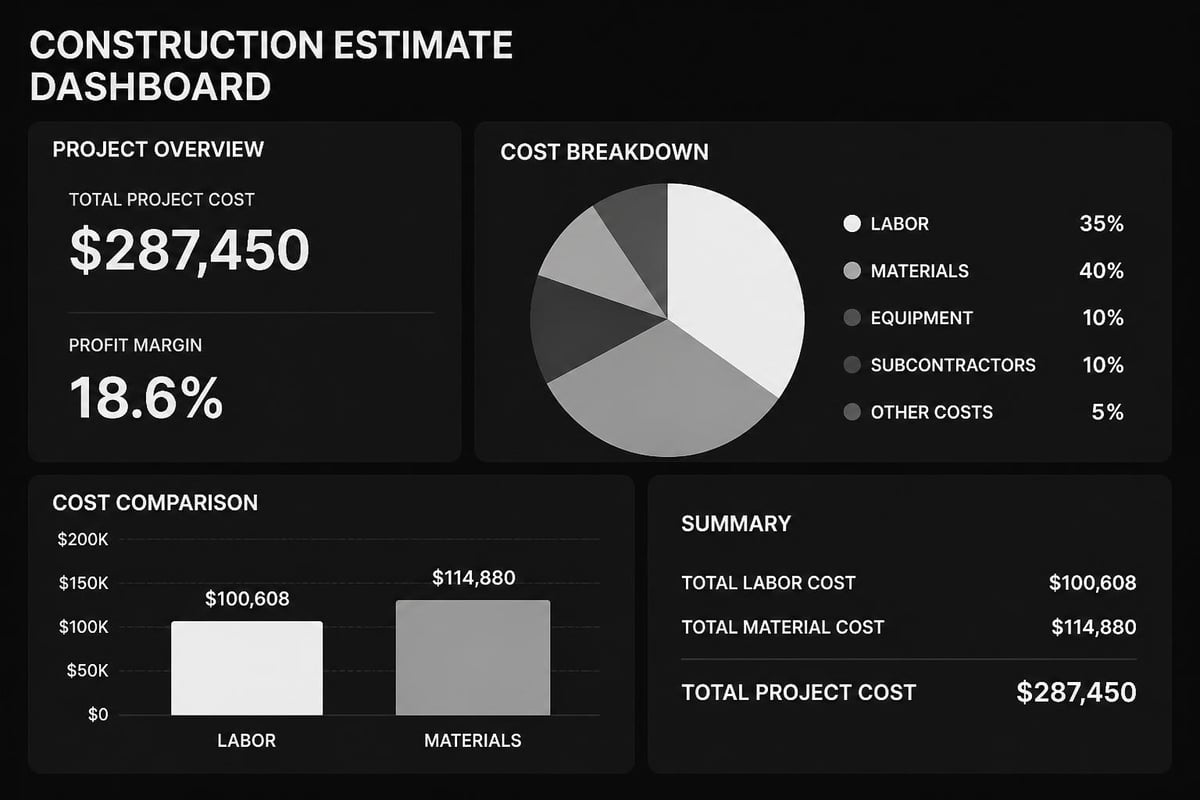
Key dashboard elements for construction estimating:
- Cost distribution pie chart showing material, labor, overhead proportions
- Variance analysis comparing estimated versus typical project ratios
- Profitability indicators with conditional formatting highlighting low-margin items
- Bid history tracking showing win rates at different markup levels
Common Errors and Prevention Strategies
Even experienced estimators fall victim to spreadsheet mistakes that compromise bid accuracy. Recognizing these patterns helps you implement preventive measures before errors affect your bottom line.
Formula Reference Mistakes
When copying sections of your construction estimating spreadsheet, formulas sometimes reference the wrong cells. This problem intensifies in large estimates with hundreds of line items spanning multiple sheets.
Prevention approach: Use named ranges for critical reference cells. Instead of referencing cell B2 for your overhead rate, name that cell "Overhead_Rate" and use that name in formulas. Named ranges remain correct even when you insert rows, delete sections, or reorganize your spreadsheet structure.
Inconsistent Unit Conversions
Construction projects involve numerous measurement units-square feet, cubic yards, linear feet, board feet, tons, and more. Mixing units within calculations produces wildly incorrect totals.
Prevention approach: Create a units reference table that standardizes all conversions. When estimating concrete, always convert to cubic yards. For lumber, standardize on board feet or linear feet depending on your suppliers. Color-code cells by unit type to make inconsistencies visually obvious during review.
Outdated Cost Data
Material prices fluctuate significantly, especially for commodities like lumber, steel, and fuel-dependent products. Estimates built on six-month-old pricing rarely reflect current market conditions.
Prevention approach: Date-stamp your cost data and implement a monthly review schedule. The construction estimating best practices article emphasizes maintaining updated cost databases as essential for competitive bidding. Link your spreadsheet to supplier price lists when possible, or maintain a separate pricing database that feeds into your estimates.
Missing Contingency Allowances
Unexpected conditions arise on virtually every construction project. Estimates lacking contingency provisions leave no buffer for unforeseen circumstances, turning profitable projects into money-losing ventures.
| Project Type | Typical Contingency | Risk Factors |
|---|---|---|
| New construction | 5-10% | Site conditions, weather, design changes |
| Renovation | 15-20% | Hidden conditions, code upgrades, asbestos |
| Historic restoration | 20-30% | Unknown structural issues, specialty materials |
| Tenant improvements | 10-15% | Coordination with existing systems, schedule pressure |
Prevention approach: Build contingency as a separate line item rather than padding individual costs. This transparency demonstrates professional estimating practices and gives you flexibility to reduce contingency during negotiations while maintaining project viability.
Integration with Project Management Systems
Modern construction businesses rarely rely on standalone estimating spreadsheets. Integration with scheduling, accounting, and project management platforms creates a seamless information flow from initial estimate through project completion.
Exporting to Accounting Software
Your construction estimating spreadsheet should structure data for easy transfer to QuickBooks, Sage, or other accounting platforms. This compatibility eliminates duplicate data entry and ensures your job costing system reflects estimated costs accurately.
Format your estimate with columns that match your accounting system's import requirements:
- Cost code or account number
- Description matching your chart of accounts
- Estimated quantity
- Unit cost
- Extended amount
- Category (material, labor, subcontractor, equipment)
The construction estimate templates for residential and commercial projects include export formatting that simplifies this accounting integration, saving hours of manual data manipulation.
Linking to Scheduling Tools
Labor estimates should align with project schedules to ensure adequate crew allocation. Export labor hours from your estimate into Microsoft Project, Primavera, or construction-specific scheduling software.
This integration reveals schedule conflicts early. If your estimate assumes 40 hours of electrical work but your schedule shows only two days available with a two-person crew (32 hours maximum), you've identified a planning problem before mobilization.
Maintaining Estimate Accuracy Over Time
A construction estimating spreadsheet requires ongoing maintenance to remain valuable. Treating your template as a living document rather than a static tool dramatically improves long-term accuracy.
Building a Historical Cost Database
After each project completion, extract actual costs and compare them to your estimates. Track variance percentages for:
- Material quantities (Did you order 10% more lumber than estimated?)
- Labor productivity (Did framing take 120 hours versus the estimated 100?)
- Waste factors (Was drywall waste actually 15% instead of your assumed 10%?)
- Overhead allocation (Did general conditions exceed your percentage?)
Compile this information in a separate analysis spreadsheet. Over time, these patterns reveal your estimating tendencies. If you consistently underestimate electrical labor by 8%, adjust your productivity rates accordingly. Companies like LTJ Industrial Services that provide specialized fabrication and welding services benefit significantly from tracking actual versus estimated hours on complex metalwork projects, using this data to refine future manufacturing estimates.
Version Control and Documentation
As you improve your construction estimating spreadsheet, maintain clear version control. Each significant modification should increment your version number and include change documentation.
Recommended versioning approach:
- Save major template updates with new version numbers (v2.0, v3.0)
- Document what changed in a separate changelog tab
- Archive previous versions for at least two years
- Train all estimators on new features before implementation
- Run parallel estimates (old and new versions) for two weeks to validate changes
This disciplined approach prevents confusion when reviewing older estimates and ensures all team members work from the current template.
Regular Formula Audits
Schedule quarterly reviews of your spreadsheet formulas, even if everything appears to work correctly. Check for:
- Circular references that create calculation loops
- Hidden errors suppressed by IFERROR functions
- Hardcoded values that should reference cells
- Unused columns or sheets adding file bloat
- Broken links to external data sources
These audits catch deterioration before it affects bid accuracy. The methodology outlined in spreadsheet engineering for financial models applies equally to construction estimating, where standardized review processes maintain spreadsheet reliability over years of use.
Training Your Team on Estimating Spreadsheets
The most sophisticated construction estimating spreadsheet delivers no value if your team can't use it effectively. Structured training ensures consistent, accurate estimates across all estimators.
Onboarding New Estimators
New team members need comprehensive training on your specific spreadsheet structure, not just general Excel skills. Develop a standardized onboarding program covering:
Week 1: Template navigation, cost category definitions, where to find reference data
Week 2: Basic formula understanding, making simple estimates for small projects
Week 3: Advanced features, scenario modeling, proposal generation
Week 4: Review process, quality checks, working with historical data
Pair new estimators with experienced mentors who can review their work and provide context for judgment calls that spreadsheets can't make automatically. This apprenticeship model transfers institutional knowledge that improves estimate quality beyond what formulas alone achieve.
Continuous Skill Development
Excel capabilities expand with each new version, offering features that enhance construction estimating. Regular training sessions keep your team current on:
- New functions that simplify complex calculations
- Power Query for importing supplier price lists
- Conditional formatting techniques for error detection
- Collaboration tools for team-based estimating
- Mobile access for on-site estimate adjustments
Organizations like My Training Network provide customizable corporate training that can be tailored specifically to your construction estimating needs, ensuring your team develops skills directly applicable to your business processes.
Security and Backup Considerations
Construction estimates contain sensitive competitive information and represent significant invested effort. Protecting this intellectual property requires appropriate security measures.
Password Protection Strategies
Implement tiered access controls for your estimating spreadsheets:
- Full access for senior estimators who can modify formulas and structure
- Edit access for estimators who input data but shouldn't change calculations
- View-only access for project managers and accounting staff who need to reference estimates
Excel offers workbook and worksheet protection features, though understanding how to password protect Excel workbooks ensures you implement these controls correctly. For particularly sensitive competitive bids, consider individual password protection on critical worksheets containing markup percentages and pricing strategies.
Backup and Recovery Protocols
Hard drive failures, accidental deletions, and corrupted files threaten your estimating work. Implement multiple backup layers:
- Automatic cloud backup through OneDrive, Google Drive, or Dropbox
- Local backup to network attached storage or external drives
- Version history preserving previous saves in case you need to revert changes
Test your backup recovery process quarterly by actually restoring files from backup. Many businesses discover their backups are incomplete or corrupted only when they desperately need them. If you need to recover an Excel file that was overwritten, having multiple backup sources proves invaluable.
Scaling Your Estimating System
As your construction business grows, your estimating spreadsheet must scale accordingly. What works for a small residential contractor bidding three projects monthly won't serve a commercial contractor managing twenty concurrent estimates.
Multi-Project Management
Create a master estimate tracker that consolidates information from individual project spreadsheets:
- Project name and number
- Client information
- Estimate status (draft, submitted, won, lost)
- Total estimated value
- Estimated profit margin
- Bid date and decision date
- Estimator responsible
This centralized tracking prevents duplicate effort, highlights workload distribution across your estimating team, and creates a database for analyzing win rates at different margin levels.
Standardized Component Libraries
Develop libraries of pre-estimated assemblies for common construction elements. Instead of estimating a standard bathroom from scratch each time, create a template assembly that includes all typical components-fixtures, tile, plumbing rough-in, electrical, ventilation, and finishes.
These assembly libraries dramatically accelerate estimating while improving consistency. Your entire team uses the same specifications and pricing for standard elements, eliminating variations caused by different estimators making different assumptions.
Mastering your construction estimating spreadsheet transforms how you approach bidding, turning a time-consuming challenge into a competitive advantage through accurate calculations and efficient processes. Whether you're wrestling with complex formulas, building custom templates, or training your team on advanced features, expert spreadsheet guidance makes all the difference. The Analytics Doctor specializes in diagnosing and fixing spreadsheet problems, offering personalized Excel training and support that helps construction professionals build cleaner, smarter estimating systems that consistently deliver reliable results.