Spreadsheet errors cost businesses thousands of hours and countless dollars every year. A single misplaced cell reference or logical mistake can cascade through an entire workbook, producing inaccurate reports that lead to poor decisions. Traditional troubleshooting methods require meticulous cell-by-cell checking, deep knowledge of Excel functions, and patience that most busy professionals simply don't have. The emergence of artificial intelligence has fundamentally changed this landscape, offering instant diagnostics, automated repairs, and intelligent explanations that make excel formula troubleshooting with ai accessible to users at every skill level.
Understanding Common Excel Formula Errors
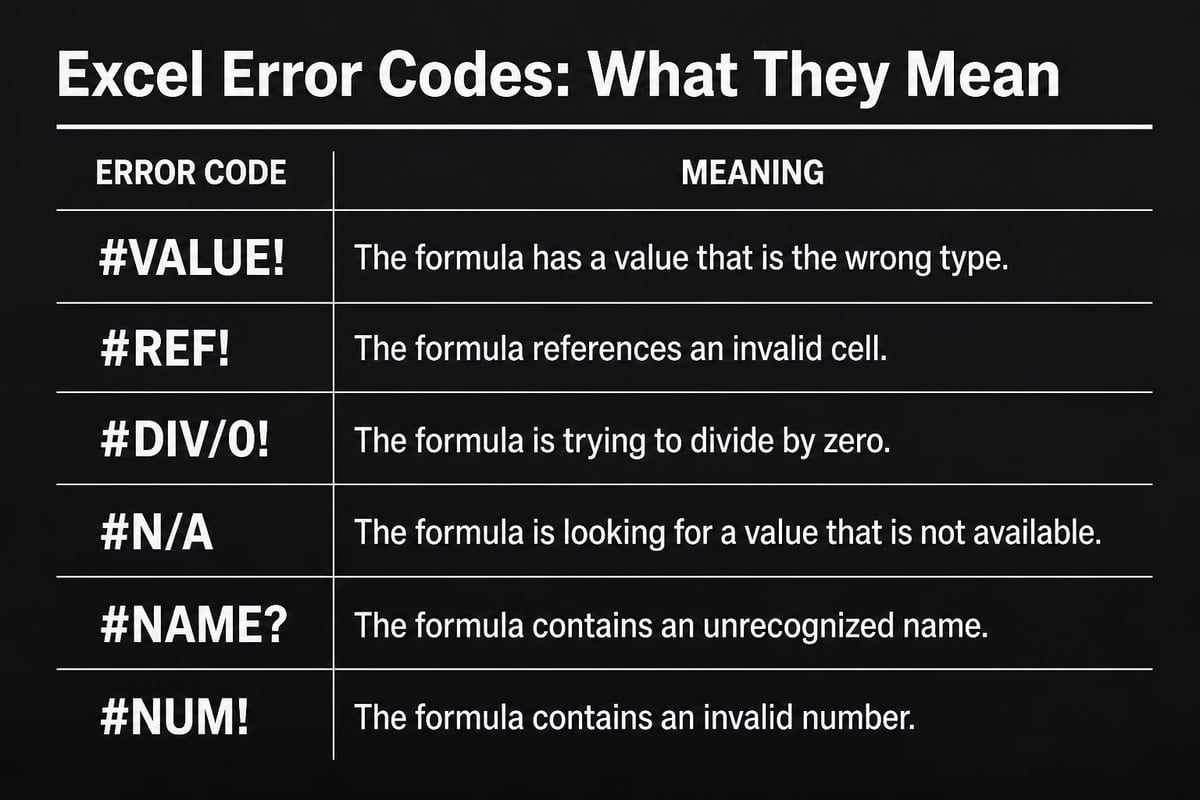
Before exploring AI solutions, recognizing the types of errors you'll encounter helps you understand what AI tools detect and fix. Excel categorizes errors with specific codes that signal different problems in your formulas.
The #VALUE! error appears when your formula references incompatible data types, such as attempting mathematical operations on text. The #REF! error indicates broken cell references, often occurring after deleting rows or columns that formulas depend on. The #DIV/0! error signals division by zero, while #N/A typically means lookup functions can't find matching values.
Structural and Logical Issues
Beyond these standard error codes, formulas often contain logical problems that don't trigger errors but produce incorrect results. Inconsistent formulas across similar rows, circular references that create endless calculation loops, and improper use of absolute versus relative references all fall into this category.
According to Microsoft’s guidance on detecting formula errors, many spreadsheet mistakes go unnoticed because they still return values that appear reasonable at first glance. These silent errors are particularly dangerous in financial models, inventory systems, and reporting dashboards where accuracy is non-negotiable.
How AI Transforms Formula Troubleshooting
Traditional formula debugging requires you to trace precedents, evaluate formulas step-by-step, and manually test different scenarios. Excel formula troubleshooting with ai accelerates this process through pattern recognition, natural language processing, and access to vast databases of formula examples.
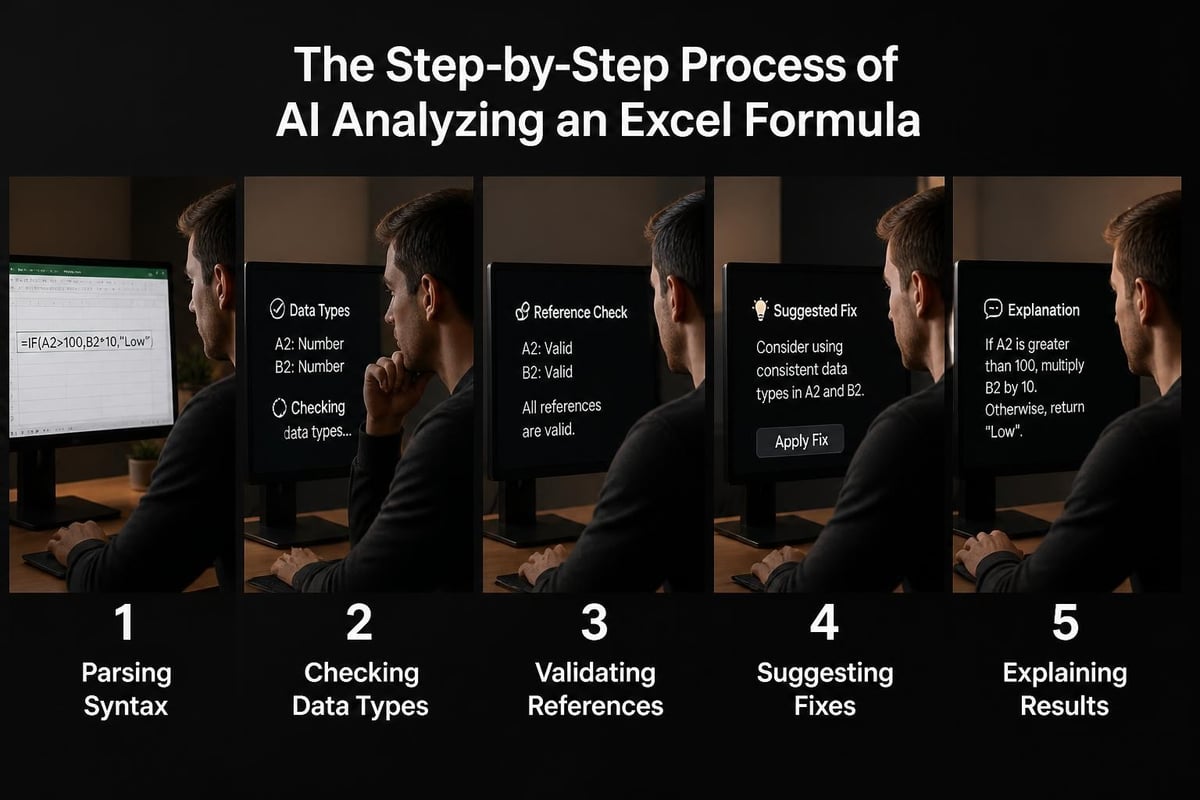
AI-powered tools analyze your formulas by:
- Breaking down complex nested functions into understandable components
- Comparing your syntax against millions of working formula examples
- Identifying data type mismatches before they cause errors
- Suggesting corrections based on context and cell relationships
- Explaining what each part of your formula does in plain English
Microsoft's recent introduction of Agent Mode represents a significant advancement in this space. As reported by Windows Central’s coverage of Agent Mode, this feature actively diagnoses broken formulas and proposes solutions, learning from user acceptance or rejection of its suggestions.
Natural Language Error Explanations
One of the most valuable aspects of excel formula troubleshooting with ai involves receiving explanations you can actually understand. Instead of cryptic error codes, AI tools describe what went wrong, why it happened, and how to prevent similar issues.
When a VLOOKUP fails, for example, AI might explain: "Your lookup value in cell B2 contains extra spaces. The match in your table is in column D, row 15, but the spaces prevent an exact match. Use TRIM(B2) to remove spaces first." This level of specificity transforms troubleshooting from frustrating guesswork into targeted problem-solving.
Implementing AI Solutions in Your Workflow
Several approaches exist for incorporating AI into your Excel troubleshooting process, each with different strengths depending on your specific needs and technical environment.
Built-In AI Features
Excel's native AI capabilities continue to expand throughout 2026. The Copilot function allows you to describe the calculation you need in plain language, generating formulas automatically. However, as PC Gamer notes in their analysis, Microsoft itself cautions against using this feature for tasks requiring high accuracy or reproducibility.
This limitation highlights an important principle: excel formula troubleshooting with ai works best when human expertise validates AI suggestions. The Microsoft Excel consulting services provided by specialized firms combine AI efficiency with professional verification.
Third-Party AI Tools
External AI platforms offer additional capabilities beyond Excel's built-in features. These tools often provide deeper analysis, batch processing of multiple workbooks, and integration with business intelligence systems.
| Feature | Built-In AI | Third-Party Tools |
|---|---|---|
| Real-time suggestions | Excellent | Good |
| Historical error patterns | Limited | Extensive |
| Custom business rules | Basic | Advanced |
| Batch processing | No | Yes |
| Learning from your data | Minimal | Significant |
Research from academic studies on Excel formula repair demonstrates that AI models trained on large datasets of real-world formulas achieve impressive accuracy in identifying and correcting errors. These findings inform the development of commercial tools that can handle increasingly complex troubleshooting scenarios.
Practical Applications for Business Users
Understanding how excel formula troubleshooting with ai applies to common business scenarios helps you recognize opportunities for implementation. Different departments and functions benefit from AI assistance in distinct ways.
Finance teams use AI to validate complex financial models, ensuring that projection formulas correctly reference historical data and apply appropriate growth rates. When building annual budgets with hundreds of interconnected formulas, AI can spot inconsistencies that would take hours to find manually.
Operations managers rely on AI to troubleshoot inventory tracking formulas, especially when dealing with multiple warehouse locations, product variants, and dynamic reorder points. AI quickly identifies when formulas fail to account for all variables or when cell references break after adding new product lines.
Sales analysts benefit from AI when building commission calculators, territory performance dashboards, and forecast models. These applications typically involve nested IF statements, VLOOKUP chains, and date-based calculations that are error-prone and difficult to debug.
Real-World Troubleshooting Scenarios
Consider a scenario where you've built a monthly reporting dashboard that suddenly shows incorrect totals. Traditional debugging might involve:
- Checking each formula individually
- Verifying cell references haven't shifted
- Confirming data sources are current
- Testing edge cases manually
- Documenting the fix for future reference
With excel formula troubleshooting with ai, you describe the problem in natural language: "My monthly sales total is showing half the expected value." The AI scans your formulas, identifies that a SUMIF range only covers rows 2-50 when your data extends to row 95, and suggests expanding the range or converting to a table reference that automatically adjusts.
Advanced AI Techniques for Formula Optimization
Beyond simple error detection, AI applies sophisticated analytical methods to improve formula performance and reliability. These advanced techniques draw from computer science research and practical implementation experience.
Neurosymbolic Approaches
Research published in studies on neurosymbolic formula repair describes methods that combine neural networks with symbolic reasoning. This hybrid approach allows AI to understand both the syntax rules of Excel formulas and the semantic meaning of what calculations accomplish.
When troubleshooting a complex array formula, neurosymbolic AI recognizes not just whether the syntax is valid, but whether the logic achieves your intended outcome. This deeper understanding enables suggestions that improve both correctness and efficiency.
Pattern Recognition and Static Analysis
Tools like those described in ExceLint research use static analysis to detect errors without executing formulas. By examining the structure and relationships between formulas across your entire workbook, these systems identify anomalies that suggest mistakes.
Static analysis detects issues such as:
- Formulas that differ from expected patterns in similar cells
- References that skip unexpected rows or columns
- Calculations that ignore apparently relevant data
- Inconsistent use of absolute versus relative references
- Unusual nesting patterns that may indicate logic errors
This approach complements AI-driven troubleshooting by catching errors that don't produce obvious symptoms but still compromise data integrity.
Integrating AI with Traditional Excel Tools
The most effective approach to excel formula troubleshooting with ai combines artificial intelligence with Excel's traditional auditing features. Understanding how these tools work together maximizes your troubleshooting efficiency.
Excel's Trace Precedents and Trace Dependents features visually map formula relationships. When AI identifies a potential error, these tools help you understand its impact across your workbook. Similarly, the Evaluate Formula feature lets you step through AI-suggested corrections to verify they work as intended.
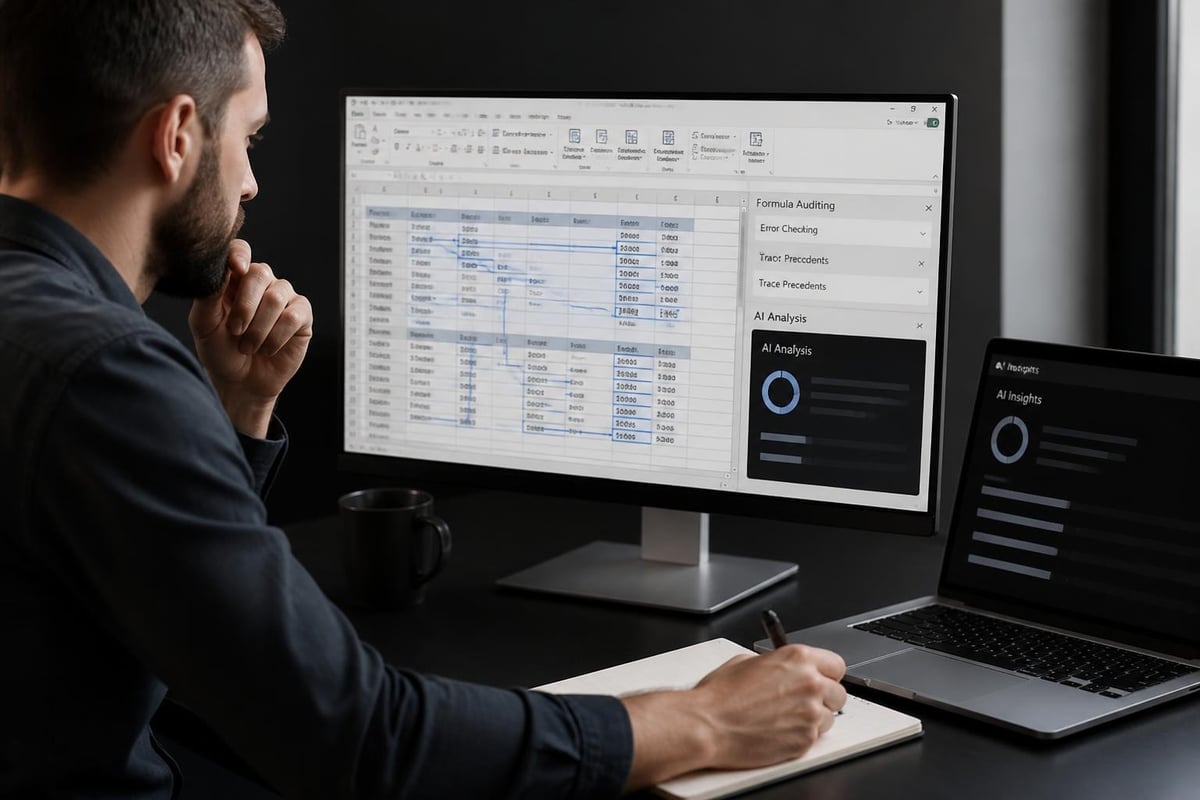
Error Checking Rules
Microsoft's built-in formula error checking capabilities work alongside AI to provide multiple layers of validation. While these rules catch common mistakes like numbers stored as text or formulas inconsistent with nearby cells, AI provides context-aware explanations and personalized solutions.
When you enable background error checking, Excel flags potential issues with green triangles in cell corners. AI tools can then analyze these flagged cells in batch, prioritizing critical errors and suggesting systematic fixes rather than requiring individual cell attention.
Training Your Team on AI-Assisted Troubleshooting
Implementing excel formula troubleshooting with ai requires more than just deploying tools. Your team needs understanding of how to work effectively with AI assistants, when to trust their suggestions, and how to validate recommendations.
Building AI Literacy
Effective training programs should cover the capabilities and limitations of AI troubleshooting tools. Users need to understand that AI excels at pattern matching and syntax checking but may not grasp unique business rules or unusual edge cases specific to your organization.
Professional Excel training programs increasingly incorporate AI tools, teaching users to leverage automation while maintaining critical thinking skills. This balanced approach prevents over-reliance on AI while capturing efficiency benefits.
Key training topics include:
- Interpreting AI error explanations accurately
- Validating AI suggestions before applying them
- Providing effective context to AI tools
- Recognizing when human expertise is essential
- Documenting solutions for future reference
Creating Feedback Loops
As your team uses AI troubleshooting tools, capture information about which suggestions prove helpful and which miss the mark. Many AI systems improve through user feedback, learning organizational-specific patterns and preferences over time.
Establish a simple process for team members to report AI recommendations that required modification or proved incorrect. This feedback helps both AI improvement and knowledge sharing among team members facing similar challenges.
Preventing Formula Errors with AI
While troubleshooting is essential, preventing errors from occurring delivers even greater value. AI assistance extends beyond fixing problems to anticipating them during formula creation.
Modern AI tools provide real-time suggestions as you type formulas, similar to how code editors assist programmers. These systems recognize common patterns that lead to errors and offer corrections before you finish entering the formula.
Microsoft's guidance on avoiding broken formulas emphasizes proactive measures like using table references instead of range addresses and naming cells meaningfully. AI reinforces these best practices by detecting deviations and suggesting improvements.
Predictive Error Detection
Advanced AI implementations analyze your spreadsheet usage patterns to predict where errors are likely to occur. If you frequently add rows to a data range, AI might suggest converting to a table format or using dynamic array formulas that automatically expand.
When building complex financial models, AI can simulate thousands of scenarios to identify input combinations that might cause division by zero, circular references, or overflow errors. This predictive capability transforms excel formula troubleshooting with ai from reactive problem-solving to proactive quality assurance.
| Prevention Method | Traditional Approach | AI-Enhanced Approach |
|---|---|---|
| Input validation | Manual data type checking | Automatic pattern recognition |
| Reference management | Careful manual updates | Intelligent reference tracking |
| Formula consistency | Visual inspection | Automated pattern comparison |
| Edge case testing | Sample scenarios | Exhaustive simulation |
Selecting the Right AI Tools for Your Needs
The expanding market for AI-powered Excel tools presents choices that can feel overwhelming. Selecting solutions that match your specific requirements ensures you gain meaningful benefits without unnecessary complexity.
Consider your organization's primary pain points. Do you struggle most with formula syntax errors, logical mistakes in calculations, or performance issues with complex workbooks? Different AI tools emphasize different strengths, and matching capabilities to needs produces better outcomes.
Tools focused on AI-driven Excel automation may offer broader functionality beyond troubleshooting, including report generation and data cleaning. If your needs extend beyond formula fixes, integrated platforms provide efficiency advantages over point solutions.
Evaluating AI Tool Features
Assessment criteria should include:
- Accuracy rates for error detection and suggested corrections
- Integration with your existing Excel environment and workflows
- Learning capabilities that improve recommendations over time
- Privacy and security measures for sensitive business data
- Support and documentation quality for troubleshooting the troubleshooting tools
Free trials and pilot programs allow hands-on evaluation with your actual spreadsheets before committing to enterprise deployments. Testing AI tools with representative workbooks from different departments reveals how well they handle your specific formula complexity and data structures.
Data Quality and AI Effectiveness
The accuracy of excel formula troubleshooting with ai depends significantly on the quality of your underlying data. AI algorithms perform best when analyzing clean, well-structured information with consistent formatting and logical organization.
Spreadsheets with mixed data types in single columns, inconsistent date formats, or irregular table structures challenge AI systems just as they frustrate human users. Investing in data cleaning processes improves both AI effectiveness and overall spreadsheet reliability.
When AI suggests formula corrections, verify that the underlying data supports those changes. A VLOOKUP formula might be syntactically perfect but still fail if lookup values contain invisible characters or inconsistent spacing that prevent matches.
Standardizing Spreadsheet Practices
Organizations that establish spreadsheet standards see better results from AI troubleshooting tools. Guidelines covering naming conventions, table structures, and formula patterns help AI recognize organizational norms and provide more relevant suggestions.
Document preferred approaches for common calculations like date differences, percentage changes, and conditional aggregations. AI tools can then learn these preferences and recommend solutions that align with your established practices rather than generic alternatives.
Measuring ROI from AI Troubleshooting
Quantifying the business value of excel formula troubleshooting with ai helps justify investments and guide expansion decisions. Several metrics capture both direct time savings and indirect quality improvements.
Track the average time required to resolve formula errors before and after implementing AI tools. Most organizations report 60-80% reductions in troubleshooting time, translating directly to productivity gains and faster project completion.
Additional ROI indicators include:
- Reduction in error-related rework and corrections
- Decreased requests to IT or Excel specialists for help
- Improved confidence in spreadsheet accuracy
- Faster onboarding of new team members
- Enhanced ability to handle complex analytical tasks
Financial services firms and accounting departments often achieve particularly strong returns given their heavy reliance on complex formulas and the high cost of calculation errors. Manufacturing and supply chain operations benefit from improved inventory formulas and production planning accuracy.
Future Developments in AI Formula Assistance
The field of excel formula troubleshooting with ai continues rapid evolution throughout 2026, with several emerging trends pointing toward even more powerful capabilities in coming years.
Conversational AI interfaces are becoming more sophisticated, allowing extended dialogues about formula problems rather than simple question-and-answer exchanges. You might explain a complex business requirement in detail, with AI asking clarifying questions before proposing comprehensive solutions.
Research into automated troubleshooting guide generation from historical incident data suggests future systems will learn from your organization's specific error patterns, creating customized prevention strategies based on your unique challenges.
Cross-Platform Intelligence
AI systems are beginning to work across Excel, Google Sheets, and other spreadsheet platforms, recognizing that many organizations use multiple tools. Research on Google Sheets AI integration demonstrates how natural language error explanations benefit users regardless of platform.
This cross-platform capability becomes particularly valuable for teams that collaborate with external partners using different software or organizations transitioning between tools. AI that understands formula logic independent of specific syntax differences can facilitate smoother migrations and collaboration.
Excel formula troubleshooting with ai represents a fundamental shift in how professionals diagnose and resolve spreadsheet issues, combining speed and accuracy that traditional methods cannot match. Whether you're dealing with persistent #REF! errors, mysterious calculation inconsistencies, or simply want to optimize complex workbooks, AI tools provide immediate value while continuously improving through experience. The Analytics Doctor combines cutting-edge AI capabilities with deep Excel expertise to diagnose your spreadsheet challenges, implement smart solutions, and train your team to work more efficiently. From fixing broken formulas to building automated reports that actually work, we deliver the clarity and precision your data deserves.