Excel remains the backbone of business analytics and reporting across industries, but sharing spreadsheet files through email attachments or network drives creates version control nightmares, security risks, and collaboration barriers. When you turn Excel into web app solutions, you unlock real-time collaboration, centralized data management, and secure access controls that transform how teams interact with critical business data. This comprehensive guide explores proven methods, platforms, and best practices for converting your Excel workbooks into professional web applications without requiring extensive programming knowledge.
Why Organizations Need to Turn Excel Into Web App Solutions
Traditional Excel file sharing creates multiple versions of the same workbook scattered across email inboxes and local drives. One person updates their copy while another makes conflicting changes, leading to data reconciliation headaches that waste valuable time and increase error rates.
Web applications eliminate these problems by centralizing data in a single source of truth. When you convert Excel spreadsheets into web applications using specialized platforms, multiple users can access the same data simultaneously without creating duplicate files.
Key business benefits include:
- Real-time collaboration with automatic updates visible to all users
- Granular permission controls that protect sensitive formulas and data
- Mobile access from any device with a web browser
- Elimination of version control issues
- Automated audit trails tracking who changed what and when
- Reduced risk of formula corruption from multiple editors
Organizations that maintain complex Excel dashboards particularly benefit from web app conversion, as stakeholders can view updated metrics without downloading files or requesting email updates.

No-Code Platforms That Turn Excel Into Web App Interfaces
The landscape of conversion tools has matured significantly in 2026, offering solutions for different use cases and technical skill levels. Each platform takes a distinct approach to preserving your Excel logic while adding web functionality.
Direct Formula Preservation Platforms
Some platforms maintain your existing Excel formulas and cell references intact, translating them directly into web application logic. This approach minimizes conversion effort for spreadsheets with complex calculations.
Airrange specializes in preserving Excel formulas while creating shareable web interfaces. Users upload their workbook, configure access permissions, and deploy functional web apps without modifying underlying calculations.
Keikai offers a developer-friendly approach that embeds Excel functionality into custom web applications. This platform suits organizations building integrated business systems that incorporate spreadsheet logic alongside other web services.
| Platform | Best For | Formula Preservation | Coding Required |
|---|---|---|---|
| Airrange | Quick deployment | High | None |
| Keikai | Custom integration | High | Moderate |
| Appizy | Calculators | Moderate | None |
| SpreadsheetWeb | Enterprise apps | High | Minimal |
Database-Driven Conversion Tools
Other platforms extract your Excel data and business rules into database-backed web applications. This approach offers better scalability for large datasets and complex multi-user scenarios.
DaDaBIK enables conversion of Excel files into self-hosted web applications with complete CRUD (Create, Read, Update, Delete) interfaces. The platform automatically generates user authentication, role-based permissions, and responsive interfaces from your spreadsheet structure.
SpreadsheetWeb offers comprehensive solutions for organizations needing enterprise-grade security, compliance features, and integration with existing business systems. Their platform supports both cloud-hosted and on-premises deployments.
Step-by-Step Process to Turn Excel Into Web App Functionality
Converting spreadsheets into web applications follows a structured methodology that ensures data integrity and functional accuracy. The specific steps vary by platform, but the overall approach remains consistent.
Pre-Conversion Preparation
Before uploading your workbook to any conversion platform, invest time cleaning and organizing your spreadsheet structure. Web applications perform best when working with well-organized data.
Essential preparation tasks:
- Remove merged cells that complicate data extraction
- Standardize date formats across all columns
- Eliminate external links to other workbooks
- Document formula logic for complex calculations
- Separate input cells from calculation and output cells
- Test all formulas to ensure accuracy
Organizations with locked or protected Excel workbooks should unlock these files before conversion, as most platforms cannot process password-protected sheets.
Platform Selection and Configuration
Choose your conversion platform based on technical requirements, budget constraints, and long-term scalability needs. Most platforms offer free trials that allow testing with sample workbooks before committing to paid plans.
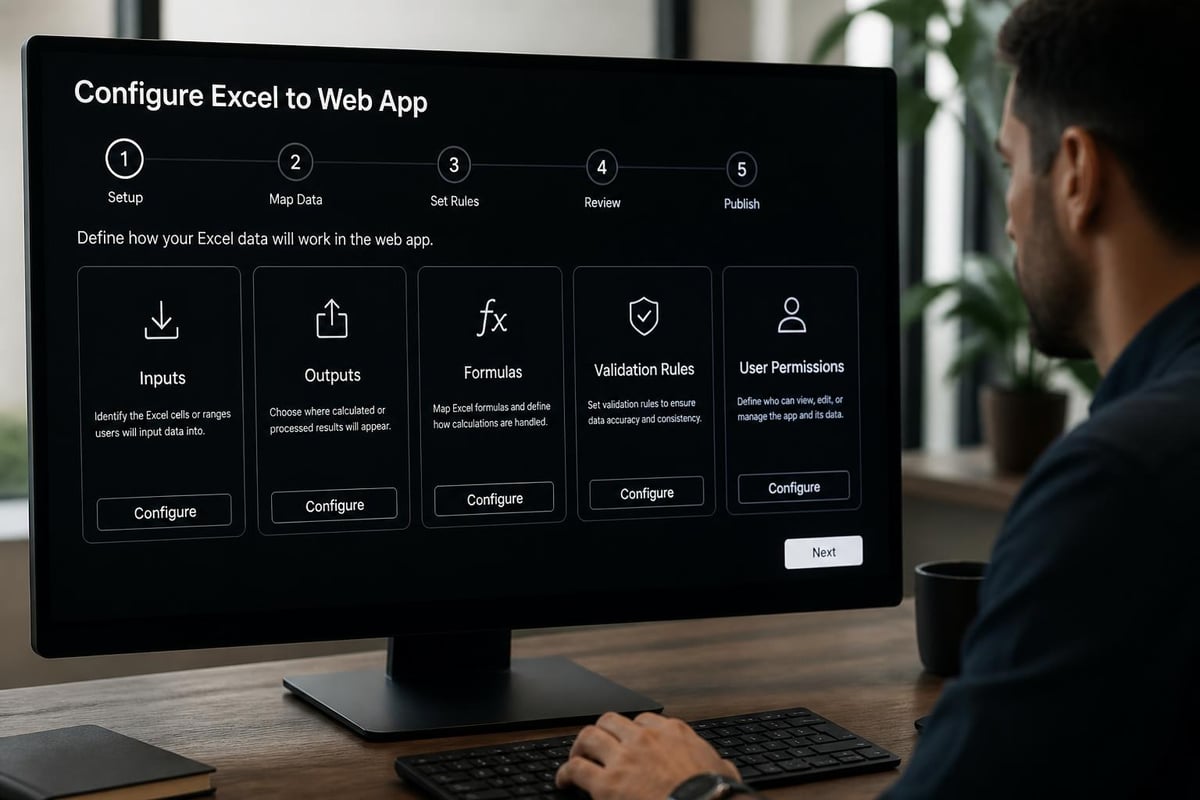
After selecting a platform, upload your prepared Excel file and configure initial settings. This typically includes:
- Identifying input cells that users will modify
- Designating output cells that display results
- Setting validation rules for user inputs
- Configuring calculation triggers (automatic or manual)
- Establishing user roles and permissions
Testing and Refinement
Never deploy a converted web application without thorough testing across multiple scenarios. Create test cases that validate calculation accuracy, permission controls, and edge case handling.
Critical testing areas include:
- Calculation accuracy compared to original Excel file
- Permission enforcement for different user roles
- Mobile device compatibility and responsive layout
- Performance with maximum expected concurrent users
- Data validation preventing invalid inputs
- Export functionality if users need offline copies
Complex spreadsheets with advanced Excel functions may require formula adjustments to ensure compatibility with web application engines. Document any modifications for future maintenance.
Security and Access Control for Web-Based Excel Applications
Security considerations multiply when you turn Excel into web app environments accessible over the internet. Proper configuration prevents unauthorized access, data breaches, and accidental modifications by untrained users.
User Authentication and Permissions
Implement multi-layered access controls that separate viewing rights from editing capabilities. Most platforms support role-based permissions allowing granular control over who can modify specific cells or worksheets.
Common permission tiers include:
- Viewers: Read-only access to outputs without seeing formulas
- Contributors: Can modify designated input cells only
- Editors: Full editing rights except protected formula cells
- Administrators: Complete access including permission management
Organizations handling sensitive financial data should enable two-factor authentication and IP address restrictions limiting access to approved networks.
Data Validation and Input Controls
Web applications require stricter validation rules than traditional Excel files. When multiple users access the same application simultaneously, a single invalid input can corrupt calculations for everyone.
Implement comprehensive data validation rules that enforce data types, acceptable ranges, and logical constraints. Most platforms allow configuring validation at the cell, column, or table level.
| Validation Type | Purpose | Example |
|---|---|---|
| Data type | Ensure correct format | Dates in MM/DD/YYYY only |
| Range limits | Prevent unrealistic values | Revenue between $0 and $1M |
| List constraints | Force selection from options | Department from predefined list |
| Formula checks | Verify logical consistency | End date after start date |
Real-World Applications and Use Cases
Organizations across industries successfully turn Excel into web app solutions for diverse business processes. Understanding common use cases helps identify opportunities within your own operations.
Financial Calculators and Quote Generators
Sales teams frequently use Excel for pricing calculations, ROI projections, and proposal generation. Converting these into web applications allows field representatives to generate accurate quotes from mobile devices without emailing files back to the office.
Appizy provides tools specifically designed for creating interactive web calculators from Excel spreadsheets. These calculators can be embedded directly into company websites, allowing prospects to explore pricing scenarios before contacting sales.
Budget Planning and Resource Allocation
Finance departments maintaining departmental budget templates benefit enormously from web app conversion. Rather than distributing Excel files to each department manager, a centralized web application ensures everyone works from the same budget assumptions and allocation formulas.
Version control becomes automatic when budget owners update allocations through the web interface. Creating dashboards that roll up departmental submissions into executive views provides real-time visibility into organizational spending plans.
Inventory and Operations Management
Operations teams tracking inventory levels, production schedules, or maintenance logs often maintain complex Excel workbooks with interrelated worksheets. Converting these systems into web applications enables real-time updates from warehouse floors, production lines, or field service locations.
The academic research on spreadsheet conversion at financial institutions demonstrates how critical business processes can migrate from desktop Excel to enterprise web applications while maintaining calculation accuracy and expanding accessibility.

Integration with Existing Business Systems
Modern web applications rarely operate in isolation. When you turn Excel into web app solutions, consider how converted applications will exchange data with your existing technology ecosystem.
Database Connections and Data Sync
Many platforms support connecting web applications to external databases, pulling fresh data for calculations or writing results back to corporate systems. This eliminates manual data export and import cycles that consume staff time and introduce errors.
Common integration patterns include:
- Nightly data refresh from ERP or CRM systems
- Real-time API calls to external pricing or inventory services
- Automated export of calculation results to data warehouses
- Webhook triggers notifying other systems when values change
Organizations with SQL Server, PostgreSQL, or MySQL databases can configure direct connections that keep web applications synchronized with authoritative data sources.
API Access for Custom Workflows
Advanced scenarios may require programmatic access to web application data through REST APIs or similar interfaces. This enables custom integrations built by internal IT teams or external consultants.
For complex automation needs, consider platforms offering VBA-level programming capabilities within the web environment. This preserves existing automation logic while gaining web accessibility benefits.
Performance Optimization and Scalability Planning
Spreadsheets performing acceptably for single users may struggle when converted to multi-user web applications. Proactive performance optimization prevents frustrating user experiences and system failures.
Calculation Optimization Strategies
Web applications typically recalculate formulas when users modify input cells. Inefficient formulas that iterate through thousands of rows create noticeable delays in web environments where users expect instant feedback.
Optimization techniques include:
- Replacing volatile functions (NOW, RAND) with static values where appropriate
- Minimizing array formulas spanning large ranges
- Using indexed lookups instead of scanning entire datasets
- Breaking complex calculations into intermediate steps
- Configuring manual calculation triggers for batch updates
Applications processing large datasets should evaluate whether database queries would perform better than spreadsheet formulas for certain operations.
Concurrent User Planning
Estimate peak concurrent users to ensure adequate system resources. A web application supporting 100 total users but expecting only 10-15 simultaneous sessions requires different infrastructure than one serving 50 concurrent users.
| Concurrent Users | Recommended Server Specs | Database Size Limit |
|---|---|---|
| 1-10 | 2 CPU cores, 4GB RAM | 100,000 rows |
| 10-50 | 4 CPU cores, 8GB RAM | 500,000 rows |
| 50-100 | 8 CPU cores, 16GB RAM | 1,000,000 rows |
| 100+ | Custom infrastructure | Database required |
Cloud-hosted platforms typically handle scaling automatically, but self-hosted solutions require capacity planning and monitoring.
Maintaining and Updating Web-Based Excel Applications
The development process does not end at initial deployment. Web applications require ongoing maintenance to fix bugs, accommodate changing business requirements, and optimize performance based on actual usage patterns.
Version Control and Change Management
Establish formal processes for modifying production web applications. Unlike Excel files where users can freely edit local copies, changes to web applications immediately affect all users.
Recommended practices include:
- Maintaining development and production environments for testing changes
- Documenting all formula modifications with business justification
- Requiring approval from application owners before deploying updates
- Scheduling changes during off-peak hours to minimize disruption
- Maintaining rollback capability to restore previous versions if problems emerge
Organizations with complex spreadsheet models should establish audit trails documenting when formulas changed, who authorized modifications, and what business requirements drove the updates.
User Training and Support
Even intuitive web interfaces require user training to maximize adoption and minimize support requests. Create documentation explaining how to access the application, interpret outputs, and troubleshoot common issues.
Training approaches include:
- Recorded video walkthroughs demonstrating key workflows
- Quick reference guides with screenshots of critical functions
- FAQ documents addressing common questions
- Office hours where users can ask questions and request assistance
- Feedback channels for suggesting improvements or reporting bugs
Organizations offering comprehensive Excel training programs should extend these to cover web application interfaces, ensuring users understand both the underlying Excel logic and the web-specific features.
Cost Considerations and ROI Analysis
Budget planning for web application conversion includes platform subscription costs, development time, training expenses, and ongoing maintenance. Accurate cost estimation requires understanding both obvious and hidden expenses.
Platform Pricing Models
Conversion platforms use various pricing structures based on user counts, calculation complexity, storage requirements, and support levels. Most offer tiered plans accommodating different organizational needs.
Common pricing factors include:
- Number of published applications
- Maximum concurrent users
- Calculation complexity and processing requirements
- Data storage limits and retention periods
- Support response times and training resources
- On-premises versus cloud hosting options
Free tiers with limited functionality allow testing before committing to paid subscriptions. Organizations should budget for production-grade plans that include adequate support and SLA guarantees.
Calculating Return on Investment
Justify conversion projects by quantifying time savings, error reduction, and improved decision-making speed. Track metrics demonstrating business value delivered through web application deployment.
Measurable benefits include:
- Hours saved eliminating email file distribution and version consolidation
- Reduction in calculation errors from simultaneous editing
- Faster decision cycles from real-time data availability
- Decreased IT support tickets related to file corruption or access issues
- Improved compliance through automated audit trails
A pricing calculator requiring 30 minutes to email and update monthly now instantly accessible to sales teams represents significant productivity gains when multiplied across dozens of representatives.
Common Pitfalls and How to Avoid Them
Organizations encountering problems when they turn Excel into web app solutions typically make predictable mistakes during planning, conversion, or deployment phases. Learning from common failures accelerates successful implementation.
Insufficient Requirements Gathering
Rushing into conversion without thoroughly documenting how users currently interact with Excel files leads to web applications missing critical functionality. Spend adequate time understanding all use cases before selecting platforms or configuring applications.
Interview current users to identify:
- Which cells they modify versus which they only view
- What reports or exports they generate from the spreadsheet
- How they currently share results with stakeholders
- What validation or error checking they perform manually
- Which Excel features (charts, pivot tables, macros) they depend on
Applications that omit frequently-used functionality face resistance and low adoption regardless of technical quality.
Overlooking Mobile User Experience
Web applications technically accessible from mobile devices may provide poor user experiences without responsive design optimization. Test thoroughly on smartphones and tablets if field users will access applications away from desks.
Consider whether mobile users need simplified interfaces showing only essential inputs and outputs. Some platforms allow creating separate mobile and desktop views from the same underlying data model.
Neglecting Performance Testing
Applications performing well during initial testing with sample data may degrade significantly under realistic data volumes and user loads. Conduct stress testing before production deployment to identify bottlenecks.
Load testing should simulate:
- Peak concurrent user scenarios
- Full production data volumes
- Complex calculation chains
- Simultaneous updates by multiple users
- Network latency conditions for remote users
Identifying performance issues during testing prevents embarrassing failures after announcement to broader user populations.
Hybrid Approaches Combining Excel and Web Access
Not every scenario requires complete abandonment of Excel files. Hybrid solutions maintain Excel as the authoring environment while adding web-based distribution and consumption capabilities.
Some organizations continue developing complex models in Excel while publishing read-only web views for stakeholders. This preserves analyst productivity in familiar Excel environments while expanding data access through web interfaces.
Other approaches extract specific calculators or reporting modules from larger Excel workbooks, converting only high-value components into standalone web applications. The remaining Excel functionality continues serving its original purpose for specialized users.
Evaluate whether your situation requires full conversion or whether strategic web-enabling of specific workflows delivers adequate benefits at lower cost and complexity.
Converting spreadsheets into web applications represents a natural evolution for organizations outgrowing traditional file-based collaboration while preserving valuable Excel-based business logic. When your team needs expert guidance diagnosing spreadsheet problems, optimizing complex workbooks for web conversion, or implementing robust data validation before deployment, The Analytics Doctor provides the specialized Excel expertise to ensure successful transitions. Whether you need formula troubleshooting, custom training on web application platforms, or comprehensive spreadsheet audits preparing for conversion, you'll get practical solutions that make your data work harder for your business.