Excel proficiency has become non-negotiable in Richmond's competitive business environment. Whether you're a financial analyst working in the heart of downtown, a small business owner managing inventory, or a recent graduate preparing to enter the workforce, mastering Microsoft Excel opens doors to efficiency and career advancement. The demand for excel training richmond has surged in 2026 as organizations recognize that spreadsheet competency directly impacts productivity, accuracy, and decision-making capabilities. Finding the right training approach tailored to your current skill level and professional goals makes all the difference between frustration and genuine mastery.
Why Excel Skills Matter More Than Ever in Richmond
Richmond's diverse economy spans finance, healthcare, education, and manufacturing sectors. Each of these industries relies heavily on Excel for data management, financial modeling, reporting, and analysis. Companies increasingly expect employees to arrive with solid Excel fundamentals or demonstrate the initiative to develop these skills quickly.
The University of Richmond’s Robins School of Business mandates an Excel competency exam for pre-business students, ensuring proficiency in essential Excel skills such as data sorting, pivot tables, and various functions. This academic requirement reflects employer expectations across the region. Professionals who can manipulate data efficiently, create meaningful visualizations, and automate repetitive tasks command higher salaries and receive more advancement opportunities.

The Cost of Excel Inefficiency
Many Richmond professionals spend hours manually performing tasks that Excel could automate in minutes. This inefficiency compounds across teams and departments, creating significant productivity drains. Common problems include:
- Manually copying and pasting data between workbooks
- Creating reports from scratch each week instead of building templates
- Making calculation errors that require time-consuming corrections
- Struggling with data that should take seconds to analyze
- Missing opportunities for insights hidden in spreadsheet data
Excel training richmond programs address these challenges by teaching practical solutions that immediately impact daily workflows. The return on investment becomes apparent within weeks as trained employees complete tasks faster and with greater accuracy.
Training Options Available in Richmond
Richmond offers several pathways for developing Excel expertise, each suited to different learning styles, schedules, and proficiency levels. Understanding these options helps you select the most effective approach for your situation.
Instructor-Led Classroom Training
ONLC offers instructor-led Excel training classes in Richmond, covering topics from basic features to advanced operations designed to prepare participants for Microsoft Office Specialist Certification. These structured courses provide hands-on practice with immediate feedback from experienced instructors.
Classroom training works particularly well for learners who thrive in interactive environments and benefit from real-time question-and-answer sessions. Scheduled class times create accountability, helping busy professionals commit to skill development.
| Training Type | Best For | Typical Duration | Cost Range |
|---|---|---|---|
| Classroom | Structured learners, certification prep | 1-3 days per level | $300-$800 |
| Online Courses | Self-paced learners, budget-conscious | 4-12 weeks | $50-$300 |
| Private Tutoring | Customized needs, specific problems | 2-8 sessions | $100-$200/hour |
| Corporate Training | Teams, standardization | 1-2 days onsite | $2,000-$5,000 |
Online Learning Platforms
Remote excel training richmond options have expanded significantly, providing flexibility for professionals with demanding schedules. TechRadar reviews the best Excel online courses of 2026, including offerings from Coursera, LinkedIn Learning, and Udemy that suit various proficiency levels.
Online platforms allow you to learn at your own pace, revisit challenging concepts, and practice skills without time pressure. Many courses include downloadable practice files and real-world scenarios that mirror actual workplace tasks. For those seeking comprehensive resources, the Corporate Finance Institute offers free Excel materials including courses, templates, and webinars for both beginners and advanced users.
Personalized One-on-One Instruction
Customized excel training richmond services address your specific challenges rather than following a generic curriculum. This approach proves especially valuable when you need to solve actual problems from your workplace or when you have an unusual combination of skill gaps.
Working with an Excel specialist allows you to bring your own spreadsheets, identify inefficiencies in your current processes, and develop tailored solutions. The Analytics Doctor provides this personalized approach, diagnosing spreadsheet problems and delivering practical solutions that immediately improve your workflow.
Essential Skills Every Richmond Professional Needs
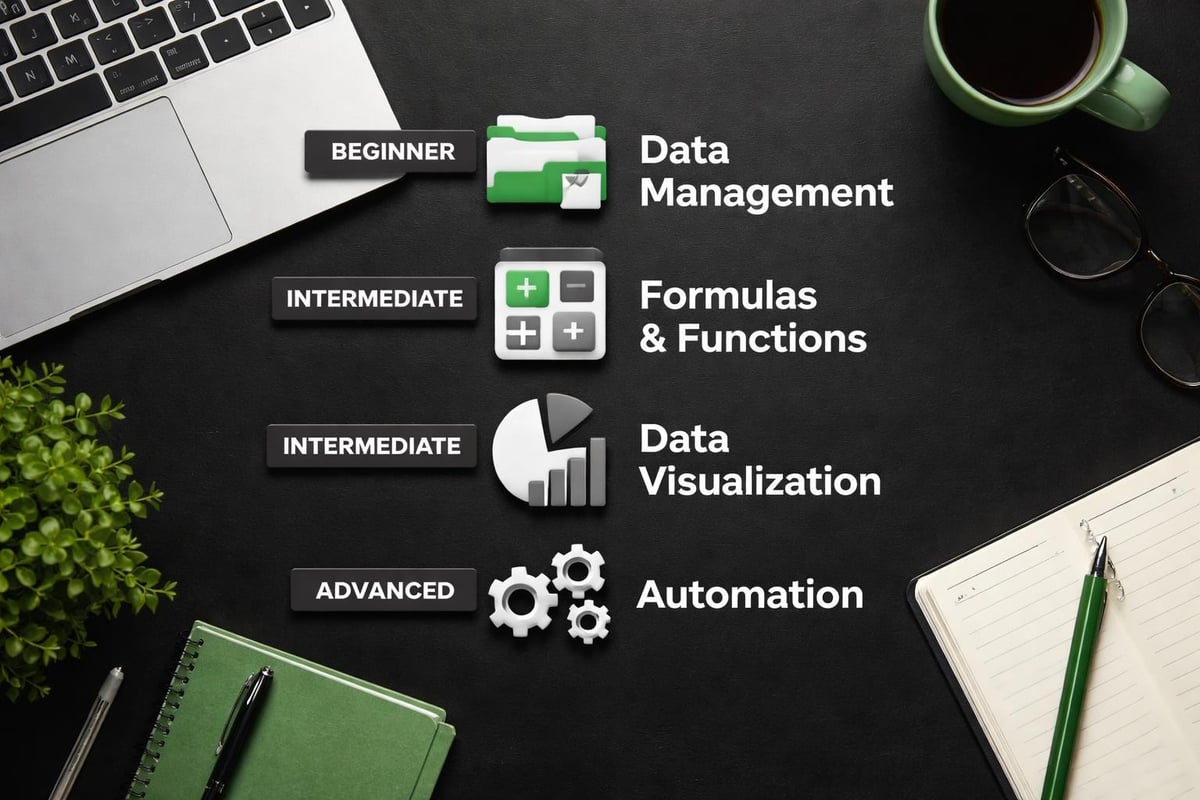
Excel training richmond programs should cover foundational competencies that apply across industries and job functions. Building these core skills creates a platform for more specialized applications.
Data Management and Organization
Effective spreadsheet work begins with proper data structure. Training should cover:
- Table formatting and named ranges for easier formula writing
- Data validation to prevent entry errors and maintain consistency
- Sorting and filtering for quick data access and analysis
- Conditional formatting to highlight important information automatically
Understanding validation data in Excel prevents countless downstream problems by ensuring data quality from the start.
Formula Proficiency
Formulas transform static data into dynamic analytical tools. Comprehensive excel training richmond courses emphasize practical formula applications:
- Lookup functions (VLOOKUP, XLOOKUP, INDEX/MATCH) for connecting related data
- Logical functions (IF, AND, OR) for conditional calculations
- Text functions for cleaning and standardizing data
- Date and time functions for scheduling and tracking
- Statistical functions for analysis and reporting
Mastering these functions eliminates manual calculations and reduces errors. Advanced users should understand array formulas and the newer dynamic array functions introduced in recent Excel versions.
Pivot Tables and Data Analysis
Pivot tables represent one of Excel's most powerful features, yet many users never learn to leverage them effectively. Quality training demonstrates how to:
- Create pivot tables from raw data in seconds
- Reorganize data perspectives with simple drag-and-drop actions
- Calculate summaries without writing formulas
- Filter and slice data for specific insights
- Build pivot charts for visual analysis
These skills prove invaluable for anyone who regularly analyzes sales data, financial information, or operational metrics.
Visualization and Dashboard Creation
Communicating insights clearly often matters more than the analysis itself. Excel training should include chart creation, design principles, and dashboard development. Learning how to create dashboards in Excel enables professionals to present complex data in digestible, actionable formats.
Choosing the Right Excel Training Richmond Program
The proliferation of training options makes selection challenging. Several factors should guide your decision beyond simple cost considerations.
Assess Your Current Skill Level
Honest self-assessment prevents wasting time on material you already know or jumping into advanced topics without adequate foundations. Most excel training richmond providers offer skill assessments or diagnostic tools. Consider these proficiency markers:
Beginner Level:
- Comfortable with basic data entry and simple formulas
- Understand cell references and basic formatting
- Can create simple charts
- Limited experience with functions beyond SUM and AVERAGE
Intermediate Level:
- Regular use of VLOOKUP and IF statements
- Experience creating and modifying pivot tables
- Understand relative versus absolute cell references
- Can record basic macros
Advanced Level:
- Build complex nested formulas and array formulas
- Design comprehensive dashboards
- Write VBA code for automation
- Optimize workbook performance and troubleshoot errors
Define Your Learning Objectives
Generic Excel knowledge helps, but targeted skills deliver faster career benefits. Identify specific outcomes you want to achieve:
- Automate a monthly reporting process
- Build financial models for budgeting
- Clean and analyze customer data
- Create executive dashboards
- Prepare for certification exams
Clear objectives help you evaluate whether a training program addresses your actual needs or covers irrelevant topics that consume time without delivering value.
Consider Learning Style and Schedule
Excel training richmond options range from intensive bootcamps to extended evening courses. Match the format to your learning preferences and availability:
| Learning Style | Recommended Format | Considerations |
|---|---|---|
| Hands-on practice | Instructor-led workshops | Requires dedicated time blocks |
| Self-directed | Online video courses | Needs self-discipline |
| Problem-solving | Private tutoring | Higher cost but maximum relevance |
| Collaborative | Group workshops | Networking benefits |
Some professionals learn best through structured progression, while others prefer diving into specific problems as they arise. Neither approach is superior; effectiveness depends on individual preference and situation.
Advanced Excel Training for Richmond Professionals
Once foundational skills are solid, advanced excel training richmond programs unlock Excel's full potential for complex business applications.
Automation with Macros and VBA
Recording macros provides basic automation, but writing VBA (Visual Basic for Applications) code enables sophisticated solutions tailored to unique business processes. Advanced training covers:
- Understanding the VBA development environment
- Writing loops and conditional statements
- Creating custom functions
- Building user forms for data entry
- Error handling and debugging
Automation eliminates repetitive tasks entirely, freeing professionals to focus on analysis and decision-making rather than manual data manipulation.
Power Query and Power Pivot
Modern Excel includes Power Query for data transformation and Power Pivot for handling datasets too large for traditional worksheets. These tools represent critical skills for data-intensive roles. Training should demonstrate:
- Connecting to external data sources (databases, web data, other files)
- Transforming and cleaning data with Power Query
- Creating data models with Power Pivot
- Building measures using DAX formulas
- Analyzing millions of rows efficiently
Organizations dealing with substantial data volumes increasingly require these capabilities from their analytics teams.
Complex Financial Modeling
Finance professionals benefit from specialized excel training richmond focused on building accurate, flexible financial models. Key topics include:
- Three-statement modeling (income statement, balance sheet, cash flow)
- Scenario analysis and sensitivity testing
- Data tables for multi-variable analysis
- Goal Seek and Solver for optimization
- Best practices for model structure and audit trails
Financial modeling demands precision and clear documentation. Quality training emphasizes techniques that make models transparent and maintainable by others.
For professionals tackling sophisticated analytical challenges, exploring advanced Excel projects provides inspiration and practical templates that accelerate development.
Corporate Excel Training Solutions
Richmond businesses often need to elevate Excel skills across entire teams or departments. Corporate excel training richmond programs deliver standardized knowledge while accommodating varying skill levels within groups.
Customized Corporate Curricula
Off-the-shelf courses rarely align perfectly with organizational needs. Effective corporate training begins with understanding:
- Current spreadsheet pain points and inefficiencies
- Industry-specific applications and terminology
- Existing templates and processes that need improvement
- Skill distribution across the team
- Strategic business objectives that Excel can support
Trainers should review actual company spreadsheets and design exercises around real workflows. This relevance accelerates adoption and ensures immediate applicability.
Onsite vs. Remote Corporate Training
Both delivery methods offer advantages depending on circumstances:
Onsite Training Benefits:
- Minimal disruption to work schedules
- Immediate application to company systems
- Enhanced team cohesion and shared learning
- Trainer access to actual data and systems
Remote Training Benefits:
- Lower costs (no travel, facility expenses)
- Flexible scheduling across time zones
- Easy recording for absent employees
- Access to specialized instructors regardless of location
Hybrid approaches combining live online instruction with onsite practice sessions often provide optimal results.
Overcoming Common Excel Training Challenges
Even motivated learners encounter obstacles during excel training richmond programs. Recognizing these challenges helps you prepare strategies to address them.
Information Overload
Excel contains hundreds of functions and features. Comprehensive courses can overwhelm students with more information than they can absorb or apply. Combat this by:
- Focusing on features relevant to your actual work
- Practicing each new skill immediately with real data
- Creating a personal reference guide of useful techniques
- Revisiting challenging concepts multiple times
- Building competency gradually rather than rushing through material
Quality training prioritizes depth over breadth, ensuring students genuinely master core concepts before introducing advanced topics.
Forgetting Between Practice Sessions
Skills fade without regular application. Spaced repetition and consistent practice cement knowledge. After completing excel training richmond courses:
- Schedule weekly practice sessions with your own data
- Identify opportunities to apply new skills in daily work
- Create templates that incorporate techniques you've learned
- Share knowledge with colleagues through informal teaching
- Set reminders to review notes and resources monthly
The transition from training to habitual use determines long-term skill retention.
Troubleshooting Complex Problems
Advanced Excel work inevitably produces errors and unexpected results. Learning to diagnose problems systematically represents a crucial meta-skill. When formulas break or workbooks behave strangely, effective troubleshooting involves:
- Breaking complex formulas into smaller components
- Using Excel's formula evaluation tools
- Checking for common issues like incorrect cell references
- Verifying data types and formats
- Understanding error messages and their meanings
Sometimes spreadsheet problems require expert intervention. Knowing when to seek help saves hours of frustration. For challenging issues like removing password protection in Excel or accessing password-protected files, specialized assistance proves invaluable.
Measuring Excel Training ROI
Richmond organizations investing in employee development rightfully expect measurable returns. Excel training delivers quantifiable benefits across multiple dimensions.
Productivity Gains
Time savings represent the most immediate and measurable benefit. Track these metrics before and after training:
- Hours spent on routine reporting tasks
- Time required to complete monthly closes
- Speed of ad-hoc data analysis requests
- Frequency of calculation errors requiring correction
- Employee overtime related to manual data work
Even modest improvements compound significantly across teams. A five-person department saving two hours weekly generates 520 hours annually at improved productivity levels.
Quality Improvements
Better Excel skills reduce errors that create downstream problems. Monitor:
- Accuracy rates in financial reporting
- Frequency of data correction requests
- Customer service issues related to billing or inventory errors
- Audit findings related to spreadsheet controls
Quality improvements often deliver greater value than speed gains, particularly in regulated industries where errors carry compliance risks.
Strategic Capabilities
Advanced excel training richmond programs enable analytical work previously outsourced or simply not attempted. Organizations gain capabilities for:
- Sophisticated forecasting and scenario planning
- Customer segmentation and targeting
- Operational efficiency analysis
- Real-time performance dashboards
- Data-driven decision support
These strategic capabilities create competitive advantages that justify training investments many times over.
Continuing Excel Education Beyond Initial Training
Technology evolves rapidly, and Excel continuously adds features and capabilities. Treating skill development as a one-time event leaves professionals increasingly outdated. Building ongoing learning into your professional routine ensures continued relevance.
Excel Communities and Resources
Richmond professionals benefit from both local and online Excel communities. Excel Campus provides curated resources including books and tutorials focused on practical applications and time-saving techniques. Engaging with these communities offers:
- Solutions to specific problems from experienced users
- Exposure to creative applications you wouldn't discover independently
- Accountability through participation and contribution
- Advance notice of new features and best practices
Regular engagement with Excel content, even fifteen minutes weekly, maintains and expands your skill set.
Specialized Advanced Topics
After mastering fundamentals, pursue specialized knowledge relevant to your industry or role. Options include:
- Statistical analysis for research and quality control
- Financial statement analysis and valuation
- Project management and resource allocation
- Sales forecasting and pipeline management
- HR analytics and workforce planning
Specialized excel training richmond programs targeting these niches deliver expertise that distinguishes you from peers with only general Excel knowledge.
Developing Excel proficiency through quality training transforms how Richmond professionals approach data, analysis, and decision-making. Whether you need foundational skills, advanced automation capabilities, or solutions to specific spreadsheet challenges, investing in targeted excel training richmond delivers measurable returns through improved productivity and analytical capabilities. When you encounter stubborn spreadsheet problems or need personalized guidance tailored to your unique workflows, The Analytics Doctor provides expert diagnosis and practical solutions that make your data work for you.