Google's Gemini AI has fundamentally changed how we interact with spreadsheets, offering unprecedented capabilities for analysis, troubleshooting, and automation. This gemini spreadsheet analysis guide will walk you through the essential techniques, practical applications, and strategic workflows that transform raw data into actionable insights. Whether you're struggling with broken formulas, need to generate complex analyses quickly, or want to streamline repetitive tasks, understanding Gemini's spreadsheet capabilities will revolutionize your data management approach.
Understanding Gemini's Spreadsheet Integration
Google has embedded Gemini directly into Google Sheets, creating a seamless experience where artificial intelligence becomes your data analysis partner. Unlike traditional spreadsheet tools that require manual formula construction and troubleshooting, Gemini can now explain and fix broken formulas automatically, providing natural-language explanations that make sense even to non-technical users.
This integration represents more than just a helpful assistant. It's a fundamental shift in how we approach spreadsheet work. The AI understands context, recognizes patterns in your data, and can suggest solutions that would take hours to develop manually.
Native Capabilities vs. External Analysis
Gemini operates in two distinct modes when working with spreadsheets: native integration within Google Sheets and external file analysis through uploads. Each approach offers unique advantages for different use cases.
Native Integration Benefits:
- Real-time formula assistance and debugging
- Contextual awareness of your entire workbook structure
- Immediate implementation of suggested changes
- Seamless collaboration features with team members
- Auto-updating analyses as data changes
External Upload Advantages:
- Support for multiple file formats beyond Google Sheets
- Larger file size handling capabilities
- Cross-platform compatibility with Excel and CSV files
- Privacy-focused analysis without cloud storage requirements
The supported formats and size limits vary depending on your workspace tier, making it essential to understand which approach fits your workflow best.

Formula Troubleshooting with AI Assistance
One of the most powerful features in this gemini spreadsheet analysis guide is Gemini's ability to diagnose and repair broken formulas. Traditional spreadsheet troubleshooting requires deep knowledge of syntax rules, function libraries, and logical structures that many users find intimidating.
How Gemini Identifies Formula Errors
When a formula fails, Gemini analyzes multiple factors simultaneously. It examines the syntax structure, verifies cell references, checks for circular dependencies, and validates function arguments against expected parameters. This comprehensive approach mirrors the diagnostic process that The Analytics Doctor uses when helping clients untangle complex workbooks.
The AI doesn't just identify what's wrong; it explains why the error occurred in plain language. For example, instead of seeing "#REF!" and wondering what went wrong, you'll receive an explanation like: "This formula references cell B15, which was deleted. You likely meant to reference B14, which contains the sales total."
Step-by-Step Error Resolution
Google Sheets with Gemini now provides detailed explanations for formula failures, breaking down complex problems into manageable steps:
- Error Detection: Gemini automatically identifies the problematic formula
- Context Analysis: The AI examines surrounding data and formula dependencies
- Root Cause Identification: Pinpoints the specific issue causing the failure
- Solution Recommendation: Suggests corrected formula syntax
- Implementation Option: Offers one-click correction or manual adjustment
| Error Type | Traditional Approach | Gemini Approach | Time Saved |
|---|---|---|---|
| Circular Reference | Manual trace precedents | Instant visualization of loop | 15-30 min |
| Invalid Range | Check each cell reference | Automatic range correction | 5-10 min |
| Function Syntax | Consult documentation | Natural language explanation | 10-20 min |
| Data Type Mismatch | Trial and error testing | Immediate type identification | 5-15 min |
Building Self-Updating Analytical Frameworks
This gemini spreadsheet analysis guide emphasizes the power of creating dynamic, self-maintaining spreadsheets that adapt to changing data. Rather than manually updating reports each week or month, you can use Gemini to create self-updating budgets and analytical dashboards.
Designing Automated Data Workflows
The key to successful automation lies in understanding how Gemini interprets your instructions. Natural language prompts work best when they're specific, context-rich, and include clear success criteria.
Effective prompt structure:
- State the objective clearly
- Specify data sources and ranges
- Define calculation methods
- Indicate desired output format
- Mention update frequency or triggers
For instance: "Create a monthly sales analysis that calculates total revenue, average transaction value, and growth percentage compared to the previous month using data from columns A through E."
Advanced Analysis Techniques
Beyond basic calculations, Gemini excels at generating sophisticated analytical insights. The AI can identify trends, spot anomalies, and suggest relevant visualizations without requiring deep statistical knowledge from the user.
When working with large datasets, understanding how Gemini analyzes spreadsheets with AI-powered insights becomes crucial for maximizing efficiency. The platform can process thousands of rows, identify correlation patterns, and generate summary statistics that would traditionally require specialized tools.

Data Visualization and Chart Generation
Creating meaningful visualizations is where many spreadsheet users struggle, even when their underlying data is clean and accurate. This section of our gemini spreadsheet analysis guide addresses how AI transforms the chart creation process.
AI-Powered Chart Recommendations
Gemini analyzes your data structure and automatically suggests appropriate visualization types. Instead of guessing whether a line chart, bar graph, or scatter plot best represents your information, the AI evaluates data characteristics and recommends optimal formats. The enhanced capabilities for data analysis and chart generation include understanding temporal patterns, categorical distributions, and numerical relationships.
Chart selection criteria Gemini evaluates:
- Number of variables being compared
- Data type (categorical, continuous, temporal)
- Relationship complexity between variables
- Audience and presentation context
- Data volume and density
Customization Through Natural Language
Rather than navigating through multiple menu options, you can describe desired chart modifications in plain English. Commands like "make the bars blue, add data labels, and increase the font size to 14 points" execute instantly, streamlining the design process.
This approach particularly benefits users who know what they want visually but struggle with traditional chart editing interfaces. Similar to how you might create drop-down lists in Excel through specific steps, Gemini accepts detailed instructions for visual customization.
Platform Limitations and Workarounds
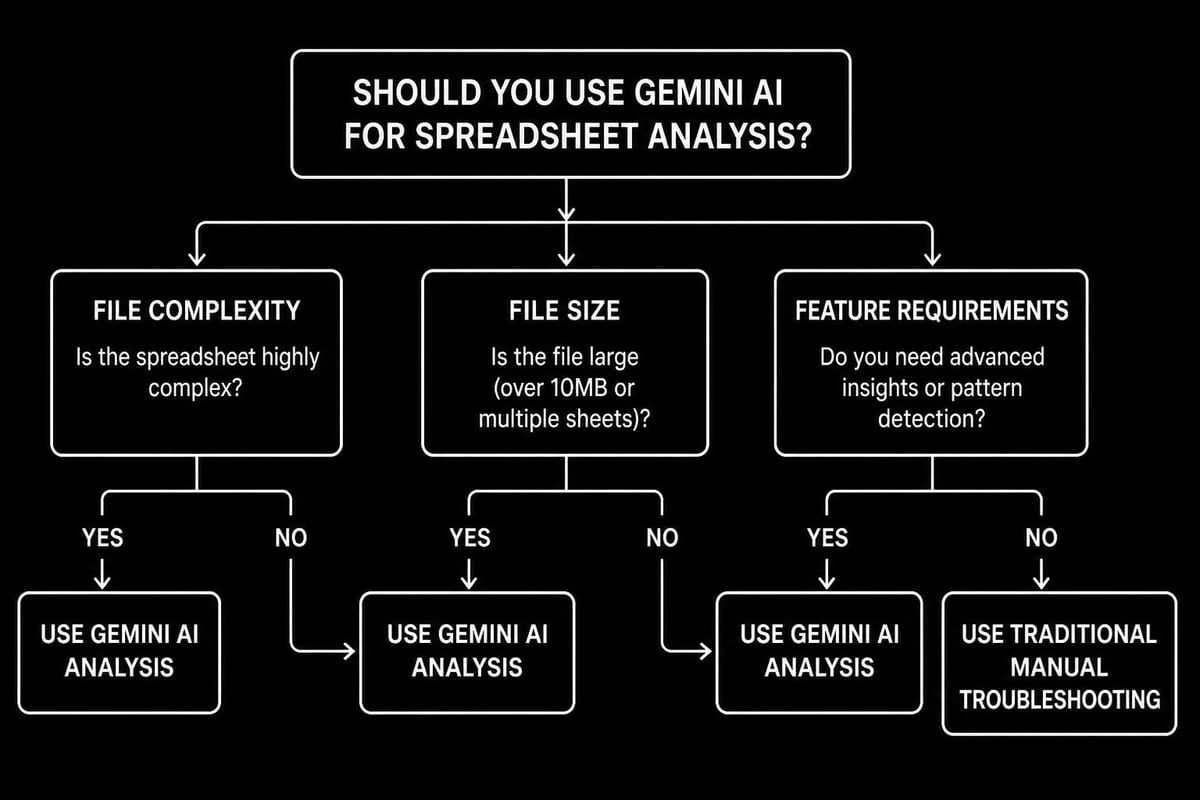
No gemini spreadsheet analysis guide would be complete without addressing practical constraints. Understanding where Gemini excels and where it faces limitations helps you develop realistic expectations and alternative strategies.
File Size and Format Restrictions
Different Google Workspace tiers impose varying limits on spreadsheet analysis capabilities. Basic users typically face stricter constraints than Business or Enterprise subscribers regarding file sizes, processing power, and advanced features.
| Workspace Tier | Max File Size | Max Rows Analyzed | Advanced Features |
|---|---|---|---|
| Personal | 100 MB | 50,000 rows | Basic analysis only |
| Business Standard | 250 MB | 200,000 rows | Full analysis suite |
| Business Plus | 500 MB | 500,000 rows | Priority processing |
| Enterprise | 1 GB+ | 1M+ rows | Custom integrations |
When files exceed these thresholds, consider breaking them into smaller segments or using alternative analysis platforms. The comprehensive guide on platform limits and file formats provides detailed specifications for late 2026 implementations.
Complex Formula Challenges
While Gemini handles most standard formulas excellently, extremely complex nested functions with multiple dependencies sometimes require manual intervention. The AI performs best with formulas containing three or fewer nested levels and clear logical structures.
When to use manual troubleshooting:
- Legacy spreadsheets with undocumented custom functions
- Macros involving external data connections
- Array formulas with circular reference workarounds
- Password-protected worksheets requiring specialized unlocking techniques
Integrating Gemini with Existing Workflows
This gemini spreadsheet analysis guide recognizes that most professionals work within established processes and systems. Successfully implementing AI assistance requires thoughtful integration rather than wholesale replacement of proven methods.
Hybrid Approach Strategies
The most effective workflows combine Gemini's strengths with traditional spreadsheet expertise. Use AI for rapid prototyping, initial data exploration, and routine maintenance tasks while reserving human judgment for strategic decisions, quality validation, and exceptional cases.
Consider how six specific ways Gemini supercharges Google Sheets can complement your current practices rather than replace them entirely. This measured adoption reduces resistance and allows teams to build confidence gradually.
Cross-Platform Considerations
Many organizations use both Google Sheets and Microsoft Excel, creating a need for consistent analysis approaches across platforms. While Gemini primarily integrates with Google's ecosystem, understanding how to transfer techniques to Excel environments maintains workflow consistency.
Platform translation checklist:
- Identify Gemini-suggested formulas that have Excel equivalents
- Document any Google Sheets-specific functions requiring alternatives
- Test formula accuracy when migrating between platforms
- Establish validation procedures for cross-platform consistency
- Create reference guides for team members working in both systems
Advanced Analytical Capabilities
Moving beyond basic formula assistance, this gemini spreadsheet analysis guide explores sophisticated analytical functions that transform how you extract insights from data.
Pattern Recognition and Trend Analysis
Gemini excels at identifying patterns that humans might overlook in large datasets. The AI can detect seasonal variations, cyclical trends, and anomalous values that warrant investigation. This capability proves particularly valuable when analyzing time-series data or tracking performance metrics across multiple dimensions.
The analytical depth of native integration enables context-aware analysis that understands your data's business meaning, not just its numerical properties. For instance, the AI recognizes that sales figures dropping to zero on weekends might be normal for a B2B business but concerning for retail operations.
Predictive Insights Generation
While not a full-featured statistical package, Gemini can generate basic forecasts and projections based on historical data trends. These predictions help with budget planning, inventory management, and resource allocation decisions.
Predictive capabilities include:
- Linear trend extrapolation for sales forecasting
- Seasonal adjustment calculations
- Growth rate projections with confidence intervals
- Comparative scenario modeling
- Risk factor identification based on variance patterns
Similar to how you might calculate moving averages in Excel, Gemini automates these statistical functions through natural language requests.
Data Cleaning and Preparation
Raw data rarely arrives in analysis-ready format. This section of our gemini spreadsheet analysis guide addresses how AI streamlines the often tedious process of data preparation.
Automated Standardization
Gemini can identify and correct common data inconsistencies like varying date formats, inconsistent capitalization, extra spaces, and mixed data types within columns. These cleaning operations that traditionally require multiple formula combinations now execute through simple commands.
Request "standardize all dates to MM/DD/YYYY format" or "remove duplicate entries based on customer ID" and watch Gemini execute complex multi-step processes instantly. This efficiency particularly benefits users who regularly import data from external systems requiring consistent formatting.
Missing Data Handling
The AI suggests appropriate strategies for handling missing values based on data context and analytical goals. Rather than blindly filling gaps with zeros or deleting incomplete records, Gemini evaluates whether interpolation, averaging, or exclusion best serves your specific situation.
| Missing Data Scenario | Gemini Recommendation | Rationale |
|---|---|---|
| Single missing value in time series | Linear interpolation | Maintains trend continuity |
| Random scattered gaps | Median imputation | Minimizes outlier impact |
| Entire row missing critical fields | Flag for review | Prevents false assumptions |
| Systematic gaps (weekends) | Leave blank | Reflects true data structure |
Collaborative Analysis Features
Modern spreadsheet work rarely happens in isolation. Understanding how Gemini enhances collaborative analysis completes this gemini spreadsheet analysis guide.
Team-Based Insights
When multiple people work on the same spreadsheet, Gemini maintains consistency by suggesting standardized approaches to common tasks. Team members receive similar formula recommendations for equivalent problems, reducing variation and improving quality control.
The AI also helps onboard new team members by explaining existing formulas and data structures in accessible language. This documentation capability reduces dependency on specific individuals and builds organizational knowledge resilience.
Version Control and Change Tracking
Gemini's suggestions create natural audit trails showing why specific analytical approaches were chosen. Comments automatically generated by the AI explain formula logic, making it easier to review changes and understand decision rationale months later.
This transparency proves invaluable when revisiting analyses for compliance reviews, process improvement initiatives, or knowledge transfer situations. The documented reasoning prevents the "mystery spreadsheet" phenomenon where nobody understands why calculations work a certain way.
Performance Optimization Techniques
Even with AI assistance, large or complex spreadsheets can slow down. This final section addresses optimization strategies that keep Gemini-enhanced workbooks running smoothly.
Efficient Formula Architecture
Gemini generally suggests efficient formula structures, but understanding optimization principles helps you evaluate recommendations critically. Volatile functions like INDIRECT and OFFSET should be minimized, while array formulas can often replace multiple individual calculations.
Performance hierarchy (fastest to slowest):
- Direct cell references
- Named ranges
- Standard lookup functions (VLOOKUP, INDEX/MATCH)
- Array formulas
- Volatile functions requiring constant recalculation
When working with datasets approaching platform limits, consider techniques similar to managing large Excel workbooks that improve navigation and calculation speed.
Strategic Data Organization
How you structure data significantly impacts both Gemini's analytical effectiveness and overall spreadsheet performance. Organizing information in proper database format with consistent column headers, no merged cells, and single data types per column enables more powerful analysis.
This structured approach allows Gemini to understand your data relationships more accurately and suggest more sophisticated analytical techniques. The AI works best when data follows standard spreadsheet best practices rather than creative formatting that prioritizes visual appeal over functional efficiency.
Mastering Gemini's spreadsheet analysis capabilities transforms how you work with data, reducing errors while uncovering insights that drive better decisions. However, when you encounter complex spreadsheet challenges beyond AI capabilities or need personalized training to leverage these tools effectively, expert human guidance makes all the difference. Whether you're struggling with formulas that Gemini can't quite fix, need custom automation solutions, or want comprehensive training that bridges AI and traditional spreadsheet skills, The Analytics Doctor provides the specialized expertise to solve your toughest data problems and build lasting analytical competence.