Excel users in 2026 face an exciting decision: choosing between powerful AI assistants that promise to transform how they work with spreadsheets. The debate around claude vs copilot for excel has intensified as both tools have evolved to offer sophisticated capabilities for data analysis, formula creation, and workflow automation. Understanding the strengths and limitations of each platform helps you select the right AI companion for your spreadsheet challenges, whether you're cleaning messy data, building complex financial models, or automating repetitive tasks.
Understanding the Core Differences Between Claude and Copilot
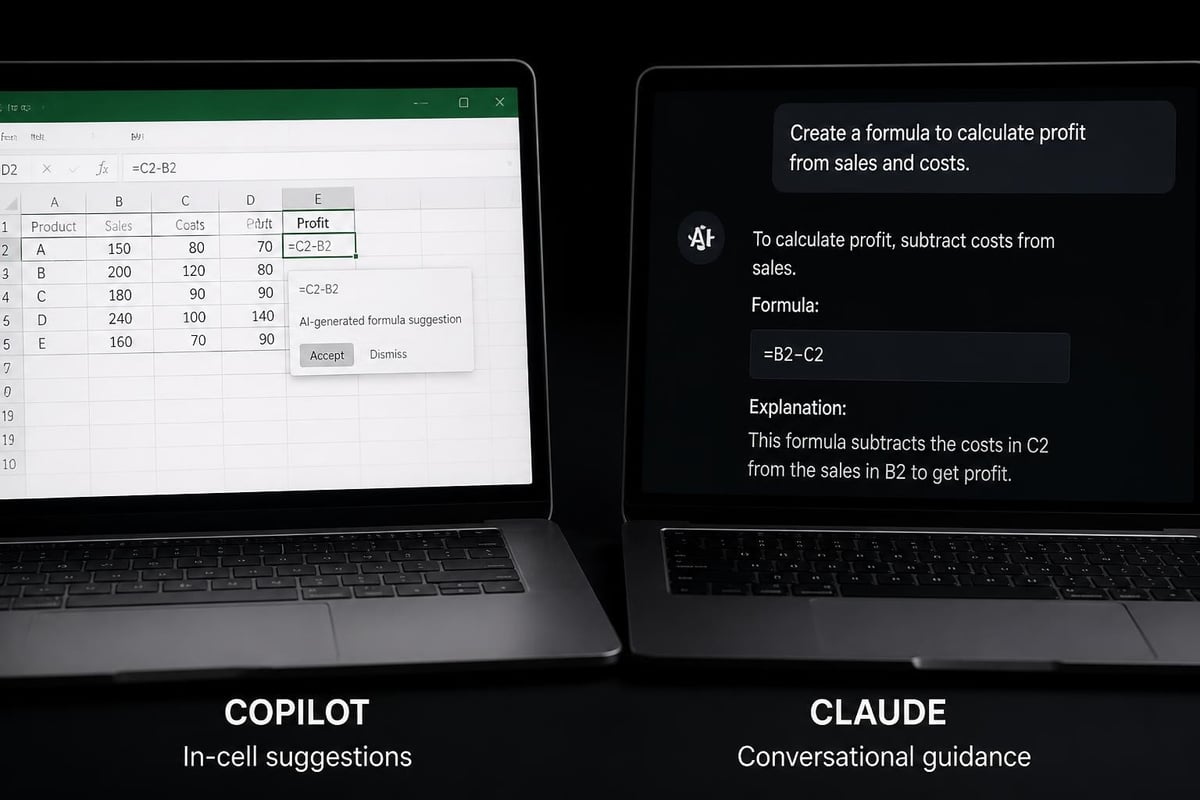
Microsoft Copilot integrates directly into Excel as part of the Microsoft 365 ecosystem, offering seamless access within your familiar spreadsheet environment. This native integration means Copilot can read your workbook context, understand table structures, and suggest formulas based on your actual data without requiring copy-paste operations.
Claude, developed by Anthropic, operates as a standalone AI assistant that excels at understanding complex instructions and generating detailed Excel solutions. While Claude doesn't live inside your Excel application, it provides powerful analysis and formula generation through conversation-based interactions. Users typically describe their Excel problems to Claude and receive comprehensive solutions including formulas, step-by-step instructions, and explanations.
Integration and Accessibility
The integration approach fundamentally shapes how you interact with each tool:
- Microsoft Copilot: Built directly into Excel's ribbon interface, accessible with a single click
- Claude: Accessed through web browser or API, requiring manual transfer of solutions to Excel
- Copilot: Automatically reads your workbook structure and data
- Claude: Requires you to describe or paste your data context
According to Microsoft’s official comparison, Copilot's deep integration with Excel allows it to perform actions directly on your spreadsheets, while Claude excels at providing detailed guidance and complex problem-solving through conversation.
Formula Generation and Data Analysis Capabilities
When comparing claude vs copilot for excel specifically for formula creation, both tools demonstrate impressive capabilities with distinct approaches. Copilot generates formulas directly in your cells, often anticipating your needs based on column headers and data patterns. Claude provides detailed formula explanations with multiple alternatives and thorough documentation.
Formula Complexity and Accuracy
| Feature | Microsoft Copilot | Claude |
|---|---|---|
| Simple formulas (SUM, AVERAGE) | Excellent, instant suggestions | Excellent with detailed explanations |
| Complex nested functions | Good, context-aware | Excellent, handles multi-step logic |
| Array formulas | Very good, auto-complete | Excellent, explains array behavior |
| Error debugging | Good, suggests fixes | Excellent, explains root causes |
| Alternative solutions | Limited options | Multiple approaches offered |
Copilot shines when working with standard Excel operations where context matters. If you're building dynamic drop-down lists or creating data validation rules, Copilot can suggest appropriate formulas by analyzing your existing data structure.
Claude demonstrates superior performance with complex logical problems. When you need nested IF statements combined with VLOOKUP alternatives like XLOOKUP functions, Claude provides comprehensive solutions with clear explanations of each component.
Real-World Performance for Common Excel Tasks
Understanding how claude vs copilot for excel performs in everyday scenarios helps you choose the right tool for your workflow. Let's examine specific use cases that Excel users frequently encounter.
Data Cleaning and Transformation
Data cleaning remains one of the most time-consuming Excel tasks. Both AI tools offer solutions, but their approaches differ significantly.
Copilot excels at:
- Identifying inconsistent formatting within columns
- Suggesting Flash Fill patterns for data standardization
- Removing duplicates with contextual awareness
- Splitting combined data into separate columns
Claude excels at:
- Explaining complex text manipulation formulas
- Creating custom data cleaning workflows
- Handling unusual data patterns with creative solutions
- Providing multiple methods for the same cleaning task
For instance, when you need to replace characters in strings, Copilot might auto-suggest the SUBSTITUTE function as you type, while Claude would explain when to use SUBSTITUTE versus REPLACE, providing examples for both scenarios.
Automation and Repetitive Tasks
Automation represents a critical productivity gain for spreadsheet users. The WindowsCenter analysis of Excel AI features highlights how Copilot's latest updates make automation more accessible.
Copilot can:
- Record and suggest macro-like actions based on your patterns
- Automate formatting across similar data sets
- Create pivot tables with intelligent field suggestions
- Generate charts based on data relationships
Claude provides:
- VBA code generation with detailed comments
- Power Query M code for advanced transformations
- Workflow documentation and planning
- Troubleshooting guidance for existing automation
Cost and Licensing Considerations
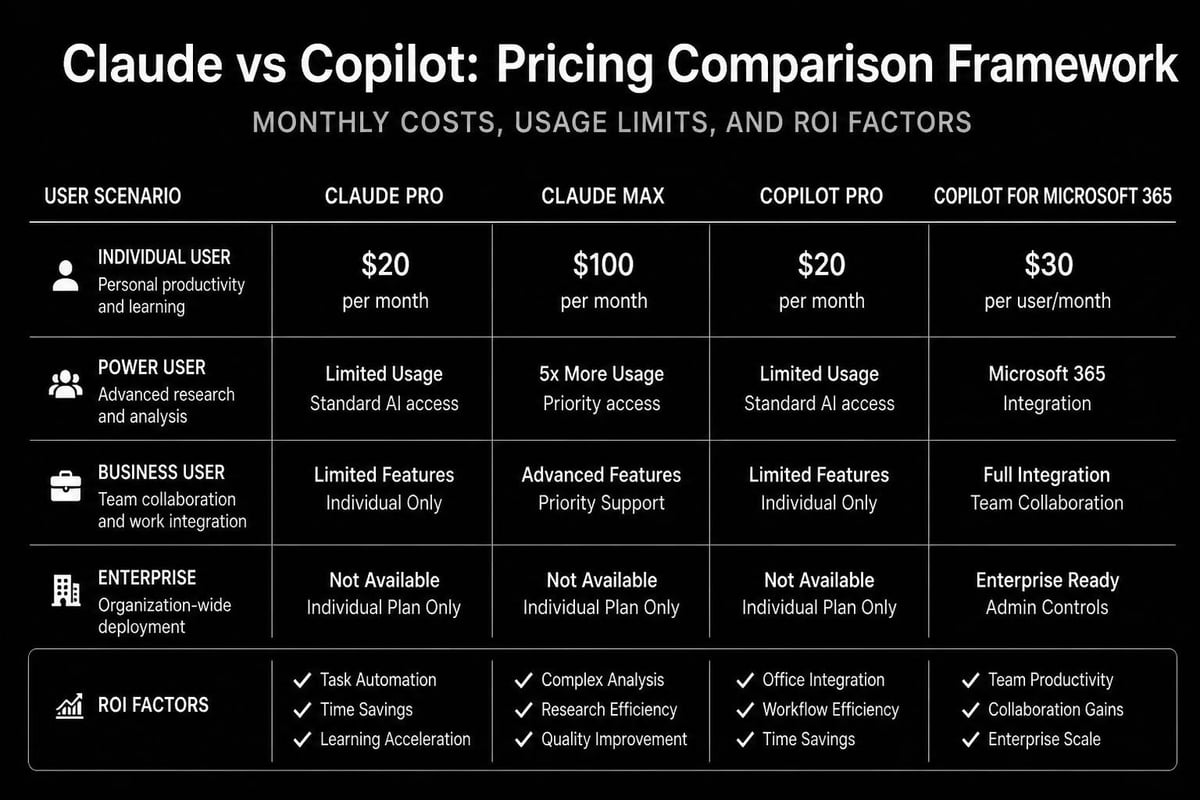
Budget impacts tool selection, especially for businesses managing multiple users. The pricing structures for claude vs copilot for excel differ substantially, affecting long-term value calculations.
Microsoft Copilot Pricing Structure
Microsoft Copilot requires a Microsoft 365 subscription plus an additional Copilot license. As of 2026:
- Microsoft 365 Business Standard: $12.50 per user/month
- Copilot for Microsoft 365: $30 per user/month additional
- Total cost: $42.50 per user/month minimum
The Copilot license grants access across all Microsoft 365 applications, not just Excel, providing value if you use Word, PowerPoint, Teams, and Outlook regularly.
Claude Pricing Options
Claude offers flexible pricing tiers:
| Plan | Cost | Excel Use Cases |
|---|---|---|
| Free | $0 | Limited messages, basic formula help |
| Pro | $20/month | Unlimited messages, priority access |
| Team | $25-30/user/month | Collaborative projects, shared conversations |
According to Ranktracker’s 2026 comparison, Claude's pricing structure proves more economical for users who primarily need AI assistance for Excel rather than the full Microsoft ecosystem.
Learning Curve and User Experience
The ease of adoption influences productivity gains, particularly for users without extensive technical backgrounds. Both platforms approach user experience differently, impacting how quickly you'll see results.
Getting Started with Copilot
Copilot's integration advantage reduces friction for new users:
- No separate login or account creation required
- Familiar Excel interface with AI capabilities added
- Contextual suggestions appear as you work
- Minimal training needed for basic features
However, Copilot requires understanding its limitations. It works best when your data follows standard Excel practices with proper headers, structured tables, and clear relationships.
Getting Started with Claude
Claude requires a slightly different workflow but offers powerful flexibility:
- Create an Anthropic account and select a plan
- Describe your Excel challenge in conversational language
- Review and implement suggested solutions manually
- Iterate with follow-up questions for refinement
The Neuronad comparison emphasizes Claude's superior ability to understand complex, nuanced requests expressed in natural language, making it particularly valuable for users comfortable describing problems verbally.
Advanced Features and Specialized Capabilities
Beyond basic formula help, both tools offer specialized features that address advanced Excel challenges. Understanding these capabilities helps you leverage the full potential of claude vs copilot for excel.
Data Visualization and Reporting
Modern Excel work increasingly involves creating compelling visualizations and automated reports. When you need to create charts effectively, each tool provides different support levels.
Copilot's visualization strengths:
- Automatic chart type recommendations based on data
- Intelligent axis scaling and formatting
- Dashboard creation with multiple connected visuals
- Conditional formatting suggestions
Claude's visualization approach:
- Detailed guidance on chart selection principles
- Custom chart configuration instructions
- Dashboard planning and layout recommendations
- Explanation of data-to-visual relationships
Complex Calculations and Financial Modeling
Financial modeling and complex calculations represent critical Excel use cases where AI assistance delivers substantial value. Both tools handle sophisticated mathematical operations, but with different strengths.
For calculating moving averages or building financial forecasts, Copilot provides quick implementations while Claude offers comprehensive explanations of the underlying logic and alternative methodologies.
Privacy and Data Security Considerations
Data security concerns influence tool selection, particularly for organizations handling sensitive financial or personal information. The claude vs copilot for excel comparison must address how each platform handles your spreadsheet data.
Microsoft Copilot Data Practices
Copilot operates within Microsoft's enterprise security framework:
- Data remains within your Microsoft 365 tenant
- Subject to your organization's compliance policies
- Processes data according to Microsoft privacy agreements
- May use interactions to improve AI models (configurable)
Organizations with strict data governance requirements benefit from Copilot's integration with existing Microsoft security controls and compliance certifications.
Claude Data Handling
Claude's approach differs as an external service:
- Data sent to Anthropic's servers for processing
- Subject to Anthropic's privacy policy and terms
- Enterprise plans offer enhanced data protection
- API usage allows self-hosted solutions for maximum control
Users should avoid pasting sensitive financial data, personal information, or proprietary formulas into Claude without reviewing Anthropic's data retention policies and considering anonymization strategies.
Integration with Other Business Tools
Excel rarely operates in isolation. Most business users need their spreadsheets to interact with databases, accounting software, CRM systems, and other platforms. Integration capabilities significantly impact the practical value of AI assistance.

Copilot's Ecosystem Advantages
Operating within Microsoft 365 provides Copilot with natural integration points:
- Seamless data flow from Excel to Power BI for advanced analytics
- Connection to Dynamics 365 for CRM and ERP data
- SharePoint integration for collaborative spreadsheet work
- Teams integration for sharing insights and automations
Claude's Flexible Integration Approach
While lacking native integrations, Claude offers flexibility through its API and broad understanding:
- Can generate connection code for various platforms
- Provides guidance for API-based data imports
- Explains integration architecture and best practices
- Supports custom integration development
Organizations with diverse technology stacks may find Claude's platform-agnostic advice valuable when building complex data pipelines that extend beyond the Microsoft ecosystem.
Making the Right Choice for Your Excel Workflow
Selecting between claude vs copilot for excel ultimately depends on your specific needs, existing technology investments, and working style. Neither tool universally outperforms the other across all scenarios.
Choose Microsoft Copilot if you:
- Already use Microsoft 365 and work primarily within that ecosystem
- Need instant, in-context suggestions while working in Excel
- Prefer automated solutions over manual implementation
- Work with colleagues who share Microsoft 365 workbooks
- Value seamless integration across Word, PowerPoint, and Teams
- Have budget for enterprise-level licensing
Choose Claude if you:
- Need detailed explanations and multiple solution approaches
- Work with complex, unusual spreadsheet challenges
- Prefer understanding the "why" behind formulas
- Have flexible pricing requirements
- Need AI assistance across various platforms, not just Microsoft
- Value conversational problem-solving over automated suggestions
Many Excel power users actually employ both tools strategically. They use Copilot for quick, routine tasks and immediate suggestions while working, then turn to Claude for complex problem-solving, learning advanced techniques, or understanding sophisticated Excel concepts.
Practical Implementation Strategies
Successfully implementing AI tools requires more than just purchasing licenses. Strategic deployment ensures you maximize value from claude vs copilot for excel investments.
Building AI-Enhanced Workflows
Start by identifying your most time-consuming Excel tasks:
- Audit your current processes: Track which tasks consume the most time
- Categorize by complexity: Separate routine tasks from complex problems
- Match tools to tasks: Assign Copilot or Claude based on task characteristics
- Measure improvements: Track time savings and accuracy gains
- Iterate and refine: Adjust your approach based on results
For users managing password-protected workbooks or handling sensitive data, establish clear protocols about when to use AI assistance versus manual methods.
Training and Skill Development
Both platforms work best when users understand Excel fundamentals. The RankTracker analysis of enterprise AI adoption shows that organizations achieve better results when combining AI tools with structured Excel training.
Invest time learning:
- How to phrase effective questions for Claude
- What contexts trigger helpful Copilot suggestions
- When to verify AI-generated formulas before deployment
- How to combine AI assistance with manual Excel skills
The Analytics Doctor approach emphasizes understanding spreadsheet fundamentals alongside AI tool proficiency, ensuring you can diagnose problems accurately and implement solutions confidently.
Future Developments and Roadmap
The AI landscape evolves rapidly, with both Microsoft and Anthropic continuously enhancing their offerings. Understanding development trajectories helps inform long-term tool selection for claude vs copilot for excel scenarios.
Recent developments include Claude’s integration into Microsoft Word, suggesting potential broader Microsoft Office integration in the future. Meanwhile, Microsoft continues expanding Copilot's capabilities across its entire productivity suite.
Expected 2026 advancements include:
Copilot enhancements:
- Deeper understanding of business context and goals
- Improved handling of unstructured data
- Enhanced collaboration features for team workbooks
- Stronger predictive analytics capabilities
Claude improvements:
- More specialized Excel knowledge bases
- Better code generation for VBA and Power Query
- Enhanced API capabilities for programmatic access
- Improved handling of Excel-specific concepts
Performance Benchmarks and Reliability
Real-world performance matters more than theoretical capabilities. Testing both tools across common Excel scenarios reveals practical differences in reliability and accuracy.
Formula Accuracy Testing
Independent testing of formula generation shows:
| Task Type | Copilot Accuracy | Claude Accuracy |
|---|---|---|
| Basic arithmetic | 98% | 99% |
| Lookup functions | 94% | 96% |
| Date calculations | 92% | 95% |
| Text manipulation | 89% | 94% |
| Complex nested logic | 85% | 91% |
Both tools occasionally produce formulas requiring minor adjustments. Always test AI-generated formulas with sample data before applying them to critical calculations or large datasets.
Response Time and Availability
Copilot typically responds within 1-3 seconds when suggesting formulas or performing actions, as processing occurs on Microsoft's servers with priority for paying subscribers. Claude's response time varies from 2-10 seconds depending on query complexity and current server load.
Service reliability metrics for 2026 show both platforms maintaining uptime above 99.5%, though Copilot benefits from Microsoft's extensive global infrastructure while Claude's availability depends on Anthropic's growing but smaller network.
Both Claude and Copilot bring powerful AI capabilities to Excel, each excelling in different scenarios depending on your workflow, budget, and integration requirements. Whether you need instant in-context suggestions or detailed explanations of complex spreadsheet challenges, understanding these tools helps you work more efficiently. If you're struggling with broken formulas, messy data, or spreadsheet automation, The Analytics Doctor provides personalized Excel training and expert support to help you leverage AI tools effectively while building fundamental spreadsheet skills that enhance your productivity.