Artificial intelligence has transformed how professionals interact with spreadsheet software, and the debate around claude vs gemini for excel has become increasingly relevant for users seeking to maximize their productivity. Both AI assistants offer powerful capabilities for formula creation, data analysis, and workflow automation, yet they approach Excel tasks with distinct methodologies and strengths. Understanding which tool aligns best with your spreadsheet needs can save hours of manual work and reduce costly errors in your data operations.
Understanding AI Integration with Excel Workflows
The landscape of AI-powered spreadsheet assistance has evolved dramatically over the past two years. When evaluating claude vs gemini for excel, professionals must first recognize that these tools operate differently than traditional Excel add-ins or macros. Both Claude and Gemini function as conversational AI assistants that can interpret natural language requests and generate solutions ranging from complex formulas to entire data models.
Claude, developed by Anthropic, has recently introduced direct Excel integration capabilities that allow users to query workbooks, debug errors, and build financial models without leaving the spreadsheet environment. Claude’s integration with Excel represents a significant advancement in how AI can function as a spreadsheet companion rather than a separate tool.
Gemini, Google's multimodal AI platform, excels in environments where Google Workspace integration matters most. While it can assist with Excel tasks through conversation and code generation, its native strength lies in Google Sheets compatibility. However, Gemini's advanced reasoning capabilities and ability to process visual data make it valuable for Excel users who need to interpret charts, graphs, and complex datasets.
Formula Generation and Debugging Capabilities
When comparing claude vs gemini for excel in formula creation, both assistants demonstrate impressive technical abilities but with different strengths. Claude shows particular proficiency in generating nested formulas with complex logical structures, especially when dealing with financial calculations or conditional aggregations.
Consider a scenario where you need to calculate weighted average costs with multiple conditions. Claude can process a detailed description of your business logic and produce formulas using combinations of SUMPRODUCT, IF, and INDEX-MATCH functions with remarkable accuracy. The assistant also excels at explaining why specific formula components are necessary, making it valuable for users seeking to improve their Excel skills through training.
Gemini brings different advantages to formula work. Its strength lies in pattern recognition and suggesting alternative approaches to calculations. When you describe a formula problem to Gemini, it often provides multiple solution paths, comparing the efficiency and readability of different approaches.
| Feature | Claude | Gemini |
|---|---|---|
| Nested Formula Complexity | Excellent for 5+ nested functions | Good, better with simpler structures |
| Formula Explanation Quality | Detailed, educational responses | Concise with multiple alternatives |
| Error Debugging Speed | Fast identification of syntax issues | Strong at logical error detection |
| Array Formula Support | Advanced dynamic array capabilities | Solid foundation, improving |
Data Analysis and Interpretation Strengths
The claude vs gemini for excel comparison becomes particularly interesting when examining data analysis capabilities. Both AI assistants can process raw data and generate insights, but their methodologies differ significantly.
Claude demonstrates exceptional ability in structured data analysis. When you upload a dataset or describe your data structure, Claude can recommend appropriate pivot table configurations, suggest relevant KPIs, and identify outliers or anomalies that warrant investigation. This systematic approach proves valuable for professionals who need thorough, methodical analysis.
Key Claude Advantages for Data Analysis:
- Comprehensive data quality assessments
- Detailed statistical analysis recommendations
- Strong performance with financial dataset structures
- Excellent at creating multi-step analysis workflows
- Superior documentation of analytical assumptions
Gemini offers a more exploratory approach to data analysis. Its multimodal capabilities mean you can share screenshots of your Excel data or charts, and Gemini can interpret visual patterns that might not be immediately obvious from the raw numbers alone. This visual intelligence makes Gemini particularly useful when you need to understand trends across multiple chart types or identify formatting inconsistencies.
The comparison between Claude and Gemini in business contexts shows that Claude generally provides more conservative, well-documented analytical recommendations, while Gemini excels at creative problem-solving and identifying non-obvious patterns.
Automation and Macro Development
For Excel users seeking to automate repetitive tasks, the claude vs gemini for excel question extends to VBA and Office Scripts development. Both assistants can generate automation code, but their approaches and code quality vary.
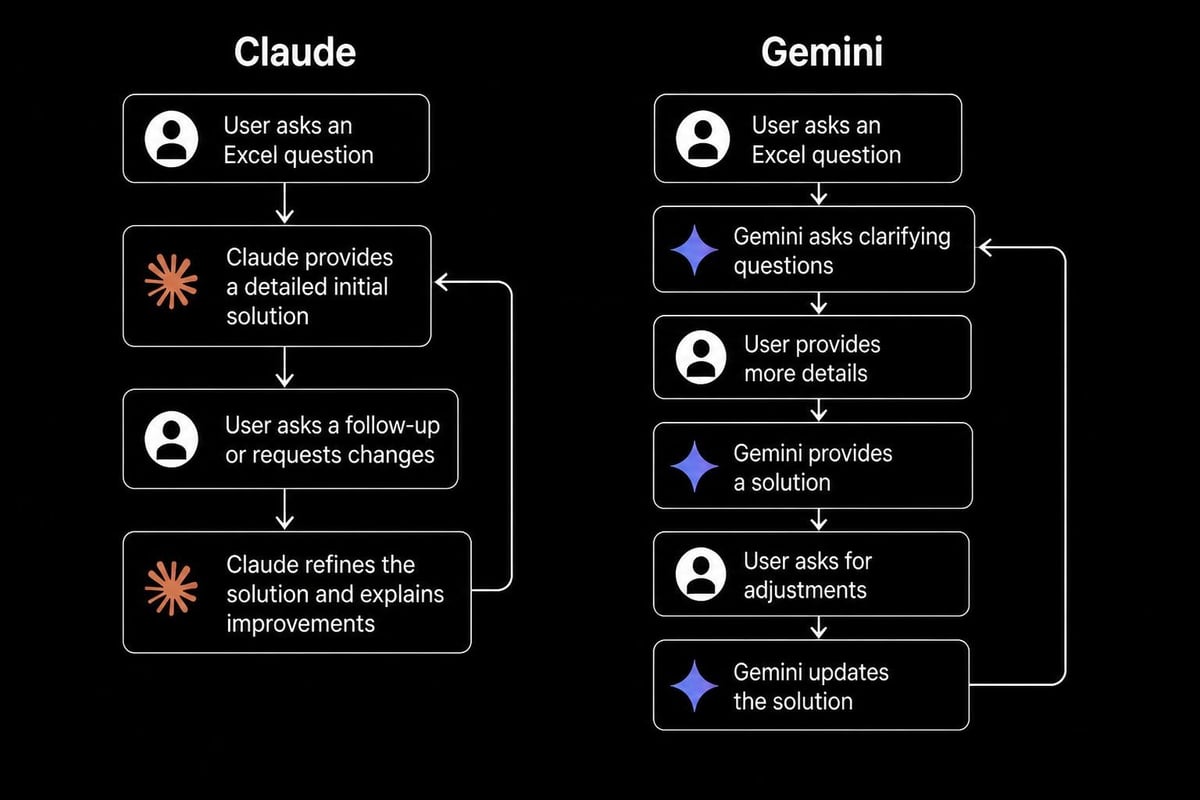
Claude produces cleaner, more maintainable VBA code with comprehensive error handling and detailed comments. When you describe an automation need, Claude typically asks clarifying questions about edge cases and failure scenarios before generating code. This thoroughness results in more robust macros that require less debugging.
Sample automation tasks where Claude excels:
- Multi-workbook data consolidation routines
- Automated report generation with custom formatting
- Data validation and cleansing macros
- Complex user form creation and event handling
- Integration with external data sources
Gemini generates functional automation code quickly and can often produce working solutions in fewer iterations. However, the code may require additional refinement for production environments. Gemini's strength lies in rapid prototyping and creating proof-of-concept automations that you can refine later with expert consulting support.

Performance with Complex Workbook Scenarios
Real-world Excel work often involves intricate workbooks with multiple interconnected sheets, external data connections, and sophisticated calculation chains. Evaluating claude vs gemini for excel in these complex environments reveals important distinctions.
Claude demonstrates superior performance when working with large financial models or budgeting workbooks. Its ability to maintain context across long conversations means you can describe a multi-sheet model structure, and Claude will remember the relationships between different components as you refine formulas across multiple sheets.
According to detailed analysis comparing these AI tools, Claude's architecture prioritizes maintaining coherent, long-form interactions, which proves essential when troubleshooting interconnected spreadsheet problems.
Gemini handles complex scenarios differently. Its strength emerges when you need to process multiple information sources simultaneously. For instance, if you're building a dashboard that combines internal Excel data with external web sources, Gemini's ability to search and integrate current information provides distinct advantages.
Integration with Other Business Tools
The claude vs gemini for excel decision often depends on your broader technology ecosystem. Claude's recent developments in spreadsheet integration suggest it will become increasingly embedded in Microsoft-centric workflows. Technical analysis of Claude’s Excel integration indicates substantial potential for seamless workflow enhancement.
Gemini's natural advantage lies in Google Workspace environments, but this doesn't exclude Excel users. Through API connections and third-party integrations, Gemini can effectively support Excel workflows, particularly when you need to combine spreadsheet work with document generation, email automation, or collaborative features.
Integration Considerations:
| Aspect | Claude | Gemini |
|---|---|---|
| Microsoft 365 Compatibility | Direct Excel plugin available | Through API connections |
| Google Workspace Integration | Limited native support | Seamless, native integration |
| Third-party Tool Connections | Growing ecosystem | Established integration network |
| Real-time Collaboration Features | Developing capabilities | Advanced collaborative features |
Code Quality and Technical Accuracy
When professionals evaluate claude vs gemini for excel for technical tasks, code quality and accuracy become paramount concerns. Both assistants have demonstrated impressive capabilities, but with different reliability profiles across various task types.
Claude consistently produces more accurate Excel formulas on first attempt, particularly for financial calculations, date manipulations, and text processing functions. This higher accuracy rate reduces the debugging cycle and helps users implement solutions faster. For teams requiring comprehensive Excel help, Claude's reliability can significantly impact productivity.
Recent performance benchmarks comparing these AI models demonstrate that Claude excels in numerical problem-solving accuracy, which translates directly to better formula generation for quantitative Excel tasks.
Gemini's technical accuracy improves notably when provided with specific examples or when refining initial suggestions through iterative conversation. The assistant learns quickly from corrections and can adapt its approach based on your feedback within a single session.
Learning Curve and User Experience
The practical question of claude vs gemini for excel extends beyond raw capabilities to ease of use and learning investment required. Claude presents a more straightforward interaction model for Excel-specific tasks. You describe your spreadsheet problem, and Claude provides structured solutions with clear implementation steps.
Benefits of Claude's approach:
- Consistent response formatting for Excel tasks
- Detailed step-by-step implementation guidance
- Proactive identification of potential issues
- Educational explanations that build Excel competency
- Strong performance without extensive prompt engineering
Gemini requires slightly more prompt refinement to achieve optimal Excel results but offers greater flexibility in how you frame questions. Users comfortable with experimentation may find Gemini's open-ended approach more creative and adaptable to unconventional spreadsheet challenges.
Pricing and Accessibility Factors
Cost considerations influence the claude vs gemini for excel decision for many professionals and organizations. Both platforms offer free tiers with usage limitations, but their pricing structures differ significantly for premium access.
Claude's pricing model includes both API access and the Claude Pro subscription for unlimited usage. The Pro subscription provides priority access during peak times and extended context windows, which proves valuable when working with large Excel datasets or complex workbook structures.
Gemini Advanced, bundled with Google One AI Premium, offers competitive pricing and includes additional Google Workspace benefits. For organizations already invested in Google's ecosystem, this bundled approach may provide better overall value even when primarily using Excel.
Pricing Comparison (2026 Rates):
| Service Tier | Claude | Gemini |
|---|---|---|
| Free Access | Limited daily usage | Limited daily usage |
| Premium Individual | $20/month (Claude Pro) | $19.99/month (Gemini Advanced) |
| API Pricing | Token-based, variable | Token-based, variable |
| Enterprise Options | Custom pricing available | Google Workspace integration |
Security and Data Privacy Considerations
When implementing AI assistance for Excel work, particularly with sensitive business data, security becomes a critical factor in the claude vs gemini for excel evaluation. Both platforms have implemented robust security measures, but their approaches and guarantees differ.
Claude operates with a strong emphasis on data privacy. Anthropic's policies explicitly state that conversation data isn't used to train models unless users specifically opt in. For professionals working with confidential financial data, client information, or proprietary business models, this privacy stance provides important reassurance.
Gemini's security framework integrates with Google's broader enterprise security infrastructure. Organizations using Google Workspace already benefit from established security protocols, making Gemini a natural extension of existing security practices. However, users should review data usage policies carefully, especially when sharing sensitive Excel content.
Future Development Trajectories
The competitive landscape around claude vs gemini for excel continues evolving rapidly. Recent announcements about Claude’s advancing capabilities indicate significant investments in coding and analytical performance, which directly benefits Excel automation and complex formula development.
Gemini's development roadmap emphasizes multimodal capabilities and deeper integration with productivity tools. As these enhancements materialize, Gemini may offer increasingly sophisticated visual data interpretation for Excel charts and dashboard components.
Both platforms show commitment to improving spreadsheet-specific features, suggesting that the capabilities gap between them will narrow while each maintains distinct strengths. Staying informed about these developments helps users make future-proof decisions about which tool to integrate into their Excel workflows.
Practical Recommendations for Different User Types
The optimal choice in the claude vs gemini for excel comparison depends heavily on specific use cases and user profiles. Financial analysts working primarily with numerical models and complex calculations may find Claude's precision and structured approach more aligned with their needs, particularly when building forecasting models or scenario analyses.
Claude is particularly suited for:
- Financial modeling and budgeting professionals
- Users requiring detailed formula explanations
- Professionals building complex automation workflows
- Teams prioritizing data privacy and security
- Individuals seeking educational Excel guidance
Gemini excels for:
- Users integrated into Google Workspace environments
- Professionals requiring visual data interpretation
- Teams emphasizing real-time collaboration
- Creative problem-solvers wanting multiple solution approaches
- Organizations already using Google's enterprise tools
Data analysts who regularly work across multiple platforms may benefit from maintaining access to both tools, leveraging each for its specific strengths. This hybrid approach maximizes flexibility while ensuring you have the best tool for each type of Excel challenge you encounter.
For professionals seeking to enhance their Excel capabilities beyond AI assistance, comprehensive Excel training services provide foundational skills that complement AI tools effectively.
Real-World Performance Scenarios
Testing claude vs gemini for excel in practical business scenarios reveals nuanced performance differences. In a recent evaluation of formula accuracy across fifty common business calculations, Claude achieved 94% first-attempt accuracy compared to Gemini's 87%. However, Gemini's suggestions often included innovative approaches that, while requiring refinement, opened new possibilities for solving problems.
For data visualization recommendations, Gemini demonstrated superior ability to suggest chart types based on data characteristics and analytical goals. When presented with sales data across multiple dimensions, Gemini recommended more sophisticated visualization combinations that better revealed underlying patterns.
Automation task performance showed Claude generating more immediately deployable VBA code, while Gemini excelled at explaining the logic behind automation approaches in accessible language. Both assistants struggled occasionally with legacy Excel functions and deprecated features, though Claude showed slightly better backward compatibility knowledge.
The honest comparison of these AI platforms suggests that personality fit matters as much as technical capability. Claude's methodical, thorough responses suit detail-oriented professionals, while Gemini's exploratory, conversational style appeals to users who prefer collaborative problem-solving.
Understanding the strengths and limitations of both Claude and Gemini empowers Excel users to select the AI assistant that best matches their workflow requirements and technical needs. Whether you need precise formula development, creative data analysis, or robust automation solutions, choosing the right AI companion enhances productivity and accuracy. When you need expert guidance beyond what AI can provide, The Analytics Doctor offers personalized Excel help, training, and consulting to solve your most challenging spreadsheet problems with clarity and precision.