Unlock new insights in your spreadsheets with just a few clicks. Conditional formatting in Excel transforms raw numbers into vivid visuals, making trends and outliers stand out instantly.
If you have ever wondered what is a conditional format in excel, you are in the right place. This beginner’s guide for 2025 demystifies the feature, so you can confidently turn data into actionable knowledge, even if you are just starting out.
In this article, you will explore the basics of conditional formatting, discover its key benefits, and see real-world examples that save time and boost decision-making. Step-by-step instructions, troubleshooting tips, and advanced techniques will help you master Excel, one visual at a time.
Ready to see your data in a whole new light? Let’s get started.
Understanding Conditional Formatting in Excel
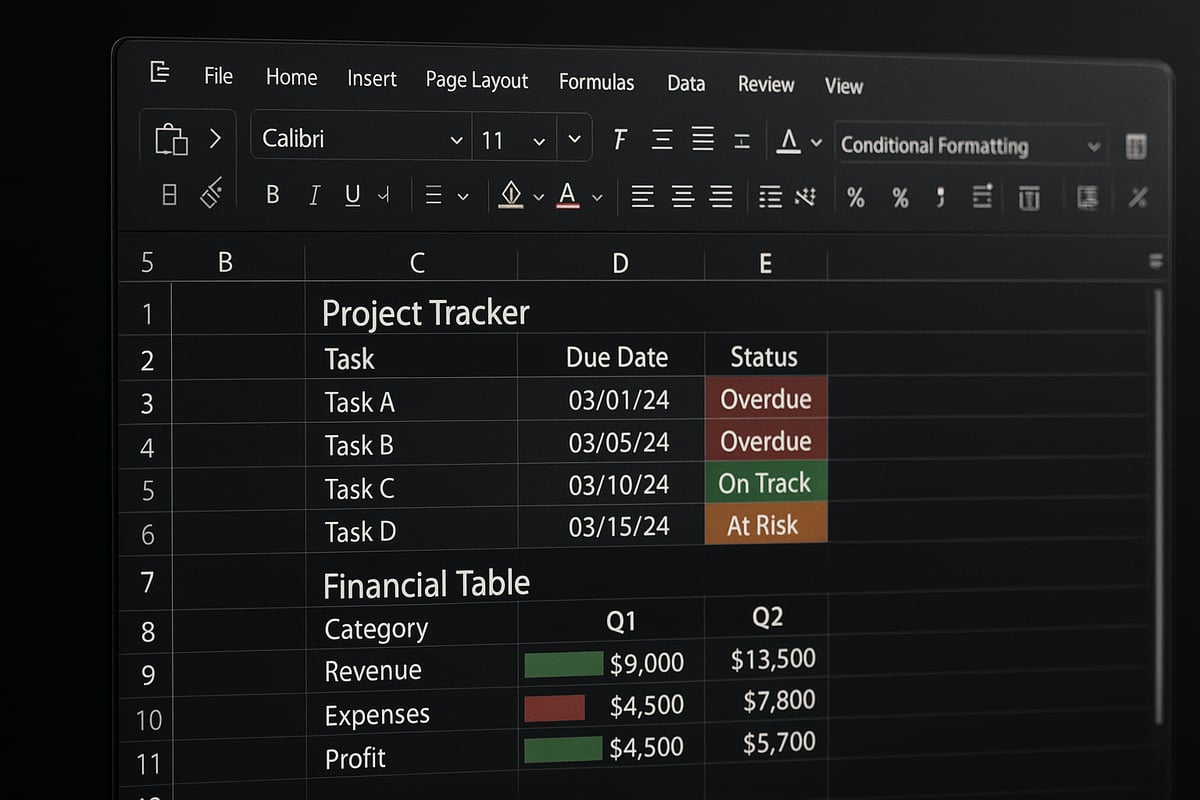
Conditional formatting is a powerful feature in Excel that lets you automatically change the appearance of cells based on specific criteria. Unlike standard formatting, which you apply manually, conditional formatting responds dynamically as your data changes. For instance, you can instantly highlight overdue tasks in a project tracker, making them stand out for quick follow-up. Excel offers a variety of built-in rules, such as highlighting cells that meet certain conditions or applying color scales to visualize value ranges. Users can also create custom rules for tailored analysis. For additional foundational details, you can refer to Microsoft’s guide on conditional formatting.
What Is Conditional Formatting?
If you have ever wondered what is a conditional format in excel, it is a tool that adds automatic visual cues to your data. Conditional formatting differs from standard formatting because it only applies when certain rules or criteria are met. For example, you could highlight all overdue tasks in red within a project management sheet. Excel provides built-in rules like "Greater Than" or "Equal To," as well as the ability to customize your own. This flexibility empowers you to tailor the look of your data based on what matters most in your workflow.
Why Use Conditional Formatting?
The main reason to learn what is a conditional format in excel is its ability to enhance how you interpret and act on your data. Conditional formatting helps you spot trends, anomalies, and important details at a glance. It saves time by automating visual cues, so you do not have to manually check each value. Common use cases include financial analysis, inventory management, and grading systems. According to a recent Microsoft user survey, over 70% of Excel users rely on conditional formatting for efficient data review, making it a staple for data-driven decision-making.
Types of Conditional Formatting Rules
Understanding what is a conditional format in excel also means knowing the different rule types available. Excel offers several categories:
- Highlight Cell Rules: Greater than, less than, equal to, and more
- Top/Bottom Rules: Top 10 items, bottom 10%, above or below average
- Data Bars: Visual bars showing value magnitude
- Color Scales: Gradients for value ranges
- Icon Sets: Symbols for quick status checks
- Custom Formulas: Tailored logic for unique needs
These options allow you to choose the best visual indicators for your specific scenario, whether you are flagging outliers or tracking progress.
How Conditional Formatting Works Behind the Scenes
To fully grasp what is a conditional format in excel, it helps to understand how the feature operates. Excel evaluates each cell based on logical tests and criteria you set. When the data updates, the formatting adjusts automatically, ensuring that visuals always reflect the latest information. Conditional formatting integrates with other Excel features like filters and sorting, so your visual cues remain consistent as you analyze and manipulate your data. This dynamic interaction is what makes conditional formatting a powerful asset in any workflow.
Limitations and Considerations
While learning what is a conditional format in excel unlocks many benefits, it is important to use the feature wisely. Applying too many rules, especially on large datasets, can slow down performance. Additionally, formatting may look different across Excel versions, including Excel 2025, so always check compatibility. Overusing conditional formatting can lead to visual clutter, making data harder to read. Best practice is to keep rules clear, purposeful, and well-documented, ensuring your visuals enhance rather than overwhelm your data.
Real-World Applications of Conditional Formatting
Conditional formatting is more than just a visual upgrade, it is a practical tool for transforming how you interpret and use data. If you have ever wondered what is a conditional format in excel, the answer lies in its ability to turn raw numbers into instantly actionable insight. Let us explore how this feature powers real results across industries and daily life.
Business and Financial Analysis
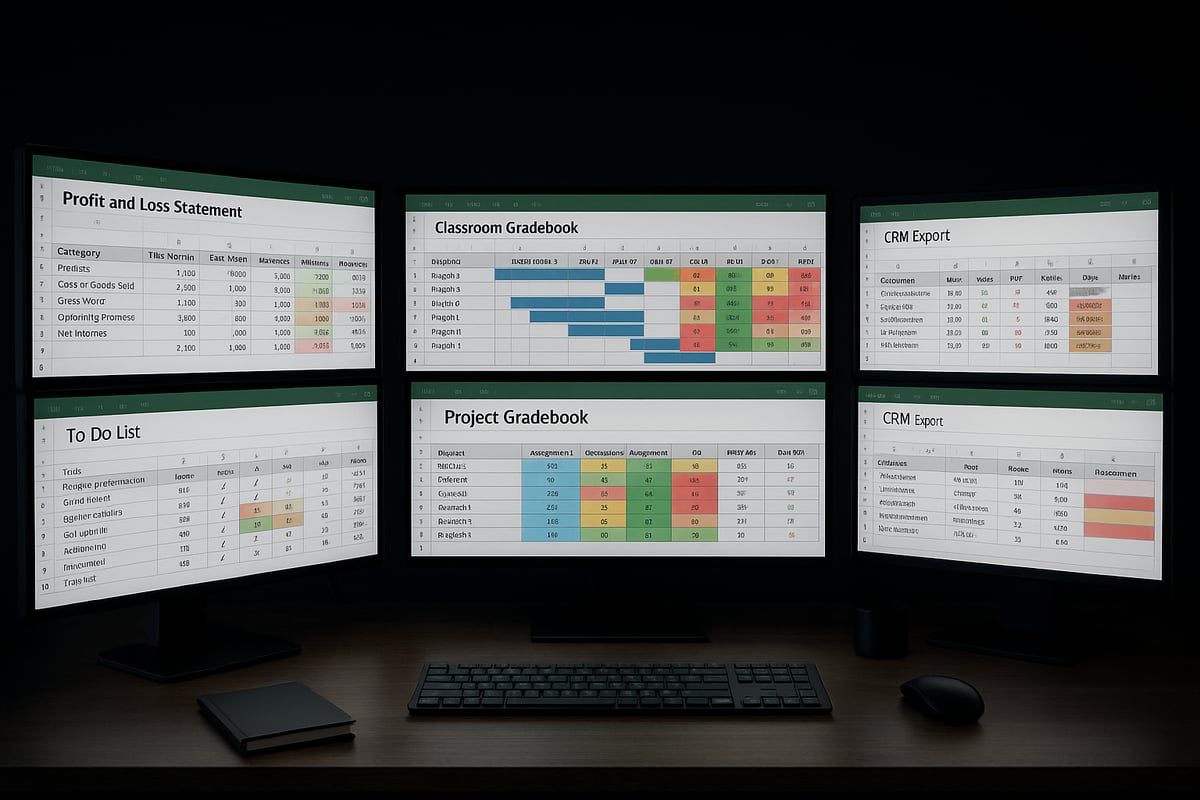
In business, knowing what is a conditional format in excel can set you apart when analyzing financial data. Conditional formatting quickly highlights profit and loss trends, helps detect budget overruns, and flags critical variances.
For example, you can set up rules to automatically color expenses that exceed your budget. This visual cue allows decision-makers to act before minor issues become major problems.
Common uses in finance include:
- Highlighting negative cash flows
- Marking overdue invoices
- Tracking top-performing sales categories
By automating these visuals, companies save time and reduce manual review errors.
Data Quality and Error Checking
Understanding what is a conditional format in excel is essential for maintaining clean, accurate datasets. Conditional formatting helps you spot duplicates, inconsistencies, and missing values within seconds.
Imagine exporting contact data from your CRM and instantly seeing all incomplete email addresses highlighted. This makes it easy to address errors before they affect your workflow.
Typical data quality checks include:
- Highlighting blank or invalid fields
- Flagging duplicate entries
- Marking outliers for review
These automated checks ensure data integrity and support better business decisions.
Project Management and Task Tracking
Project managers who grasp what is a conditional format in excel can visually track deadlines, milestones, and progress. Conditional formatting adds a layer of clarity to complex project schedules and timelines.
For instance, you can use data bars to represent task completion or color cells red for overdue activities. This helps teams prioritize and stay on target.
Popular project management applications:
- Gantt chart enhancements
- Status indicators for tasks
- Visual alerts for approaching deadlines
For a deeper dive into project tracking techniques, see the Excel for project management guide.
Educational and Grading Systems
Educators benefit from knowing what is a conditional format in excel when organizing grades, attendance, and student performance. Conditional formatting automatically color-codes grade bands, highlights students at risk, and tracks attendance patterns.
For example, a teacher can set up rules to highlight scores below a passing threshold in red. This visual feedback helps both teachers and students focus attention where it is needed most.
Common classroom uses:
- Highlighting top and bottom performers
- Marking missing assignments
- Visualizing grade distribution
These tools support data-driven teaching and timely interventions.
Personal Productivity and Everyday Use
On a personal level, understanding what is a conditional format in excel empowers you to manage tasks, habits, and goals more effectively. Conditional formatting brings organization and motivation to your daily routines.
Consider a to-do list where completed tasks turn green and overdue items turn red. Or a health tracker that changes color as you reach milestones.
Everyday uses include:
- Habit trackers with color-coded progress
- Visual reminders for bill payments
- Highlighting important calendar dates
These simple visuals make it easier to stay productive and achieve your goals.
Step-by-Step Guide: How to Apply Conditional Formatting in Excel (2025 Edition)
Unlocking the full potential of Excel starts with understanding what is a conditional format in excel. This step-by-step guide will help you turn raw data into visual insights, even if you are a beginner. Follow along to confidently apply, customize, and troubleshoot conditional formatting in Excel 2025.
Preparing Your Data for Conditional Formatting
Before diving into what is a conditional format in excel, start by preparing your data. Clean your worksheet by removing duplicates and fixing inconsistencies. Ensure all columns use the correct data type—numbers, dates, or text—since formatting relies on accurate information.
Organize your data into clear tables or ranges. Remove any existing formatting that may conflict with new rules. This step prevents unexpected results and ensures your conditional formatting works as intended.
If you are working with large datasets, consider splitting your data into manageable sections for better performance. Well-prepared data sets the stage for effective conditional formatting.
Applying Basic Conditional Formatting Rules
The easiest way to see what is a conditional format in excel is by applying built-in rules. Select the range you want to format, then open the “Conditional Formatting” menu on the Home tab.
Choose from options like Highlight Cell Rules or Top/Bottom Rules. For example, highlight sales figures above a certain target. Excel instantly applies the chosen color or style to cells meeting your criteria.
For a deeper dive into these basics, check out this Tutorial on Excel data analysis for practical examples and screenshots. Experiment with different rules to visualize your data quickly.
Using Data Bars, Color Scales, and Icon Sets
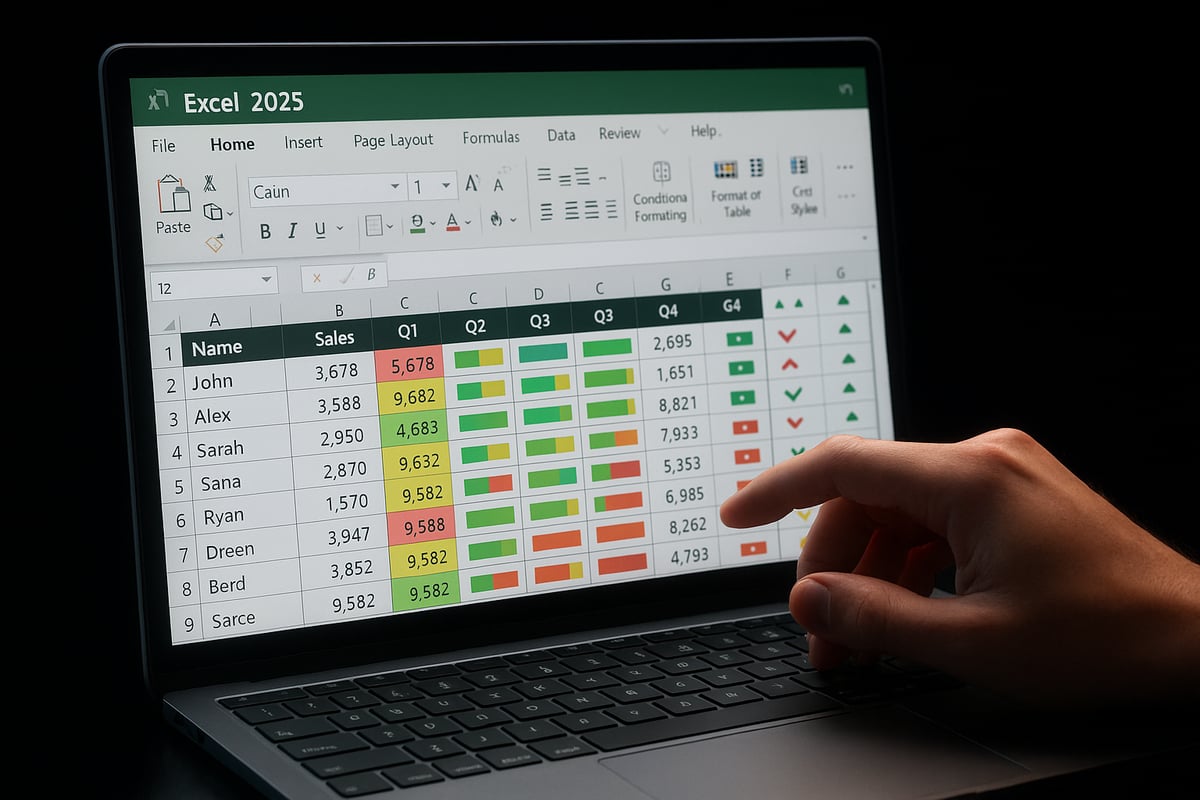
If you want to move beyond simple highlighting, explore what is a conditional format in excel using data bars, color scales, and icon sets. Data bars add horizontal bars to cells, visually representing value size. Color scales apply gradient shades to show high, medium, and low values at a glance.
Icon sets let you add symbols—like arrows or flags—for instant status checks. These tools help you compare values, spot trends, and communicate information visually without extra charts. Try them on monthly sales dashboards or performance reports for immediate impact.
Creating Custom Conditional Formatting Rules with Formulas
To unlock advanced possibilities, learn what is a conditional format in excel with formulas. Formula-based rules allow you to set complex conditions beyond built-in options. Use logical operators like =AND(), =OR(), or comparisons.
For example, to highlight weekends in a calendar, use a formula like =WEEKDAY(A2,2)>5. Select your range, click "New Rule," choose "Use a formula," and enter your custom logic.
=AND($B2="Completed", $C2<TODAY())
This highlights completed tasks that are overdue. Mastering formulas gives you precise control over your conditional formatting.
Managing and Editing Conditional Formatting Rules
Once you have applied several rules, managing them is key to understanding what is a conditional format in excel. Go to Conditional Formatting > Manage Rules to view all rules in your worksheet.
You can edit, prioritize, or delete rules as needed. If you want to copy formatting to another range, use the Format Painter tool. Keeping your rules organized prevents conflicts and maintains a clean, readable spreadsheet.
Review your rules regularly, especially after making changes to your data structure. This helps ensure accuracy and consistency across your workbook.
Best Practices for Effective Conditional Formatting
Applying what is a conditional format in excel effectively means using best practices. Avoid visual overload by limiting the number of colors and styles. Stick to a consistent color scheme for easier interpretation.
Document your rules, especially in shared workbooks, so others understand your logic. Use descriptive rule names and comments if possible. Test your formatting by changing sample data to see real-time updates.
A well-designed conditional format guides attention, clarifies trends, and supports decision-making without distracting from the data itself.
Troubleshooting Common Issues
If you encounter problems with what is a conditional format in excel, start by checking your rule logic and range selection. Rules may not apply as expected if data types are inconsistent or if multiple rules overlap.
Performance slowdowns can occur with very large datasets. Simplify rules or split data into smaller tables to improve speed. Use the "Stop If True" option to limit rule application and prevent conflicts.
If formatting disappears, check if filters or sorting are affecting your view. Regularly review and update your rules to keep your spreadsheet running smoothly.
Advanced Conditional Formatting Techniques
Unlocking advanced techniques helps you master what is a conditional format in excel and elevate your data analysis. With these methods, you can automate insights, create dynamic visuals, and ensure your spreadsheets remain both powerful and user-friendly.

Conditional Formatting with Formulas: Deep Dive
Formula-based rules are the secret sauce behind what is a conditional format in excel when you need more than built-in options. Use functions like AND, OR, and nested logic to highlight data based on multiple criteria. For example, you might want to highlight rows where sales are over $5,000 and the region is "West".
Here’s how:
- Select your data range.
- Go to Conditional Formatting > New Rule > Use a formula.
- Enter a formula such as
=AND(B2>5000, C2="West"). - Choose your formatting and apply.
This approach enables tailored data visuals and supports complex project management, financial analysis, and error checking scenarios.
Conditional Formatting Across Multiple Sheets or Workbooks
Understanding what is a conditional format in excel makes it easier to create consistency across large projects. You can apply the same rules to multiple sheets by copying formatting or using templates. For company-wide dashboards, link formatting to external data sources using references like ='DataSheet'!A1:A100.
Tips for multi-sheet formatting:
- Use consistent color schemes for clarity.
- Document rules so collaborators understand their purpose.
- Test rules in sample data before applying across all workbooks.
This technique is essential for organizations managing several teams or departments in one Excel file.
Dynamic Conditional Formatting with Tables and Named Ranges
If you want to keep your formatting responsive as data grows, mastering what is a conditional format in excel with dynamic ranges is crucial. Excel Tables automatically expand with new entries, and named ranges make rules easier to manage. For instance, apply a color scale to a table column so new sales figures are always included.
Why use Tables and named ranges?
- Formatting updates automatically with added data.
- Rules are easier to edit and reuse.
- Improved readability and collaboration.
For a detailed guide on maximizing dynamic formatting, check out Using Excel tables effectively to streamline your workflow.
Conditional Formatting with PivotTables
PivotTables are powerful for summarizing data, but what is a conditional format in excel if it cannot adapt to changing reports? Apply rules to highlight top-performing products or trends directly within PivotTable values. For example, use Data Bars to visualize sales performance by region.
Tips for PivotTable formatting:
- Apply rules only to values, not totals.
- Refresh settings to maintain formatting after updates.
- Use icon sets for instant performance snapshots.
This technique brings your dashboard to life and enables deeper insights at a glance.
Integrating Conditional Formatting with Excel Automation
Automating what is a conditional format in excel can save hours on repetitive tasks. Use macros (VBA) to create, modify, or delete rules based on business logic. For instance, a macro can highlight overdue invoices every month with a single click.
Automation strategies:
- Record a macro while applying formatting.
- Edit VBA code for more complex logic.
- Schedule macros to run on workbook open or at intervals.
Automated formatting keeps your reports current and reduces manual effort, especially in recurring tasks.
Compatibility and Sharing: Conditional Formatting in Excel Online and Mobile
Today, what is a conditional format in excel extends beyond the desktop. While most conditional formatting features carry over to Excel Online and mobile apps, some advanced options (like certain formula rules) may be limited. Always test your formatting on all platforms before sharing.
Best practices for compatibility:
- Use standard formatting options for broadest support.
- Avoid overly complex rules if collaborating cross-platform.
- Document and review rules for team access.
With these techniques, your conditional formatting will remain consistent and effective, no matter where or how your data is accessed.
Expert Tips and Resources for Mastering Conditional Formatting
Unlocking the full potential of what is a conditional format in excel requires more than just the basics. By leveraging expert tips, shortcuts, and professional resources, you can elevate your data visualization, streamline workflows, and ensure accuracy in every project.
Time-Saving Shortcuts and Hidden Features
Efficiency is crucial when working with large datasets. Mastering what is a conditional format in excel means knowing the right shortcuts and features to speed up your workflow.
- Use
Alt + H + Lto quickly open the Conditional Formatting menu. - The "Format Painter" tool allows you to copy conditional formatting rules across ranges instantly.
- Press
Ctrl + Shift + Lto toggle filters, making it easier to see how your rules behave with different data views.
For rapid application, select your formatted cell, click "Format Painter," then brush over your target cells. This ensures consistency and saves significant time, especially across multiple sheets.
Customizing Color Palettes and Styles
Visual clarity is essential in what is a conditional format in excel. Customizing your color schemes not only enhances readability but also aligns your spreadsheets with accessibility standards or company branding.
- Choose high-contrast colors for better accessibility.
- Save custom color palettes under "More Colors" in the formatting dialog.
- For corporate use, match your palette to official brand guidelines.
Consider documenting your palette choices in a legend or a dedicated worksheet. This approach makes your spreadsheets easy to interpret for collaborators and stakeholders.
Combining Conditional Formatting with Other Excel Tools
To unlock even more insight, combine what is a conditional format in excel with filters, charts, and dashboards. Conditional formatting works seamlessly with interactive elements, turning static data into dynamic visuals.
- Use filters to display only rows that meet specific conditions.
- Apply conditional formatting to chart data ranges for live visual cues.
- Build interactive dashboards by linking rules to slicers or pivot tables.
For a step-by-step walkthrough on integrating conditional formatting into dashboards, check out the Excel dashboard creation guide. This resource provides practical examples and templates to elevate your reporting.
Common Mistakes to Avoid
Even experienced users can stumble when applying what is a conditional format in excel. Avoid these frequent pitfalls to keep your work clean and effective:
- Overlapping rules that result in conflicting visuals.
- Using too many colors, which can cause confusion.
- Failing to document complex or custom rules.
Performance may suffer if you apply too many rules to large datasets. For troubleshooting and optimization tips, refer to the Excel troubleshooting tips resource, which covers common errors and their solutions.
Learning from the Pros: Community Templates and Case Studies
Harnessing the collective knowledge of the Excel community can accelerate your mastery of what is a conditional format in excel. Many professionals share templates and case studies that demonstrate real-world impact.
- Download templates from Microsoft or reputable Excel forums.
- Study case studies of nonprofit grant tracking, sales dashboards, or academic gradebooks.
- Adapt proven solutions to fit your unique needs.
These resources offer practical insights and can inspire new ways to visualize and interpret your data.
Excel Help and Personalized Training with The Analytics Doctor
For those looking to go beyond general tips and fully understand what is a conditional format in excel, personalized support is invaluable. The Analytics Doctor specializes in helping users tackle Excel conditional formatting challenges, from troubleshooting to optimization.

Whether you are an individual or part of a team, you can access tailored Excel training, step-by-step guides, and business workflow consultations. The Analytics Doctor also provides downloadable templates and direct support, ensuring you maximize the value of your data.