Messy data has plagued Excel users for decades, consuming countless hours of manual effort. Whether you're dealing with inconsistent date formats, duplicate entries, misspelled product names, or blank cells scattered throughout your workbook, data cleaning remains one of the most time-consuming aspects of spreadsheet management. In 2026, artificial intelligence is revolutionizing this process, offering automated solutions that dramatically reduce the time and expertise required to transform chaotic datasets into clean, reliable information. Excel data cleaning with AI combines machine learning capabilities with traditional spreadsheet functions to detect errors, standardize formats, and correct inconsistencies without requiring advanced technical skills or complex formulas.
Understanding the Data Cleaning Challenge in Excel
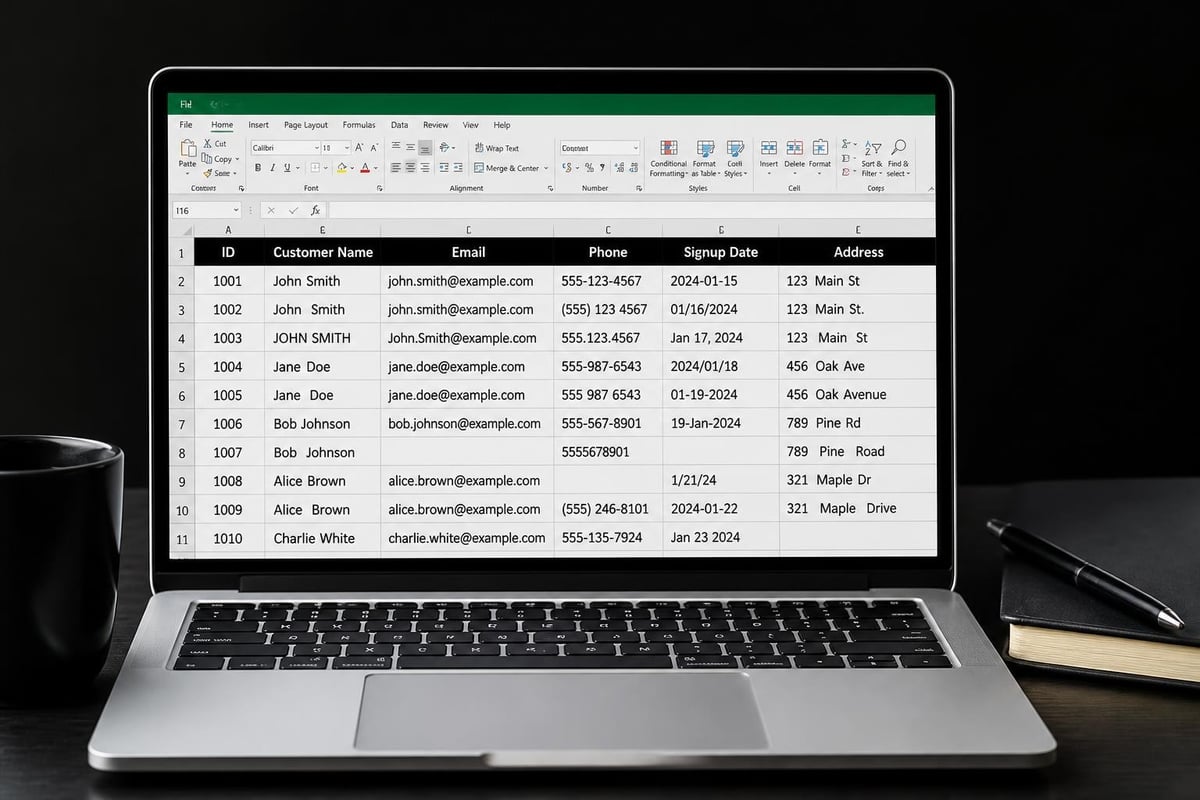
Data rarely arrives in perfect condition. Sales reports contain inconsistent customer names, financial records include formatting errors, and imported databases often feature mixed date formats that create formula failures.
Traditional manual cleaning requires painstaking attention to detail. You might spend hours using Find & Replace, sorting columns to identify duplicates, or writing complex formulas to standardize text formats. Each dataset presents unique challenges that demand different solutions.
Common data quality issues include:
- Inconsistent text capitalization across entries
- Duplicate records with slight variations
- Blank cells interrupting calculations
- Mixed date formats causing sorting errors
- Extra spaces before or after text entries
- Misspelled category names or product codes
The cost of dirty data extends beyond time. Inaccurate reports lead to poor business decisions, while formula errors can cascade through interconnected workbooks. Recent advances in AI-powered data cleaning tools demonstrate how natural language commands can replace hours of manual work with seconds of automated processing.
How AI Transforms Excel Data Cleaning
Artificial intelligence approaches data cleaning differently than traditional methods. Instead of following rigid rules, AI systems recognize patterns, understand context, and make intelligent decisions about how to standardize information.
Pattern Recognition and Error Detection
Machine learning algorithms excel at identifying inconsistencies that might escape human notice. An AI system can quickly scan thousands of rows to detect that "New York," "NY," "new york," and "N.Y." all represent the same location, then standardize them automatically.
This capability extends to numerical data as well. AI can identify outliers that suggest data entry errors, flag impossible values like negative ages or future dates in historical records, and detect when currency symbols or decimal separators are inconsistent.
Natural Language Processing for Text Cleanup
One breakthrough in excel data cleaning with AI involves natural language commands. Rather than constructing complex formulas or manually configuring cleanup operations, you can simply describe what you need in plain English.
For example, you might type "standardize all company names to title case and remove extra spaces" or "fill blank cells in the region column with the value from the row above." The AI interprets your intent and executes the appropriate transformation.
Excel’s new Agent Mode represents Microsoft's implementation of this approach, supporting multi-step workflows through conversational interaction. This feature proves particularly valuable when fixing broken formulas that result from data quality issues.
Semantic Understanding and Context Awareness
Advanced AI systems don't just match patterns-they understand meaning. Research on systems like Cocoon demonstrates how large language models combine semantic understanding with statistical error detection to automate complex cleaning processes.
This semantic awareness allows AI to make intelligent decisions. When encountering "03/05/2026," the system might analyze surrounding data to determine whether this represents March 5th or May 3rd based on the pattern of other dates in the column.
| Traditional Method | AI-Powered Method | Time Savings |
|---|---|---|
| Manual Find & Replace for duplicates | Pattern recognition across entire dataset | 75-90% |
| Formula-based text standardization | Natural language commands | 60-80% |
| Visual inspection for outliers | Automated anomaly detection | 85-95% |
| Cell-by-cell validation | Bulk semantic correction | 70-85% |
Practical Applications for Business Users
Excel data cleaning with AI delivers concrete benefits across various business scenarios. Understanding where these tools excel helps you identify the best opportunities for implementation.
Customer Database Maintenance
Customer relationship management generates massive amounts of data requiring constant cleanup. Contact information arrives from multiple sources-website forms, trade shows, purchase records-each with different formatting standards.
AI cleaning automates:
- Standardizing company name variations
- Correcting phone number formats
- Validating and formatting email addresses
- Merging duplicate customer records
- Filling missing information from related records
A sales manager might upload a new lead list and use AI to instantly match entries against existing customers, preventing duplicates while identifying potential data enrichment opportunities. Tools like The Analytics Doctor’s automation solutions help streamline these recurring maintenance tasks.
Financial Record Reconciliation
Accounting departments regularly import transactions from multiple systems, each producing slightly different output formats. Bank statements might show dates as MM/DD/YYYY while accounting software exports DD-MMM-YY.
AI excels at recognizing these variations and applying consistent formatting. It can detect when transaction descriptions contain the same vendor name spelled differently, flag unusual amounts that might indicate errors, and standardize category assignments across disparate systems.
Inventory and Product Data
Product catalogs frequently contain inconsistent category names, SKU formatting variations, and incomplete specifications. When you're managing thousands of items, manual standardization becomes impractical.
Excel data cleaning with AI can normalize product categories, ensure SKU formats follow company standards, and even identify when similar products have different descriptions that should be standardized. This cleanup directly improves inventory tracking accuracy and reporting reliability.

Implementing AI-Powered Cleaning Solutions
Getting started with excel data cleaning with AI doesn't require becoming a data scientist. Several approaches suit different skill levels and requirements.
Built-in Excel AI Features
Microsoft continues expanding Excel's native AI capabilities. The recent introduction of automated data cleaning buttons represents the company's commitment to making these tools accessible to everyday users.
Excel’s ‘Clean Data’ feature utilizes AI to automate common tasks including text and number corrections, space removal, and date error fixes. This functionality works directly within your familiar Excel interface without requiring external tools or services.
For formula assistance, Microsoft Copilot provides AI-powered support that extends beyond cleaning to include analysis and automation. Users can describe desired outcomes in natural language, and Copilot generates the appropriate formulas or transformations.
Integration with External AI Tools
While native Excel features continue improving, external AI platforms often provide more sophisticated capabilities. ChatGPT, Claude, and other language models can assist with complex data cleaning challenges.
Using ChatGPT for Excel data cleaning demonstrates how you can describe your messy data and receive step-by-step cleaning instructions, or even generate formulas that perform the necessary transformations. This approach works well when dealing with unique data quality challenges that fall outside standard cleanup scenarios.
Comparing different AI platforms helps identify the best fit for your needs. Understanding the differences between Copilot and Claude or exploring Gemini’s spreadsheet capabilities provides insight into which tools excel at specific cleaning tasks.
Developing Custom AI Solutions
Organizations with recurring data quality challenges might benefit from custom AI implementations. Research on specialized platforms demonstrates impressive results in specific domains.
The Octozi platform for clinical data cleaning combines large language models with domain-specific heuristics, achieving significant improvements over traditional methods. While designed for healthcare, this approach illustrates how domain knowledge paired with AI acceleration delivers superior results.
Best Practices for AI-Assisted Data Cleaning
Maximizing the effectiveness of excel data cleaning with AI requires strategic implementation and ongoing oversight. These guidelines help ensure reliable results while avoiding common pitfalls.
Validate AI-Generated Changes
AI systems make impressive predictions, but they're not infallible. Always review suggested changes before applying them to production data, especially when cleaning sensitive financial or customer information.
Create a validation workflow:
- Test AI cleaning on a sample dataset first
- Compare before and after versions
- Verify that edge cases are handled correctly
- Check that formulas still function with cleaned data
- Confirm that related workbooks aren't broken
This systematic approach catches problems before they affect downstream processes or reports.
Maintain Data Quality Standards
AI cleaning works best when you establish clear standards for how data should appear. Document your organization's preferred formats for dates, phone numbers, addresses, and categorical data.
| Data Type | Standard Format | Example |
|---|---|---|
| Dates | YYYY-MM-DD | 2026-07-09 |
| Phone Numbers | (XXX) XXX-XXXX | (555) 123-4567 |
| Currency | $X,XXX.XX | $1,234.56 |
| State Abbreviations | Two-letter uppercase | CA, NY, TX |
When you can articulate these standards clearly, you can provide more precise instructions to AI cleaning tools, resulting in more consistent output.
Balance Automation with Human Judgment
Excel data cleaning with AI should augment human decision-making, not replace it entirely. Some data quality issues require contextual knowledge that AI cannot possess.
For instance, an AI might standardize all company names to title case, but your organization might have specific requirements for how certain brands or acronyms should appear. Similarly, what appears to be a duplicate record might actually represent two separate entities with legitimate similarities.
Leverage AI for Excel automation for repetitive, rules-based cleaning while reserving human review for ambiguous cases requiring judgment.
Progressive Cleaning Strategies
Research on ActiveClean methodology demonstrates the value of progressive cleaning approaches that update models incrementally and prioritize records most likely to affect results. This concept applies to practical business scenarios as well.
Rather than attempting to clean an entire massive dataset at once, start with the columns and rows most critical to your immediate needs. Clean customer names before worrying about optional demographic fields. Standardize product SKUs before tackling long-form descriptions.
This incremental approach delivers value faster while reducing the risk of introducing new errors through overly aggressive bulk transformations.

Advanced AI Techniques for Complex Datasets
As your comfort with excel data cleaning with AI grows, you can tackle increasingly sophisticated challenges that previously seemed insurmountable.
Handling Multi-Column Dependencies
Real-world datasets often contain interdependent columns where cleaning one field affects others. Address fields provide a classic example-city, state, and ZIP code should align correctly.
AI systems can recognize these relationships and make coordinated corrections. If a record shows "Los Angeles" in the city field but "94102" as the ZIP code, the AI identifies the mismatch (that ZIP is in San Francisco) and flags it for review or suggests corrections based on which field is more likely correct.
Detecting and Correcting Systematic Errors
Import processes sometimes introduce systematic errors that affect entire columns or datasets. Perhaps all dates shifted forward by one day during a time zone conversion, or a currency conversion applied the wrong exchange rate.
Advanced AI analysis can detect these patterns by examining the relationships between expected and actual values. Once identified, systematic corrections can be applied across the affected records simultaneously.
Enrichment Through External Data Sources
Excel data cleaning with AI extends beyond fixing what's broken to enriching what's incomplete. AI can suggest adding missing information by cross-referencing external databases or public records.
For example, given a company name, AI might retrieve the full address, industry classification, and employee count from public business registries. This enrichment transforms sparse datasets into comprehensive information resources.
Measuring the Impact of AI-Powered Cleaning
Quantifying the benefits of excel data cleaning with AI helps justify the investment in new tools and processes. Several metrics provide meaningful insight into improvement.
Key performance indicators include:
- Time saved per cleaning session: Track hours spent on manual cleanup before and after implementing AI tools
- Error rate reduction: Measure the percentage of errors detected in reports after AI cleaning versus traditional methods
- Data completeness improvement: Calculate the percentage of blank cells or missing values before and after cleanup
- User satisfaction scores: Survey team members on their confidence in data quality and ease of cleaning processes
Organizations implementing AI-assisted cleaning typically report 60-90% reductions in time spent on data preparation tasks. This efficiency gain frees analysts and business users to focus on interpretation and decision-making rather than data wrangling.
Cost-Benefit Analysis
When evaluating excel data cleaning with AI solutions, consider both direct and indirect costs. Direct costs include software licenses or API fees for AI services. Indirect costs encompass training time and any temporary productivity dips during implementation.
Benefits extend beyond time savings. Cleaner data produces more accurate reports, reducing costly errors in inventory management, financial forecasting, and customer communications. The importance of data pre-processing for accurate machine learning models applies equally to business intelligence and operational reporting.
Common Challenges and Solutions
Even with powerful AI tools, excel data cleaning with AI presents obstacles that require thoughtful solutions.
Managing Unexpected AI Interpretations
AI sometimes interprets ambiguous data in unexpected ways. A column containing both text and numbers might be processed inconsistently, or culturally specific formatting conventions might confuse algorithms trained on different data.
Solutions include:
- Providing explicit context in your cleaning instructions
- Testing on diverse sample data before full implementation
- Creating clear data dictionaries that define expected formats
- Using validation rules to catch unexpected transformations
Handling Large Dataset Performance
AI processing of massive datasets can strain computational resources or hit API rate limits. A workbook with hundreds of thousands of rows might require special handling.
Consider chunking large datasets into manageable segments, processing them sequentially, or using specialized automation techniques that optimize performance for bulk operations.
Maintaining Audit Trails
Regulatory compliance or internal policies often require documentation of data transformations. When AI makes automated changes, tracking what was modified and why becomes essential.
Implement logging procedures that record AI cleaning operations, preserve original data in separate sheets or backups, and document the business rules that guided AI transformations. This documentation proves invaluable when explaining data provenance to auditors or investigating unexpected report values.
Future Developments in AI Data Cleaning
The field of excel data cleaning with AI continues evolving rapidly. Several emerging trends promise to further transform how we manage spreadsheet data quality.
Advances in multimodal AI will enable systems to understand data context from multiple sources simultaneously-analyzing not just cell values but also column headers, sheet names, and even comments or documentation embedded in workbooks.
Collaborative AI systems will learn from user feedback, becoming more accurate at understanding organization-specific conventions and preferences over time. Each correction you make teaches the system to handle similar situations more appropriately in future cleaning operations.
Integration between Excel and cloud-based AI services will deepen, enabling real-time data quality monitoring that alerts users to potential issues as they enter data rather than requiring dedicated cleanup sessions. This shift toward prevention rather than correction represents a fundamental improvement in data quality management.
Excel data cleaning with AI transforms hours of tedious manual work into minutes of automated processing, while improving accuracy and consistency across your datasets. Whether you're standardizing customer records, reconciling financial data, or preparing reports for analysis, these intelligent tools deliver measurable time savings and quality improvements. If you're struggling with messy spreadsheets, broken formulas, or time-consuming data preparation tasks, The Analytics Doctor provides personalized training and expert support to help you implement AI-powered solutions that make your data work for you.