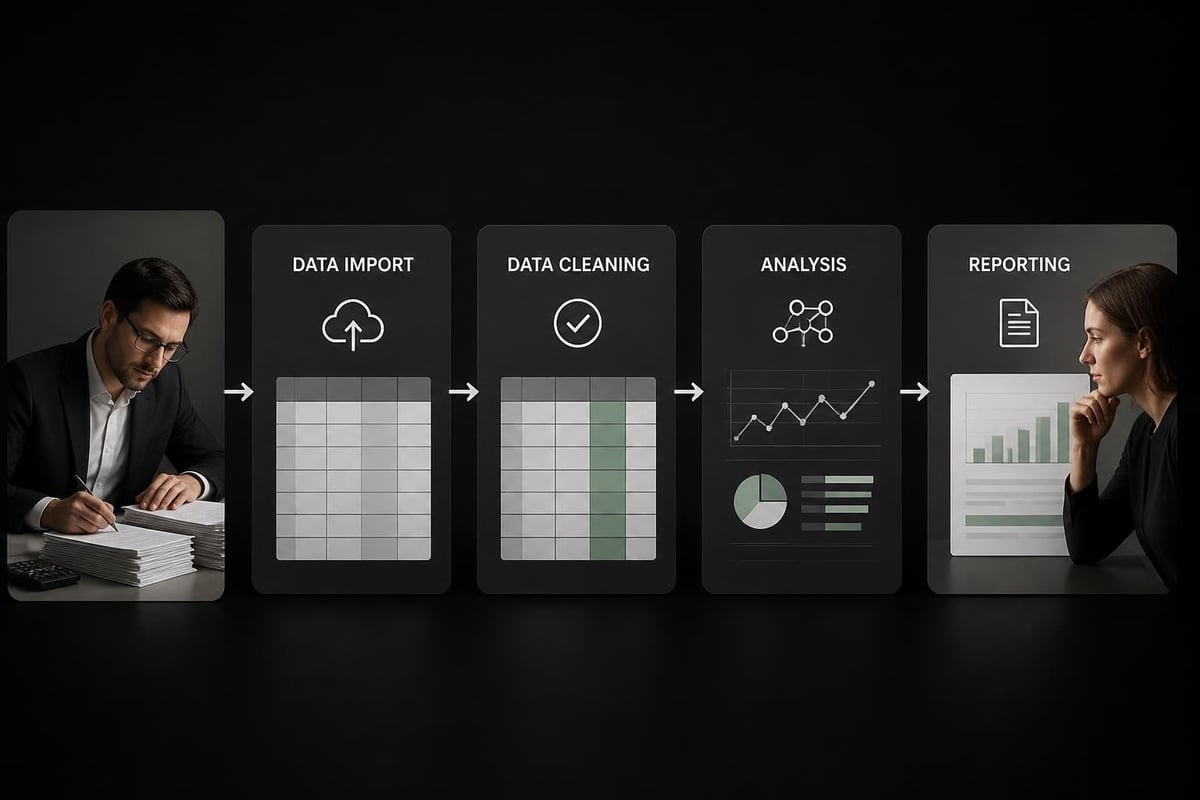
Spreadsheets have been the backbone of business analytics for decades, but the sheer volume of data and complexity of modern business challenges often overwhelm traditional manual analysis methods. AI assisted spreadsheet analysis is revolutionizing how professionals interact with their data, offering intelligent automation, error detection, and insights that would take hours to uncover manually. This transformation isn't about replacing spreadsheet users but rather empowering them with tools that handle repetitive tasks, catch mistakes, and suggest optimizations that improve accuracy and efficiency across every aspect of data work.
Understanding AI Assisted Spreadsheet Analysis
AI assisted spreadsheet analysis leverages artificial intelligence and machine learning algorithms to help users work smarter with their data. Rather than manually reviewing thousands of cells, creating complex formulas from scratch, or spending hours troubleshooting errors, professionals can now tap into intelligent systems that understand spreadsheet structure, recognize patterns, and provide actionable recommendations.
The technology works by analyzing your spreadsheet's content, structure, and relationships between data points. When you encounter a broken formula or need to clean messy data, AI tools can diagnose issues, explain what went wrong, and even fix broken formulas automatically. This capability represents a fundamental shift from reactive troubleshooting to proactive optimization.
Core Capabilities of AI-Powered Analysis
Modern AI assistants bring several powerful capabilities to spreadsheet work:
- Formula generation and correction based on natural language descriptions
- Automated data cleaning that identifies inconsistencies, duplicates, and formatting issues
- Pattern recognition that uncovers trends humans might miss
- Predictive analytics for forecasting and scenario planning
- Natural language querying to extract insights without complex formulas
These capabilities transform how users approach common spreadsheet challenges. Instead of remembering exact syntax for nested IF statements or VLOOKUP functions, you can describe what you need in plain English and receive working formulas instantly.

Practical Applications for Business Users
AI assisted spreadsheet analysis delivers tangible benefits across diverse business functions. Financial analysts use AI to validate complex models, ensuring that interconnected calculations maintain accuracy as assumptions change. Marketing teams leverage pattern recognition to segment customers based on behavioral data that traditional filters might miss.
Financial Analysis and Reporting
Financial professionals face unique challenges with spreadsheet accuracy and auditability. A single misplaced formula can cascade through quarterly reports, creating significant compliance risks. AI tools help by continuously monitoring formula integrity and flagging potential errors before they propagate.
However, it's crucial to recognize that AI does not solve poor finance infrastructure. Organizations must first establish solid data foundations and proper spreadsheet governance. AI amplifies what exists, so broken processes will only deteriorate faster with automation layered on top.
Key financial use cases include:
- Variance analysis that automatically highlights unexpected changes
- Consolidation of multiple workbooks with consistency checking
- Audit trail generation for regulatory compliance
- Scenario modeling with intelligent parameter suggestions
- Automated reconciliation between systems
Data Quality and Cleaning Operations
Messy data undermines even the most sophisticated analysis. AI excels at identifying data quality issues that manual review might overlook. When you search for duplicate entries, AI can go beyond exact matches to find fuzzy duplicates where names or values are slightly different but represent the same entity.
The technology recognizes patterns in how data should be structured and flags deviations. For example, if most entries in a date column follow MM/DD/YYYY format but a few use DD/MM/YYYY, AI will catch this inconsistency and suggest standardization approaches.
| Data Quality Issue | Traditional Approach | AI-Assisted Approach |
|---|---|---|
| Duplicate detection | Manual review or basic formulas | Fuzzy matching with confidence scores |
| Missing values | Visual inspection | Pattern-based imputation suggestions |
| Outlier identification | Statistical calculations | Context-aware anomaly detection |
| Format inconsistencies | Find and replace | Automated standardization with preview |
| Data type mismatches | Trial and error | Intelligent type inference and conversion |
Implementing AI Tools in Your Workflow
Integrating ai assisted spreadsheet analysis into existing processes requires thoughtful planning. The goal is enhancing human expertise, not creating dependency on black-box solutions that users don't understand.
Selecting the Right AI Tools
The market offers various AI-powered spreadsheet solutions, from built-in features in Excel and Google Sheets to specialized third-party applications. Google's Gemini assistant now handles formula troubleshooting within Sheets, while Claude has integrated with Excel to provide similar capabilities in Microsoft's ecosystem.
When evaluating tools, consider:
- Transparency: Can you audit how AI arrives at conclusions?
- Control: Do you maintain oversight of automated actions?
- Learning curve: How quickly can your team become productive?
- Integration: Does it work with your existing spreadsheet infrastructure?
- Cost-benefit ratio: Will efficiency gains justify subscription costs?
Research shows that effective AI spreadsheet agents need auditable and controllable actions rather than fully autonomous operation. Users should understand what the AI is doing and maintain the ability to override or modify suggestions.
Building AI-Augmented Analysis Skills
Simply having access to AI tools doesn't automatically improve spreadsheet work. Users need to develop new competencies around prompt engineering, result validation, and strategic thinking about which tasks benefit most from automation.
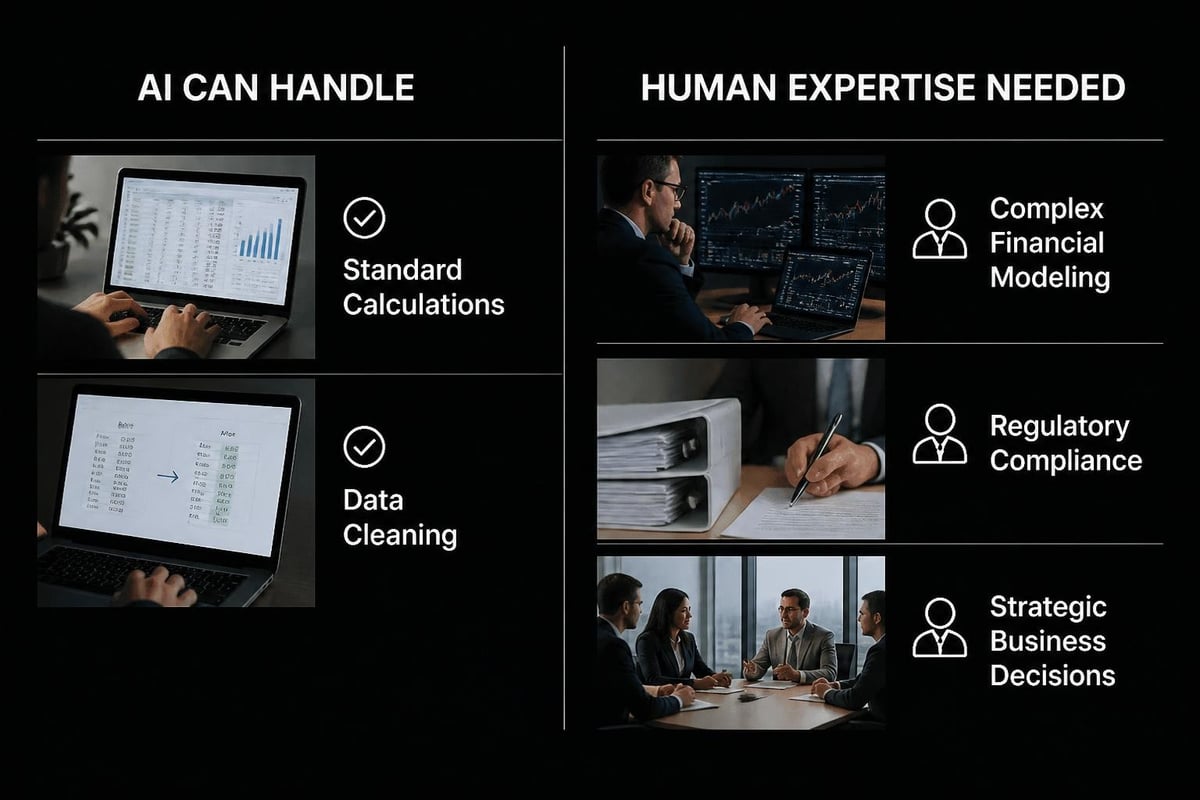
Start by identifying repetitive tasks that consume significant time but don't require nuanced judgment. Data formatting, basic cleaning operations, and standard report generation are excellent candidates for AI assistance. Complex financial modeling or strategic analysis should remain human-led with AI providing support rather than direction.
Progressive skill development path:
- Use AI for formula syntax and function discovery
- Apply AI to data quality checks and cleaning
- Leverage AI for pattern identification in exploratory analysis
- Incorporate AI suggestions into predictive modeling
- Develop custom AI-assisted workflows for recurring tasks
Advanced Techniques and Best Practices
As you become comfortable with basic ai assisted spreadsheet analysis, advanced techniques unlock even greater productivity gains. These approaches require understanding both your data domain and AI capabilities to design effective human-machine collaboration.
Natural Language Formula Creation
One of the most powerful applications involves describing desired calculations in plain English and having AI generate the corresponding formulas. Rather than remembering whether you need SUMIFS or SUMPRODUCT for a particular aggregation, you explain the business logic.
For example, instead of constructing: =SUMIFS(Sales[Amount],Sales[Region],"West",Sales[Date],">="&DATE(2026,1,1)), you could prompt: "Sum all sales amounts from the West region in 2026." The AI generates the formula while also explaining its structure, helping you learn for future reference.
This capability particularly benefits users who understand business requirements but struggle with Excel syntax. Just as understanding correlation coefficients is important for statistical analysis, knowing how to express business logic clearly enables effective AI collaboration.
Automated Error Detection and Prevention
AI excels at spotting formula errors that cause incorrect results. Common issues include circular references, #REF! errors from deleted cells, and logic mistakes in nested functions. Traditional troubleshooting requires methodically checking each formula component, but AI can instantly analyze the entire calculation chain and pinpoint problems.
Beyond reactive error fixing, AI can prevent issues through proactive monitoring. As you modify spreadsheets, intelligent assistants watch for actions that might break existing formulas or create data inconsistencies. This real-time feedback helps maintain spreadsheet integrity even as requirements evolve.
Scenario Analysis and What-If Modeling
Business decisions often require evaluating multiple scenarios with different assumptions. AI assisted spreadsheet analysis streamlines this process by automatically generating scenario variations, identifying which variables have the greatest impact, and visualizing potential outcomes.
The technology can suggest relevant scenarios you might not have considered based on patterns in your data. For instance, when analyzing sales forecasts, AI might recommend testing scenarios around seasonality factors, market segment shifts, or pricing elasticity that historical data suggests could significantly affect results.
| Scenario Type | Manual Effort | AI-Assisted Benefit |
|---|---|---|
| Parameter sweeps | Create multiple copies | Automated variation generation |
| Sensitivity analysis | Manual data tables | Intelligent variable prioritization |
| Monte Carlo simulation | Complex formula setup | Guided probability distribution selection |
| Comparative reporting | Copy-paste and formatting | Standardized output with commentary |
Addressing Common Concerns and Limitations
While ai assisted spreadsheet analysis offers substantial benefits, users should maintain realistic expectations about capabilities and limitations. AI is a powerful tool, but it cannot compensate for fundamental spreadsheet design flaws or poor data governance practices.
Data Privacy and Security Considerations
Uploading sensitive business data to cloud-based AI services raises legitimate privacy concerns. Financial information, customer data, and proprietary business intelligence require careful protection. Before implementing AI tools, evaluate how data is transmitted, where it's stored, and whether the provider's security measures meet your organization's standards.
Many organizations address these concerns by establishing clear policies around which spreadsheets can be analyzed with external AI services. Highly sensitive financial models might remain in protected environments while routine operational reports leverage cloud-based assistance.
When working with confidential information, consider whether password protection and other security measures are sufficient for your compliance requirements.
Understanding AI Limitations
AI assistants sometimes generate plausible-sounding but incorrect formulas, especially for complex domain-specific calculations. This phenomenon, known as "hallucination," means users must validate AI suggestions rather than accepting them blindly. Research on AI agents for finance workflows demonstrates that even advanced systems struggle with nuanced accounting rules and industry-specific requirements.
Critical validation points:
- Verify formulas work correctly with edge cases and boundary conditions
- Test outputs against known results before trusting for production use
- Understand the business logic behind AI suggestions, not just the syntax
- Maintain human oversight for decisions with significant consequences
- Document assumptions when AI assists with model design
The technology works best when users bring domain expertise and critical thinking to evaluate recommendations. AI handles the mechanical aspects of formula construction and pattern recognition while humans provide business context and judgment.
Emerging Trends and Future Developments
The field of ai assisted spreadsheet analysis continues evolving rapidly. Recent academic research and commercial developments point toward increasingly sophisticated capabilities that will further transform how professionals work with data.
Intelligent Documentation and Knowledge Transfer
One persistent challenge with spreadsheets is lack of documentation. Complex workbooks created by one person often become incomprehensible to others, creating organizational risk when key employees leave. New AI capabilities can generate human-readable explanations from spreadsheet operations, automatically documenting what calculations do and why they exist.
This automated documentation helps with:
- Onboarding new team members who need to understand existing models
- Audit preparation when regulators request calculation methodology
- Knowledge retention as institutional expertise gets captured
- Quality assurance through peer review of complex workbooks
- Template creation by extracting reusable patterns from custom solutions
Conversational Analysis Interfaces
Rather than constructing formulas or writing VBA code, future spreadsheet interaction may resemble conversations. Users describe analytical goals in natural language, and AI agents execute the necessary operations while explaining their approach. Early examples of this capability are already appearing in enhanced AI assistants that generate complete reports from high-level prompts.
This conversational approach particularly benefits users who understand their data and business questions but lack technical spreadsheet expertise. The AI becomes a collaborative analyst rather than just a formula generator.
Integration with Broader Business Systems
Spreadsheets rarely exist in isolation. They connect to databases, accounting systems, CRM platforms, and other enterprise applications. AI is beginning to bridge these connections more intelligently, understanding when spreadsheet data should sync with external systems and identifying discrepancies that suggest integration problems.
For organizations still using Excel when they should have a database, AI can help identify signs that spreadsheet-based processes have outgrown their infrastructure and need more robust solutions.
Practical Implementation Roadmap
Successfully adopting ai assisted spreadsheet analysis requires a structured approach that balances enthusiasm for new capabilities with practical consideration of organizational readiness and user needs.
Phase One: Assessment and Planning
Week 1-2: Inventory current spreadsheet usage
- Identify high-value spreadsheets that consume significant time
- Document pain points, recurring errors, and bottlenecks
- Survey users about their biggest spreadsheet challenges
- Evaluate data sensitivity and security requirements
Week 3-4: Tool evaluation and selection
- Test AI assistants with representative sample workbooks
- Compare capabilities, costs, and integration requirements
- Assess learning curve and support resources
- Develop selection criteria based on organizational priorities
Phase Two: Pilot Implementation
Begin with a small group of power users working on non-critical projects. This controlled environment allows you to learn what works without risking business-critical processes. As users gain comfort with AI tools, they become champions who can guide broader adoption.
Pilot success metrics:
- Time saved on routine tasks
- Reduction in formula errors
- User satisfaction scores
- Quality improvements in analysis outputs
- Identification of unexpected use cases
Documentation during the pilot phase is crucial. Capture what works well, where AI struggles, and what workarounds users develop. This knowledge informs training programs for wider rollout.
Phase Three: Scaling and Integration
After successful pilot results, expand access while building organizational capabilities around ai assisted spreadsheet analysis. This isn't simply giving everyone tool access but rather developing systematic approaches to human-AI collaboration.
Create templates and examples showing effective AI usage for common business scenarios. Establish guidelines around when to use AI assistance versus traditional methods. Build quality assurance processes that verify AI-generated outputs meet accuracy standards.
Consider how AI capabilities might allow redesigning workflows entirely. Tasks previously requiring specialized Excel expertise might become accessible to broader teams, enabling self-service analytics that reduces bottlenecks.
Maximizing Return on AI Investment
Organizations investing in ai assisted spreadsheet analysis should think strategically about where the technology delivers greatest value. Not every spreadsheet task benefits equally from AI assistance.
High-Value Use Cases
Focus AI implementation on scenarios with clear business impact:
Financial close processes where AI can accelerate reconciliation, validate consolidations, and flag unusual variances that warrant investigation. The combination of speed and accuracy helps finance teams meet tight reporting deadlines without sacrificing quality.
Sales and marketing analytics benefit from AI's pattern recognition capabilities. Rather than manually segmenting customers or identifying trends, AI surfaces insights about behavioral patterns, campaign effectiveness, and opportunity prioritization.
Operational reporting often involves repetitive data transformation and formatting. AI excels at standardizing these processes, ensuring consistent output while freeing analysts to focus on interpretation rather than data preparation.
Measuring Business Impact
| Metric Category | Traditional Approach | AI-Assisted Results | Improvement |
|---|---|---|---|
| Time to insight | 4-8 hours for complex analysis | 1-2 hours with AI assistance | 60-75% reduction |
| Error rate | 3-5% in manual formula work | <1% with AI validation | 70-80% improvement |
| Process documentation | Often incomplete or absent | Automated generation | 100% coverage |
| User satisfaction | Moderate (manual frustration) | High (efficiency gains) | 40-50% increase |
Track these metrics before and after AI implementation to demonstrate value and identify areas for continued improvement. Beyond efficiency gains, consider qualitative benefits like reduced stress, increased analytical confidence, and improved decision quality.
AI assisted spreadsheet analysis represents a powerful evolution in how professionals work with data, offering intelligent automation and insights that enhance rather than replace human expertise. Whether you're struggling with broken formulas, seeking to accelerate routine tasks, or looking to uncover patterns in complex datasets, The Analytics Doctor combines AI capabilities with personalized Excel training to deliver practical solutions tailored to your specific needs. From diagnosing spreadsheet problems to building smarter, more efficient workflows, expert guidance ensures you maximize the benefits of both traditional Excel skills and cutting-edge AI assistance.