Skip to content

Businesses in Sugar Land face increasingly complex data challenges that require more than basic spreadsheet skills. From financial modeling to inventory management, Excel remains the backbone of business operations for companies across industries. When spreadsheets become overwhelming, formulas break down, or data analysis needs exceed internal capabilities, professional excel consulting sugar land services provide the expertise needed to transform chaotic workbooks into powerful business tools. Understanding when to seek professional help and what to expect from consulting services can make the difference between struggling with inefficient processes and leveraging data for competitive advantage.
Why Sugar Land Businesses Need Excel Consulting
Sugar Land's diverse business landscape spans healthcare, energy, manufacturing, retail, and professional services. Each industry generates massive amounts of data that must be organized, analyzed, and reported efficiently.
Many companies initially attempt to manage spreadsheet challenges internally, assigning tasks to employees who have "good Excel skills." This approach often backfires when those employees lack advanced knowledge of formulas, pivot tables, macros, or database connections. The result is error-prone workbooks that consume valuable time and create compliance risks.
Professional excel consulting sugar land services address several critical business needs:
- Eliminating repetitive manual tasks through automation
- Fixing broken formulas and circular reference errors
- Designing scalable data models that grow with your business
- Creating custom dashboards for executive reporting
- Integrating Excel with other business systems
- Training staff to maintain and update solutions independently

The financial impact of inefficient spreadsheet processes extends beyond wasted time. According to research on mitigating spreadsheet risk in complex models, errors in business-critical spreadsheets can lead to faulty decision-making and significant financial losses. Professional consultants bring quality assurance methodologies that reduce these risks substantially.
Common Excel Problems That Require Expert Help
Spreadsheet issues rarely announce themselves clearly. Instead, they manifest as frustration, time drain, and growing uncertainty about data accuracy.
| Problem Type | Business Impact | Consulting Solution |
|---|---|---|
| Slow performance | Productivity loss, delayed reporting | Optimization, formula efficiency, data model redesign |
| Formula errors | Incorrect decisions, compliance issues | Formula auditing, error tracking, validation rules |
| Manual processes | Time waste, inconsistent results | VBA automation, Power Query workflows |
- Repetitive copy-paste workflows | Staff burnout, high error rates | Template design, macro development |
Many Sugar Land businesses recognize they need help when monthly reporting takes days instead of hours, when key employees are the only ones who understand critical workbooks, or when expansion plans are constrained by spreadsheet limitations. These pain points signal that excel consulting sugar land expertise could deliver immediate value.
What Professional Excel Consultants Actually Do
The consulting process begins with diagnosis, not implementation. Effective consultants spend time understanding your business processes, data sources, and reporting requirements before proposing solutions.
Initial Assessment and Discovery
A thorough assessment examines current spreadsheet workflows from multiple angles. Consultants review existing workbooks for structural issues, interview users about pain points, and identify bottlenecks in data collection and reporting cycles.
This discovery phase reveals hidden problems that users have learned to work around. Perhaps your sales team spends hours reformatting data exports because the original design didn't account for regional differences. Maybe your finance department maintains parallel spreadsheets because one person's formula approach differs from another's.
The assessment typically covers:
- Workbook structure and organization
- Formula complexity and efficiency
- Data source integration points
- User skill levels and training gaps
- Automation opportunities
- Compliance and audit trail requirements
Professional consultants like those offering Excel consulting services in Houston bring experience from diverse industries, allowing them to spot solutions that internal teams might never consider. This outside perspective often reveals that problems assumed to be Excel limitations are actually design issues with straightforward fixes.
Custom Solution Development
Once the assessment is complete, consultants design solutions tailored to your specific needs. Cookie-cutter templates rarely work because every business has unique data structures, reporting requirements, and user capabilities.
Development work ranges from simple formula corrections to comprehensive automation systems. A retail client might need inventory tracking with automatic reorder alerts. A professional services firm might require project profitability analysis with client-level dashboards. A healthcare provider might need patient data aggregation with HIPAA-compliant access controls.

The development process involves iterative refinement. Consultants build prototypes, gather feedback, adjust approaches, and test extensively before deployment. This methodology ensures solutions actually solve problems rather than creating new ones.
Key Services Offered by Excel Consultants
Excel consulting encompasses a broad spectrum of services, each addressing different business challenges. Understanding these service categories helps you identify which areas offer the greatest return on investment for your organization.
Data Analysis and Business Intelligence
Transforming raw data into actionable insights requires more than basic Excel knowledge. Consultants build analytical frameworks that reveal patterns, trends, and anomalies in your business data.
Advanced techniques include statistical analysis, forecasting models, variance analysis, and scenario planning. These capabilities support strategic decision-making with quantifiable data rather than intuition alone.
Many businesses discover that their excel consulting sugar land needs extend into Power BI and other analytics tools. Consultants help determine when Excel remains the right platform and when migration to more powerful tools makes sense. Training and consulting services often span multiple Microsoft tools to provide comprehensive solutions.
Process Automation and Macro Development
Manual, repetitive tasks represent the largest opportunity for efficiency gains. Automation through VBA macros, Power Query, or Power Automate eliminates hours of routine work.
Common automation projects include:
- Monthly report generation from multiple data sources
- Invoice processing and accounts receivable tracking
- Inventory updates from point-of-sale systems
- Employee timesheet consolidation and payroll preparation
- Customer data cleansing and deduplication
- Sales pipeline tracking and forecasting
The tools an Excel consultant uses daily extend well beyond Excel itself, incorporating complementary technologies that enhance spreadsheet capabilities. Understanding these tools helps businesses appreciate the full scope of modern Excel consulting.
Automation projects deliver measurable ROI through time savings. When a process that consumed ten hours monthly now runs in five minutes, the financial benefit becomes immediately apparent. These time savings compound across fiscal years, making automation investments highly cost-effective.
Training and Knowledge Transfer
The most sustainable consulting engagements include comprehensive training components. Rather than creating dependency on external consultants, effective professionals empower internal teams to maintain and enhance solutions independently.
| Training Format | Best For | Typical Duration |
|---|---|---|
| One-on-one coaching | Individual skill gaps, executive needs | 2-4 hours per session |
| Group workshops | Team-wide capability building | Half-day to full-day |
| Custom curriculum | Department-specific processes | Multi-week programs |
| Video tutorials | Ongoing reference, remote teams | Self-paced modules |
Training goes beyond showing people which buttons to click. It develops conceptual understanding of Excel's data model, formula logic, and design principles. This foundation enables users to adapt solutions as business needs evolve.
Choosing the Right Excel Consultant for Your Sugar Land Business
Not all Excel consultants offer the same expertise, communication style, or service approach. Selecting the right partner requires evaluating several factors beyond hourly rates.
Technical Expertise and Specialization
Excel proficiency exists on a spectrum from basic competence to genuine mastery. The consultant who can build a pivot table might lack the VBA skills needed for complex automation. Someone skilled in financial modeling might struggle with database integration.
Assess consultant capabilities against your specific needs. If your challenge involves connecting Excel to SQL databases, verify database experience. If you need statistical analysis, confirm knowledge of appropriate Excel functions and add-ins.
Many excel consulting sugar land providers serve multiple industries, while others specialize in specific sectors. Industry specialization can accelerate project timelines because consultants already understand domain-specific requirements and terminology.
Communication and Training Approach
Technical skill means little if a consultant cannot explain solutions in understandable terms. Effective consultants translate complex Excel concepts into business language that resonates with non-technical stakeholders.
During initial conversations, evaluate how consultants explain their approach. Do they use jargon without clarification? Do they ask probing questions about your business needs? Do they propose solutions immediately without understanding context?
Red flags to watch for:
- Dismissing your current processes without understanding their origins
- Proposing overly complex solutions when simpler approaches would work
- Reluctance to provide training or documentation
- Inability to explain why specific approaches were chosen
- Lack of examples or case studies from similar projects
The best consultants view engagements as partnerships rather than transactions. They invest time understanding your business, explain trade-offs between different approaches, and ensure you can sustain solutions after the engagement ends. This approach aligns with strategies for future-proofing consulting businesses through client success and long-term relationships.
Project Management and Deliverables
Clear project scope, timeline, and deliverable definitions prevent misunderstandings and budget overruns. Professional consultants provide detailed proposals outlining specific work products, milestones, and success criteria.
Understand what you'll receive at project completion. Deliverables should include not only the finished spreadsheet but also comprehensive documentation, user guides, and training materials. This documentation becomes essential when staff turnover occurs or when modifications are needed months later.
The Excel Consulting Process: What to Expect
Understanding the typical engagement flow helps businesses prepare appropriately and set realistic expectations for timelines and outcomes.
Discovery and Scoping Phase
The initial phase focuses on understanding current state and desired future state. Consultants review existing spreadsheets, interview stakeholders, observe workflows, and identify pain points.
This phase might reveal that the project scope needs adjustment. Perhaps the problem extends beyond Excel into data collection processes that feed spreadsheets. Or maybe training needs exceed initial estimates because user skill gaps are wider than anticipated.
Transparent consultants communicate scope discoveries immediately rather than proceeding with inadequate plans. Adjusting scope during discovery costs far less than redesigning solutions mid-project.
Design and Development Phase
With scope confirmed, consultants begin solution design. This phase involves creating wireframes for dashboard layouts, mapping data flows, designing formula structures, and planning automation sequences.
- Create prototype versions for stakeholder feedback
- Refine based on user input and changing requirements
- Build production versions with full functionality
- Conduct internal testing for errors and edge cases
- Prepare documentation and training materials
Development timelines vary dramatically based on project complexity. A simple dashboard might take days, while comprehensive automation systems can require weeks or months. Consultants should provide realistic timelines with milestone checkpoints for progress review.
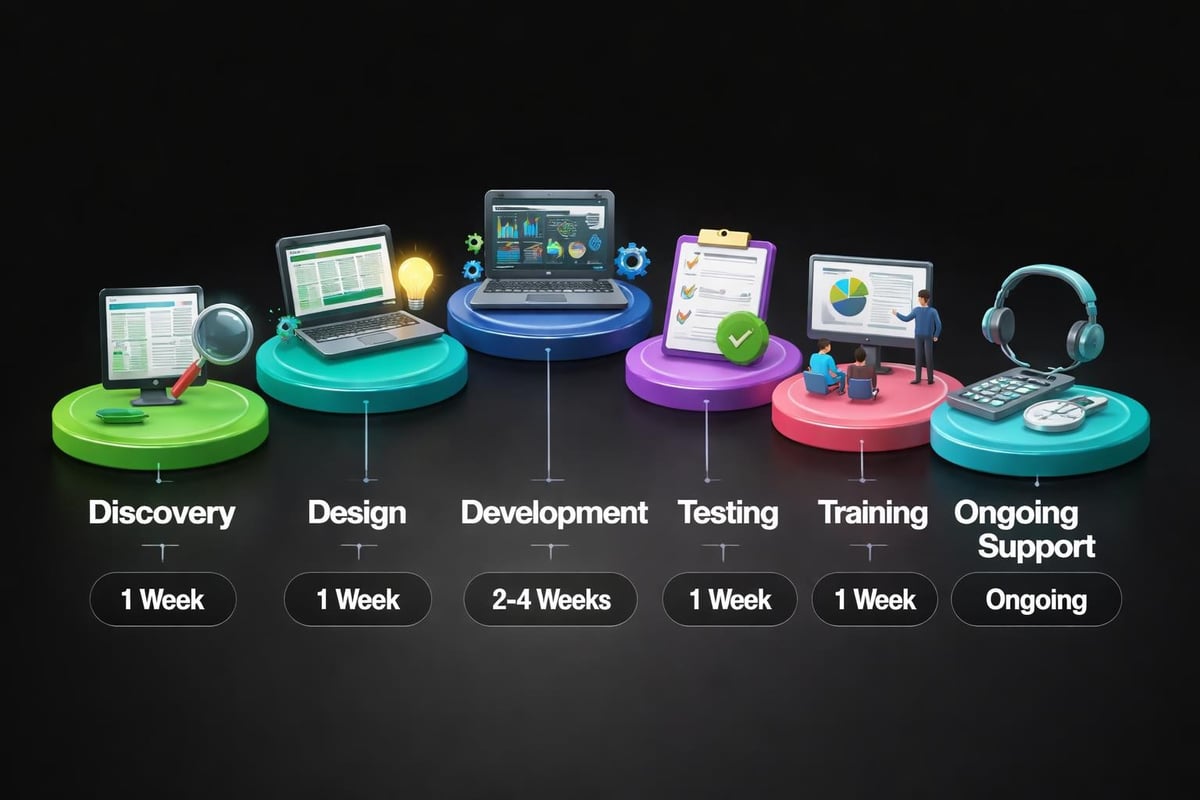
Testing, Training, and Handoff
Before deploying solutions, rigorous testing ensures accuracy and reliability. Consultants test with real data, simulate various scenarios, and verify that formulas handle edge cases appropriately.
Training delivery should match user learning styles. Some teams benefit from hands-on workshops, while others prefer reference documentation and video tutorials. Effective consultants provide multiple learning resources to accommodate different preferences.
The handoff phase includes transition planning for ongoing maintenance. Who will update data sources? How will the spreadsheet be backed up? What happens when errors occur? Addressing these questions prevents solutions from degrading over time.
Industry-Specific Excel Solutions for Sugar Land Businesses
Sugar Land's economic diversity means Excel consulting needs vary significantly across sectors. Understanding industry-specific applications helps businesses recognize relevant use cases.
Healthcare and Medical Practices
Medical practices, clinics, and healthcare administrators use Excel for patient scheduling, billing reconciliation, insurance claim tracking, and clinical outcome analysis. Consultants design HIPAA-compliant solutions with appropriate access controls and audit trails.
Common projects include physician productivity dashboards, patient volume forecasting, denial management reporting, and revenue cycle analytics. These applications require understanding both Excel capabilities and healthcare operational realities.
Energy and Engineering Firms
Sugar Land's proximity to Houston's energy corridor means many local businesses serve oil, gas, and renewable energy sectors. These companies need Excel solutions for project cost tracking, equipment maintenance scheduling, production forecasting, and regulatory compliance reporting.
Engineering firms particularly benefit from custom calculation tools that automate complex formulas for structural analysis, fluid dynamics, or thermodynamic calculations. These specialized tools reduce calculation time and eliminate transcription errors.
Professional Services and Consulting
Accounting firms, law offices, marketing agencies, and consulting practices rely heavily on Excel for client billing, project profitability analysis, resource allocation, and financial forecasting.
Time tracking integration, matter management, proposal development automation, and client engagement dashboards represent common consulting projects for professional services firms. These solutions free billable professionals from administrative tasks, directly impacting firm profitability.
Measuring ROI from Excel Consulting Investments
Business leaders naturally want to understand the financial return from consulting investments. While some benefits are immediately quantifiable, others deliver value in less obvious ways.
Quantifiable Time Savings
The most straightforward ROI calculation involves time saved through automation and process improvement. If a monthly report previously required 12 hours and now takes 30 minutes, the time savings equal 11.5 hours monthly or 138 hours annually.
Multiply those hours by loaded employee costs (salary plus benefits) to calculate direct savings. A financial analyst earning $75,000 annually costs approximately $45 per hour when accounting for benefits and overhead. The 138 hours saved represents $6,210 in annual value from this single improvement.
Additional quantifiable benefits include:
- Reduced error rates and rework costs
- Faster decision-making from real-time dashboards
- Decreased reliance on temporary or overtime staff
- Improved cash flow from faster invoice processing
- Enhanced compliance reducing audit and penalty risks
Articles exploring how Excel consulting can transform data management highlight both direct and indirect value creation, demonstrating why businesses across industries invest in professional Excel services.
Strategic Business Value
Beyond time savings, Excel consulting delivers strategic advantages that compound over time. Better data visibility enables proactive management rather than reactive firefighting. Standardized processes reduce dependency on specific individuals, mitigating business continuity risks.
Scalable solutions accommodate business growth without requiring complete redesigns. A properly architected Excel system can handle 10,000 records as easily as 1,000, allowing businesses to expand without hitting data limitations.
The confidence gained from accurate, reliable data supports better strategic decisions. When executives trust their numbers, they make bolder moves with clearer risk understanding. This intangible benefit can drive revenue growth that far exceeds consulting costs.
Common Misconceptions About Excel Consulting
Several myths prevent businesses from pursuing excel consulting sugar land services that could significantly improve operations.
"Excel Can't Handle Our Data Volume"
While Excel does have row limits (1,048,576 rows in modern versions), proper data architecture and Power Query integration extend these boundaries considerably. Consultants design solutions that leverage Excel's strengths while offloading heavy data processing to appropriate tools.
Many businesses assume they've outgrown Excel when the real issue is poor workbook design. Consultants often discover that performance problems stem from inefficient formulas, unnecessary calculations, or improper data structures rather than Excel's inherent limitations.
"We Can Just Watch YouTube Tutorials"
YouTube tutorials and online courses provide valuable learning resources, but they cannot diagnose your specific business problems or design custom solutions for your unique workflows. Generic training teaches Excel features; consulting applies those features to solve actual business challenges.
Additionally, tutorials rarely address the change management, documentation, and knowledge transfer components essential for sustainable solutions. Professional consultants ensure solutions outlast individual employees and adapt as businesses evolve.
"Consulting Is Too Expensive for Our Size"
Excel consulting fees vary widely based on project scope and consultant experience. Small projects might cost a few hundred dollars, while enterprise implementations can reach tens of thousands. However, the relevant question isn't absolute cost but return on investment.
A $2,000 consulting project that saves 10 hours weekly pays for itself within months. The ongoing value continues accumulating for years. Many small and medium-sized businesses discover that consulting represents one of their highest-ROI investments because inefficient processes consume such disproportionate resources.
Preparing Your Business for an Excel Consulting Engagement
Proper preparation accelerates consulting projects and improves outcomes. Businesses can take several steps before consultants arrive to maximize engagement value.
Document Current Processes and Pain Points
Create written descriptions of existing workflows, including who performs each step, how long tasks take, and where problems occur. This documentation helps consultants understand context quickly without consuming billable hours on basic information gathering.
Gather examples of current outputs like reports, dashboards, and analysis documents. These examples clarify expectations and help consultants understand your communication preferences and formatting standards.
Preparation checklist:
- List all spreadsheets involved in the target process
- Identify data sources and update frequencies
- Note any seasonal variations or special cases
- Compile examples of errors or issues encountered
- Define success criteria and desired outcomes
- Identify key stakeholders and decision-makers
Ensure Data Access and Permissions
Consultants cannot work with data they cannot access. Confirm that appropriate permissions exist for all relevant systems, databases, and file locations before engagements begin.
If data contains sensitive information, discuss confidentiality agreements and security protocols upfront. Professional consultants maintain strict confidentiality, but formal agreements protect both parties and clarify expectations.
Allocate Internal Resources
Consulting engagements require internal participation for requirements gathering, testing, and training. Identify who will serve as the primary business contact and ensure they have adequate time allocated for project involvement.
Projects stall when key stakeholders are unavailable for feedback or decision-making. Building project time into calendars prevents delays and demonstrates organizational commitment to successful outcomes.
The Future of Excel Consulting in Sugar Land
As business complexity increases and data volumes continue growing, demand for excel consulting sugar land expertise will expand rather than diminish. Several trends are shaping the consulting landscape for coming years.
Integration with Cloud and AI Technologies
Modern Excel consulting increasingly involves Power Platform integration, connecting Excel with Power BI for visualization, Power Automate for workflows, and Power Apps for mobile access. Consultants who master this ecosystem deliver more comprehensive solutions than Excel-only specialists.
Artificial intelligence features within Excel, including Ideas and dynamic arrays, create new possibilities for data analysis and automation. Consultants stay current with these capabilities to provide cutting-edge solutions that leverage Microsoft's ongoing innovation.
Hybrid Solutions Combining Excel with Specialized Tools
Rather than viewing Excel as an all-or-nothing proposition, consultants design hybrid solutions that use Excel for appropriate tasks while integrating specialized tools for others. A solution might use Excel for data entry and reporting while leveraging SQL databases for storage and Python for complex calculations.
This best-of-breed approach optimizes each component of business processes rather than forcing everything into a single platform. Consultants serve as technology advisors, recommending the right tool for each job while maintaining seamless integration.
Emphasis on Self-Service Analytics
Businesses increasingly want to empower non-technical staff to perform their own analysis without constant IT or consultant involvement. This shift requires consultants to design intuitive interfaces, provide comprehensive training, and build solutions that prevent users from breaking critical functionality.
The goal transitions from creating spreadsheets to building sustainable analytical capabilities within organizations. This approach aligns with modern consulting philosophy that measures success by client independence rather than ongoing dependency.
Excel consulting delivers transformational value for Sugar Land businesses struggling with inefficient processes, unreliable data, or time-consuming manual work. From initial assessment through solution development, training, and ongoing support, professional consultants bring technical expertise and business acumen that internal teams rarely possess. Whether you're facing broken formulas, automation opportunities, or simply need clearer insights from your data, The Analytics Doctor specializes in diagnosing spreadsheet problems and delivering practical solutions that make your data work harder for your business. Reach out today to discover how expert Excel help can eliminate frustration and unlock the full potential of your business information.