Skip to content

Businesses in Conroe, Texas face increasingly complex data challenges that require more than basic spreadsheet knowledge. From oil and gas companies managing production data to local retailers tracking inventory across multiple locations, Excel consulting Conroe services have become essential for organizations looking to maximize efficiency and accuracy. Whether you're struggling with broken formulas, need custom automation solutions, or want to train your team on advanced Excel techniques, professional consulting services can transform how your business handles data and makes decisions.
Understanding Excel Consulting Services in Conroe
Excel consulting encompasses a broad range of professional services designed to optimize how businesses use Microsoft Excel. In Conroe's diverse business environment, these services address everything from simple spreadsheet cleanup to complex financial modeling and data integration projects.
What Excel Consultants Actually Do
Professional Excel consultants diagnose spreadsheet problems, build custom solutions, and provide strategic guidance on data management. They work directly with your existing files to identify inefficiencies, errors, and opportunities for automation that your team might not recognize.
Common consulting deliverables include:
- Custom formulas and functions tailored to specific business processes
- Automated reporting systems that save hours of manual work
- Data validation systems that prevent entry errors
- Dashboard creation for executive-level insights
- Integration solutions connecting Excel with other business systems
The best excel consulting conroe professionals don't just fix immediate problems. They teach your team sustainable practices and create documentation so you can maintain solutions independently. This knowledge transfer ensures long-term value beyond the initial engagement.

Why Conroe Businesses Need Specialized Excel Support
Conroe's economy spans energy, manufacturing, healthcare, retail, and professional services. Each sector has unique data challenges that generic Excel training can't adequately address. When your financial model breaks during budget season or your inventory tracking spreadsheet crashes, you need someone who understands both Excel and your industry context.
Industry-Specific Excel Challenges
Manufacturing facilities in Conroe often manage production schedules, quality control data, and supply chain information across multiple interconnected spreadsheets. Without proper structure, these systems become error-prone and difficult to update. Excel consulting Conroe services help manufacturers implement automated tracking systems that reduce manual data entry and provide real-time visibility into operations.
Healthcare providers deal with patient scheduling, billing reconciliation, and compliance reporting requirements. These organizations need robust Excel solutions that handle sensitive information securely while remaining flexible enough to adapt to regulatory changes. Carnegie Mellon University’s Excel training program emphasizes the business environment skills that healthcare administrators need, though consulting takes this foundation further with custom implementations.
| Industry Sector | Common Excel Challenges | Typical Solutions |
|---|---|---|
| Energy/Oil & Gas | Production data analysis, well performance tracking | Custom dashboards, automated data imports |
| Retail | Inventory management, sales forecasting | Dynamic reports, predictive models |
| Healthcare | Patient scheduling, billing reconciliation | Secure data validation, compliance templates |
| Manufacturing | Production planning, quality control | Real-time tracking systems, integration tools |
| Professional Services | Project tracking, resource allocation | Time-saving automation, budget modeling |
Key Benefits of Professional Excel Consulting
Investing in excel consulting conroe services delivers measurable returns through time savings, error reduction, and improved decision-making capabilities. Organizations that engage consultants typically see immediate productivity gains as manual processes become automated.
Time Savings Through Automation
The average knowledge worker spends 3-4 hours daily working in Excel, with much of that time devoted to repetitive tasks. Professional consultants identify these repetitive workflows and build automation that reduces hours of work to minutes. A consultant might create macros that consolidate weekly reports from 20 locations into a single dashboard, eliminating the manual copy-paste process that previously consumed entire workdays.
Error Reduction and Data Accuracy
Manual data entry and formula errors cost businesses thousands in mistakes, delays, and rework. Excel consultants implement validation rules, error-checking formulas, and structured templates that prevent common mistakes before they happen. When you need to search for duplicates on Excel to clean up customer records, consultants can build automated systems that flag duplicates in real-time rather than requiring periodic audits.
Error prevention strategies include:
- Drop-down lists that restrict input to valid options
- Conditional formatting that highlights unusual values
- Cross-reference checks between related data sets
- Protected worksheets that prevent accidental formula deletion
- Audit trails that track changes and maintain version history
Choosing the Right Excel Consultant in Conroe
Not all Excel experts are created equal. The right consultant for your business understands your industry, communicates clearly, and delivers solutions you can actually use after they leave. When evaluating excel consulting conroe options, look beyond technical credentials to assess practical problem-solving ability.
Essential Qualifications and Experience
Strong Excel consultants combine technical mastery with business acumen. They should demonstrate expertise in advanced functions, pivot tables, Power Query, and VBA automation, but more importantly, they need to understand how these tools solve real business problems. Ask potential consultants about projects similar to yours and request references from clients in comparable situations.
Evaluation Questions for Potential Consultants
- How do you approach diagnosing spreadsheet problems before proposing solutions?
- Can you provide examples of automation projects in my industry?
- What documentation and training do you provide after implementation?
- How do you ensure solutions remain maintainable by internal staff?
- What is your typical engagement timeline and pricing structure?
The answers reveal whether a consultant focuses on quick fixes or sustainable solutions. The best professionals invest time understanding your workflows before building anything, ensuring solutions fit naturally into how your team actually works.

Common Excel Projects Consultants Handle
Excel consulting Conroe engagements range from quick troubleshooting sessions to multi-month enterprise implementations. Understanding typical project types helps you identify what you need and communicate effectively with consultants.
Financial Modeling and Forecasting
Finance teams use Excel for budgeting, cash flow projections, and scenario analysis. Consultants build dynamic models that update automatically as assumptions change, incorporating sensitivity analysis and visualization tools that help leadership understand financial implications quickly. These models often include multiple scenarios, rolling forecasts, and variance analysis that would be prohibitively time-consuming to maintain manually.
Data Cleanup and Standardization
Years of inconsistent data entry create spreadsheets full of formatting variations, duplicate records, and incomplete information. Consultants use Power Query and custom scripts to clean thousands of records efficiently, establishing standards that prevent future problems. This foundation work enables accurate reporting and analysis that wasn't possible with messy data.
Dashboard and Reporting Development
| Dashboard Type | Purpose | Key Features |
|---|---|---|
| Executive Dashboard | High-level KPI monitoring | Visual charts, trend indicators, alert systems |
| Sales Dashboard | Pipeline and performance tracking | Rep comparisons, conversion funnels, forecast accuracy |
| Operations Dashboard | Daily activity monitoring | Real-time updates, capacity utilization, bottleneck identification |
| Financial Dashboard | Budget vs. actual analysis | Variance reporting, drill-down capability, period comparisons |
Effective dashboards present complex information clearly, updating automatically as source data changes. Excel consulting conroe professionals design dashboards that answer specific business questions rather than just displaying data generically.
Training vs. Consulting: Understanding the Difference
Many businesses confuse Excel training with consulting, but these services address different needs. Training teaches general Excel skills to groups, while consulting solves specific business problems with custom solutions.
When You Need Training
Excel University’s free learning resources and group training programs work well when your team lacks foundational Excel knowledge. Training makes sense when multiple employees need similar skill development and when you have time for a structured learning program. Invest in training before major system changes or when onboarding new staff who will use Excel regularly.
When Consulting Makes More Sense
Choose consulting when you face urgent problems, need custom solutions for unique workflows, or require expertise beyond what training provides. If your budget model breaks two days before board presentation, you need a consultant who can diagnose and fix it immediately, not a four-week training course. Consulting delivers immediate value for critical business needs.
Consulting is ideal for:
- Time-sensitive problem resolution
- Custom automation development
- Complex formula troubleshooting
- System integration projects
- Strategic spreadsheet architecture decisions
Excel Consulting Pricing Models in Conroe
Understanding how consultants price their services helps you budget appropriately and evaluate proposals fairly. Excel consulting Conroe rates vary based on project complexity, consultant experience, and engagement type.
Hourly vs. Project-Based Pricing
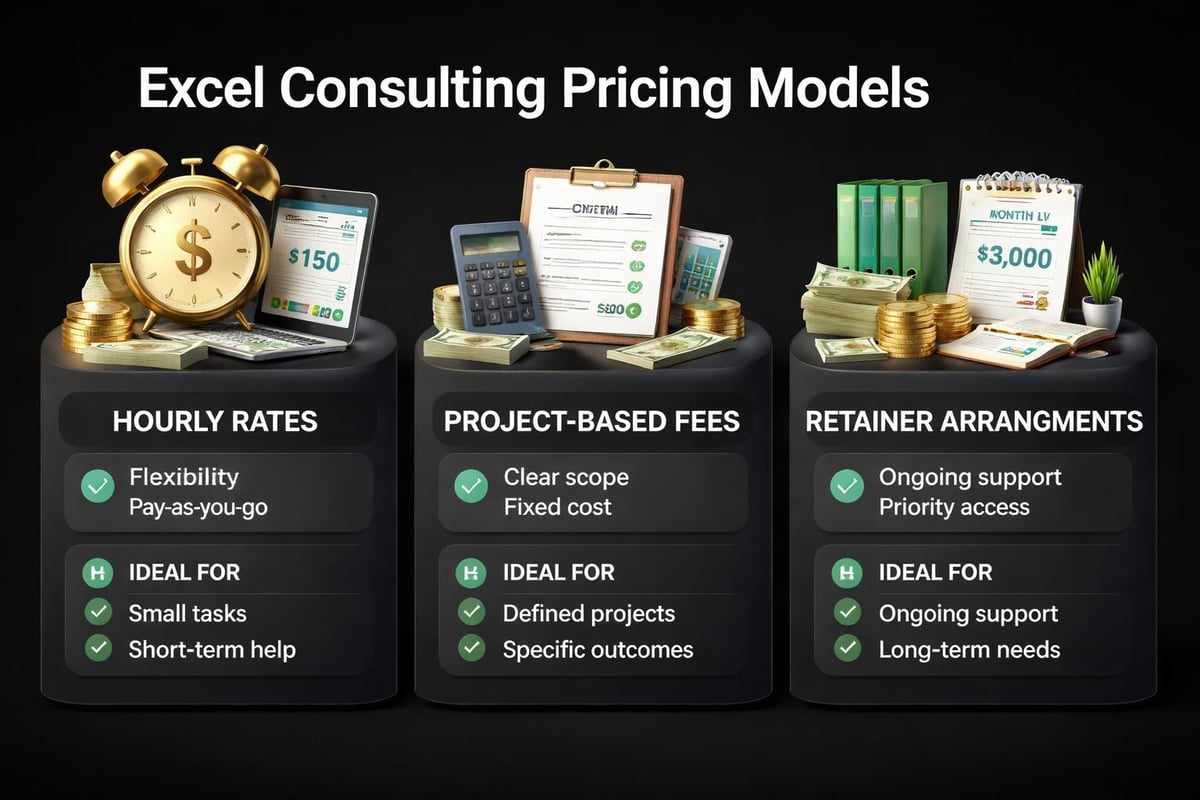
Hourly rates typically range from $75 to $200+ per hour depending on expertise level and project requirements. This model works well for troubleshooting, small fixes, and situations where scope isn't fully defined. You pay only for time used, but final costs can be unpredictable if problems prove more complex than initially apparent.
Project-based pricing provides cost certainty by establishing a fixed fee for defined deliverables. Consultants assess requirements, estimate effort, and quote a total price. This approach works best for well-defined projects like dashboard creation or specific automation builds where scope is clear upfront.
Retainer Arrangements for Ongoing Support
Businesses with continuous Excel needs often establish monthly retainers that provide allocated hours at discounted rates. This arrangement ensures consultant availability when you need help without requiring new contracts for each request. Retainers work particularly well for organizations undergoing digital transformation or managing complex spreadsheet ecosystems that require regular optimization.
Maximizing ROI from Excel Consulting Engagements
The most successful excel consulting conroe projects share common characteristics that maximize return on investment. These engagements deliver solutions that continue providing value long after the consultant completes the initial work.
Preparation Steps Before Engaging a Consultant
Document current pain points specifically rather than describing vague frustrations. "Our monthly reporting takes 12 hours and frequently contains errors in the inventory reconciliation section" provides much clearer direction than "Excel is too slow." Gather sample files, describe desired outcomes, and identify stakeholders who will use the solution.
Collaboration During the Project
Stay actively involved throughout the engagement rather than handing everything off and expecting perfect results. Consultants need your business knowledge to build solutions that truly fit your processes. Test intermediate deliverables, provide feedback promptly, and ensure solutions align with how your team actually works. The Excel Campus resources can help you understand capabilities so you can have more informed discussions with consultants.
Effective collaboration includes:
- Scheduling regular check-ins to review progress
- Testing solutions with actual data and workflows
- Providing honest feedback about usability
- Involving end users in solution validation
- Documenting requirements changes as they emerge
Post-Project Knowledge Transfer
The best consultants don't create dependency but empower independence. Insist on comprehensive documentation explaining how solutions work, where to make common updates, and what to avoid changing. Request training sessions where consultants walk your team through using and maintaining deliverables. This knowledge transfer ensures you can support solutions internally after the engagement ends.
Advanced Excel Capabilities Through Consulting
Many businesses use only a fraction of Excel's capabilities because they're unaware of advanced features or unsure how to apply them. Excel consulting Conroe services introduce powerful tools that dramatically expand what's possible with spreadsheets.
Power Query for Data Transformation
Power Query revolutionizes how businesses combine and clean data from multiple sources. This feature automates tasks that previously required manual copy-paste or complex formulas, refreshing automatically when source data updates. Consultants build Power Query solutions that import data from databases, text files, web sources, and other Excel files, transforming it into consistent formats ready for analysis.
VBA and Macros for Custom Automation
Visual Basic for Applications (VBA) enables automation beyond what formulas alone can achieve. Consultants write custom macros that perform multi-step processes with a single button click, create custom functions for specialized calculations, and build user interfaces that make complex spreadsheets accessible to non-technical users. While tools like SolverStudio extend Excel for optimization modeling, VBA handles the everyday automation that saves hours weekly.
Power Pivot for Large Dataset Analysis
Standard Excel struggles with datasets exceeding 100,000 rows, but Power Pivot handles millions of records efficiently. Consultants implement Power Pivot models that create relationships between multiple tables, perform complex calculations across large datasets, and generate pivot tables from data volumes that would crash regular Excel. This capability is essential for businesses with extensive historical data or high-transaction volumes.
Common Excel Consulting Mistakes to Avoid
Even well-intentioned consulting engagements sometimes fail to deliver expected value. Understanding common pitfalls helps you steer projects toward success and recognize warning signs early.
Over-Engineering Solutions
Some consultants build elaborate systems when simpler solutions would suffice. A basic formula might solve your problem effectively, but you end up with complex VBA code that no one on your team understands or can maintain. The best excel consulting conroe professionals match solution complexity to actual requirements, favoring simplicity when it achieves desired outcomes.
Neglecting User Adoption
Technically perfect solutions fail if your team won't use them. Consultants sometimes optimize for technical elegance rather than user experience, creating systems that require excessive training or don't fit existing workflows. Insist that solutions accommodate how people actually work, not how consultants think they should work. User testing throughout development prevents adoption problems after delivery.
Ignoring Scalability and Maintenance
Solutions that work perfectly today might break as your business grows or data volumes increase. Forward-thinking consultants design for scalability, testing with larger datasets than you currently have and building flexibility for future requirements. They also create maintainable code with clear comments and documentation, not clever tricks that only they can decipher.
Excel Consulting for Remote and Hybrid Teams
The shift toward remote work has changed how businesses use Excel and what they need from consultants. Excel consulting Conroe services now address collaboration challenges, cloud integration, and distributed team workflows that weren't priorities in traditional office environments.
Cloud-Based Excel Solutions
OneDrive and SharePoint integration enables real-time collaboration that traditional desktop Excel never supported. Consultants configure cloud-based workbooks with proper sharing permissions, version control, and concurrent editing capabilities. They also build solutions that work consistently across desktop Excel, Excel Online, and mobile apps, ensuring team members can access critical data regardless of device or location.
Collaborative Workflow Design
Remote teams need spreadsheets designed specifically for multiple users working asynchronously. Consultants implement structured workflows where different team members update specific sections without interfering with each other's work. They build validation rules preventing conflicting entries, create audit trails showing who changed what, and design templates that maintain consistency across distributed contributors.
| Remote Team Challenge | Excel Consulting Solution |
|---|---|
| Version control confusion | SharePoint integration with check-in/check-out |
| Conflicting simultaneous edits | Structured sections with role-based access |
| Lost or overwritten changes | Automatic version history and change tracking |
| Inconsistent data entry across locations | Centralized templates with validation rules |
| Delayed reporting from distributed sources | Automated data collection and consolidation |
Evaluating Excel Consulting Results
Successful engagements produce measurable improvements in efficiency, accuracy, or decision-making capability. Establishing clear success metrics before projects begin helps you evaluate whether consulting delivers promised value.
Quantitative Success Metrics
Track time savings from automation by measuring how long tasks took before and after implementation. Calculate error reduction by comparing mistake frequencies in old versus new systems. Measure system performance improvements through calculation speed and file responsiveness. These concrete metrics justify consulting investments and identify areas needing further optimization.
Qualitative Improvements
Some consulting benefits resist easy quantification but remain valuable. Improved employee satisfaction from eliminating frustrating manual tasks, enhanced confidence in data accuracy supporting critical decisions, and increased analytical capability enabling insights previously impossible to obtain all represent meaningful outcomes. Gather feedback from team members using consultant-built solutions to assess these qualitative improvements.
Key evaluation questions include:
- Are team members using the solution consistently?
- Has decision-making speed or quality improved?
- Do employees feel more confident in their Excel work?
- Have customer-facing metrics improved due to better data management?
- Can the team maintain and modify solutions independently?
Future-Proofing Your Excel Environment
Technology evolves rapidly, and excel consulting conroe services should prepare your systems for future capabilities while solving today's problems. Forward-thinking consultants build solutions that integrate with emerging tools and adapt as your business requirements change.
Preparing for Microsoft's Excel Roadmap
Microsoft continuously enhances Excel with new functions, data types, and integration capabilities. Consultants familiar with Microsoft's development roadmap design solutions that leverage upcoming features and avoid deprecated functionality. They build with modern functions like XLOOKUP and dynamic arrays rather than legacy approaches that may not receive future support. Resources like Excel University’s learning materials help users stay current with new capabilities as they're released.
Integration with Power Platform
Excel increasingly connects with Microsoft's Power Platform, including Power BI for advanced visualization, Power Automate for cross-application workflows, and Power Apps for custom business applications. Consultants help businesses understand when Excel remains the best tool and when problems require Power Platform capabilities. They build integration pathways so data flows seamlessly between systems without manual export-import cycles.
While specialized tools like NodeXL for network analysis address niche requirements, most businesses need consultants who understand the full Microsoft data ecosystem and can recommend appropriate tools for different scenarios. The best consulting relationships evolve from solving immediate Excel problems to strategic guidance on your entire data infrastructure.
Excel consulting transforms how Conroe businesses manage data, automate workflows, and make informed decisions through custom solutions that address specific operational challenges. When spreadsheet problems impact productivity or accuracy, professional expertise delivers immediate value while building your team's long-term capabilities. Whether you're struggling with broken formulas, need automated reporting systems, or want training that addresses your unique business context, The Analytics Doctor provides the expert Excel help and practical solutions that make your data work for you.